
Programmes intégrés

paint
dessiner à la souris
Tapez ceci à l'invite d'un ordinateur pour le copier sur le support :
> examples paint
> edit paint
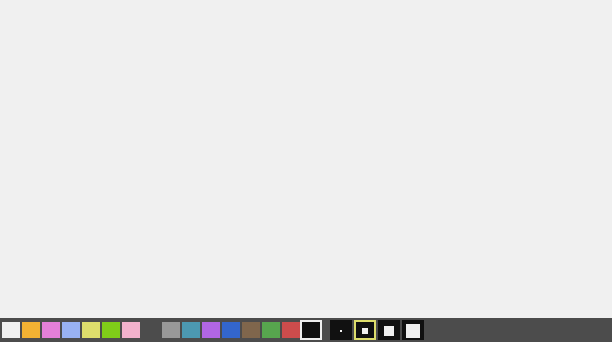
Le programme
-- Peinture : bouton de la souris enfoncé, déplacez-vous sur l'image. Bouton droit : gomme.
-- En bas : les 16 couleurs et 4 tailles de pinceau. C efface la page.
local size = gfx.size()
local W = size.w
local H = size.h
local BAR = H - 11  -- la barre d'outils commence à cette ligne de pixels
local BRUSHES = {1, 3, 5, 9}
local color = 15
local brush = 2
local lastX = 0
local lastY = 0

local function drawBar()
  gfx.rect(1, BAR, W, 12, "gray", true)
  for c = 0, 15 do
    gfx.rect(2 + c * 10, BAR + 2, 9, 8, c, true)
    if c == color then
      gfx.rect(1 + c * 10, BAR + 1, 11, 10, "white")
    end
  end
  for i = 1, #BRUSHES do
    local x = 166 + (i - 1) * 12
    gfx.rect(x, BAR + 1, 11, 10, "black", true)
    gfx.pixel(x + 5, BAR + 6, "white", math.min(BRUSHES[i], 7))
    if i == brush then
      gfx.rect(x, BAR + 1, 11, 10, "yellow")
    end
  end
end

local function page()
  gfx.rect(1, 1, W, BAR - 1, "white", true)
end

term.set_bg(term.colors.black)
term.clear()
page()
drawBar()
while true do
  local e = os.pull_event()
  if (e.name == "click" or e.name == "drag") and e.py >= BAR then
    if e.name == "click" and e.px < 162 then
      color = math.min(15, (e.px - 2) // 10)
    elseif e.name == "click" then
      brush = math.max(1, math.min(#BRUSHES, (e.px - 166) // 12 + 1))
    end
    drawBar()
  elseif e.name == "click" or e.name == "drag" then
    local ink = color
    if e.button == 2 then
      ink = "white"  -- la gomme peint de la couleur de la page
    end
    if e.name == "drag" then
      -- une ligne depuis le dernier point : pas de trous quand la souris va vite
      gfx.line(lastX, lastY, e.px, math.min(e.py, BAR - 1), ink, BRUSHES[brush])
    else
      gfx.pixel(e.px, e.py, ink, BRUSHES[brush])
    end
    lastX = e.px
    lastY = math.min(e.py, BAR - 1)
  elseif e.name == "char" and string.lower(e.char) == "c" then
    page()
  end
end