
 Global functions
print, read, sleep, conversions, loops, errors and imports: the functions every program calls without a library name.
These functions are always there: no library name in front of them, nothing to load, and every computer has them, from the Tube Computer to the Modern Computer. They show text and read the keyboard (print, read), pause the program (sleep), convert and inspect values (tonumber, type), walk through tables (pairs, ipairs), deal with errors (pcall) and split a program into several files (import).
local lines = {"12", "15", "oops", "9"}   -- readings from a log file
local total = 0
for i, text in ipairs(lines) do
  local n = tonumber(text)
  if n then
    total = total + n
  else
    print("line " .. i .. " is not a number: " .. text)
  end
end
print("total", total)line 3 is not a number: oops total 36
A variable created without local is a global too, stored in the same place as these functions. Name a variable type or print and the function is gone for the whole program: type = peripheral.type("left") breaks every later call to type(...). Pick another name (kind, blockType) or use local.
print(...) | Prints values on the screen, then goes to a new line. |
write(...) | Prints text without going to a new line. |
read([mask]) | Waits for a line typed on the keyboard and returns it. |
sleep(seconds) | Pauses the program for a number of seconds. |
tostring(value) | Converts a value to text. |
tonumber(value [, base]) | Converts text to a number, or nil. |
type(value) | Gives the type of a value: "nil", "number", "string", "boolean", "table" or "function". |
pairs(t) | Loops over every key and value of a table: for k, v in pairs(t) do. |
ipairs(t) | Loops over t[1], t[2]... until the first nil. |
error(message) | Stops the program with an error. |
pcall(f, ...) | Calls a function and catches its errors: you get {ok=true, value=...} or {ok=false, error="..."}. |
assert(value [, message]) | Stops the program with an error when the value is false or nil; otherwise returns it. |
import(path) | Runs another file once and returns what it returns: import "lib/utils". |
require(path) | Same as import. |
arg | The words typed after the program name at the prompt, as a list of strings. |
Screen and keyboard
print and write write where the cursor is, with the colours chosen by term.set_fg and term.set_bg. When the text reaches the right edge it goes on at the start of the next line, cut anywhere (not between words). When the cursor passes the bottom line, the whole screen scrolls up by one line. To place text at an exact spot without wrapping or scrolling, use term.set_cursor and term.write (see term).
Prints values on the screen, then goes to a new line.
valuesany- any number of values, of any type
Each value is converted like tostring does it: numbers without a useless .0, true, false, nil. Several values are separated by a tab, which moves to the next column that is a multiple of 4: handy to look at a few numbers, but use string.format when you want real columns. print() with nothing prints an empty line.
print("Iron ingots:", 128)
print("Running", true, nil)
print(10, 200, 3000)
print()
print("done")Iron ingots: 128 Running true nil 10 200 3000 done
A "\n" inside the text starts a new line, and a line longer than the screen (51 columns on a Personal Computer, 40 on a Tube Computer or a Microcontroller, 64 on a Modern Computer) continues on the next one:
print("Line 1\nLine 2")
print(string.rep("=", 60))Line 1 Line 2 =================================================== =========
Characters that cannot be shown (codes below 32, apart from the tab and the line break) appear as ?.
A call costs one instruction, plus one per 16 characters printed. A full line of 51 characters costs 4: nothing on a Modern Computer, but a Tube Computer only runs 20 instructions per tick, so a screen full of text takes it a few ticks. See Speed, memory and limits.
See also write() term.write() tostring()
Prints text without going to a new line.
valuesany- any number of values, of any type
The values are converted to text and written one after the other, with nothing between them (unlike print, which puts a tab). The cursor stays at the end, so the next write, print or read continues on the same line. Tabs, line breaks, wrapping and scrolling work as with print.
write("Smelting")
for i = 1, 3 do
  write(".")
end
write(" done", "\n")
write("Batch ", 4, " of ", 10)
print()Smelting... done Batch 4 of 10
Its most common job is the question before a read: the answer is typed right after it.
write("How many crates? ")
local answer = read()
See also print() read() term.write()
Waits for a line typed on the keyboard and returns it.
maskstring optional- a character shown instead of each typed character (only the first character counts)
- string
- the line typed, without the Enter
The program stops in read until a player, in the computer's screen, types a line and presses Enter. The text appears where the cursor is, so a question written with write just before stays on the same line. After Enter, the cursor goes to the start of the next line.
write("Name of the new station: ")
local name = read()
print("Station '" .. name .. "' saved.")
What you get back:
- Always a string, even if the player typed digits: convert it with
tonumberbefore doing arithmetic. ""(an empty string) when the player presses Enter without typing anything.- At most 1024 characters. A line longer than the space left on the screen scrolls sideways while it is typed.
The player can edit the line before pressing Enter: Backspace, Delete, the left and right arrows, Home and End. Ctrl+V pastes the clipboard, up to its first line break. The up and down arrows and Tab do nothing here: the history and the completion only exist at the shell's prompt.
Hiding a password. With a mask, every typed character shows as that character. Only its first character is used: read("*") and read("*#") both show *. An empty mask "" hides nothing, and a mask that is not a string stops the program with bad argument #1 to 'read' (string expected, got number).
write("Password: ")
local code = read("*")
if code == "brass42" then
  print("Welcome")
  rs.set("left", true)    -- opens the piston door on the left
  sleep(3)
  rs.set("left", false)
else
  print("Wrong password")
end
The Door with a code builds a complete door around this.
A menu. Print the choices, read a number, act, start again. The picture below is the screen while read waits:
local choices = {"Start the press line", "Stop the press line", "Quit"}
while true do
  term.clear()
  term.set_cursor(1, 1)
  term.set_fg(term.colors.yellow)
  print("== Mechanical Press line ==")
  term.set_fg(term.colors.white)
  for i, text in ipairs(choices) do
    print(i .. ". " .. text)
  end
  print()
  write("Your choice: ")
  local n = tonumber(read())
  if n == 1 then
    rs.set("back", false)   -- an unpowered clutch lets the shaft turn
    print("Line started")
  elseif n == 2 then
    rs.set("back", true)    -- a powered clutch stops it
    print("Line stopped")
  elseif n == 3 then
    break
  else
    print("Type 1, 2 or 3")
  end
  sleep(1)
end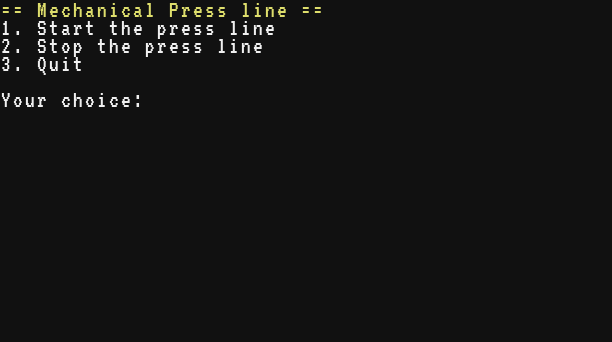
While read waits, your program does nothing else. Only the keyboard events (char, key and paste) go into the line. Every other event (a redstone change, a timer, a network message, a click) is kept in the queue, in order, and the next os.pull_event receives it. Keys pressed before read is called, during a sleep for example, are kept too: read uses them as soon as it starts (an os.pull_event with a filter, on the other hand, throws away the events it skips, keys included). To react to redstone while a player types, read the keyboard yourself with os.pull_event (see Events and Keyboard).
Ctrl+T (or the Stop button) ends the program even while it waits in read.
See also write() tonumber() os.pull_event()
Waiting
Pauses the program for a number of seconds.
secondsnumber- how long to wait, in seconds (decimals allowed)
Minecraft runs 20 ticks per second, and the computer counts its waits in ticks: sleep waits seconds × 20 ticks, rounded up to a whole tick, and always at least one tick.
| call | ticks | real time |
|---|---|---|
sleep(1) | 20 | 1 s |
sleep(0.5) | 10 | 0.5 s |
sleep(0.07) | 2 | 0.1 s |
sleep(0) or a negative number | 1 | 0.05 s |
local function ticks_of(seconds)
  local start = os.time()
  sleep(seconds)
  return os.time() - start
end
print(ticks_of(1), ticks_of(0.5), ticks_of(0.07), ticks_of(0))20 10 2 1
A countdown before closing a gate:
for s = 5, 1, -1 do
  print("Gate closes in " .. s .. " s")
  sleep(1)
end
rs.set("top", true)   -- the Mechanical Piston closes the gate
print("Gate closed")Gate closes in 5 s Gate closes in 4 s Gate closes in 3 s Gate closes in 2 s Gate closes in 1 s Gate closed
While it sleeps, the computer runs no instructions at all, and the rest of the current tick's instructions is not kept for later. So a loop with a sleep inside is the right way to repeat a job regularly without wasting the processor, and a loop with sleep(0) runs at most 20 times per second. The time is world time: the rotation speed of the computer does not change it, a lagging server makes it longer. Without rotation, though, the computer is frozen, and the wait with it: it goes on when the shaft turns again.
Events that arrive during the sleep are not lost. They wait in the queue (256 at most, the oldest is dropped when it is full) for the next os.pull_event or read:
os.queue_event("refill")
sleep(1)
local e = os.pull_event()
print(e.name .. " was still there")refill was still there
To wait for "a redstone signal, or 5 seconds, whichever comes first", sleep is not enough: start a timer with os.start_timer and wait with os.pull_event (see Time and timers).
A seconds that is not a number stops the program: bad argument #1 to 'sleep' (number expected, got string).
See also os.start_timer() os.pull_event() os.clock()
Values and conversions
Converts a value to text.
valueany- any value
- string
- the value as text
.. already turns numbers into text by itself, but not true, false or nil: "powered: " .. true stops the program with attempt to concatenate a boolean value. That is where tostring is needed.
| value | text |
|---|---|
42, -7, 2.5 | "42", "-7", "2.5" |
true, false, nil | "true", "false", "nil" |
| a table | "table: 0x1b6d3586" (the number differs for each table) |
| a function of yours, an iterator | "function: 0x..." |
a built-in function such as print | "builtin: 0x..." |
Numbers are written the same way everywhere (by print, .., tostring, table.concat): whole numbers below 1015 without a decimal point, the others with at most 14 significant digits, in exponent form when they are very large or very small. Division by zero gives inf or -inf, and 0 / 0 gives nan ("not a number").
print(tostring(64) .. " items")
print(0.1 + 0.2, 1 / 3)
print(123456789 * 1000000000, 0.00001)
print(1 / 0, -1 / 0, 0 / 0)
local powered = true
print("powered: " .. tostring(powered))64 items 0.3 0.33333333333333 1.23456789e+17 1e-05 inf -inf nan powered: true
For a fixed number of decimals (3.10) or padded columns, use string.format instead.
See also tonumber() string.format()
Converts text to a number, or nil.
valuestring|number- the text to convert (a number comes back unchanged)
basenumber optional- the base of the digits, a whole number from 2 to 36
- number|nil
- the number, or nil when the text is not a number
What read returns, what a file contains and what the shell passes in arg is always text, and arithmetic on text is an error ("10" + 1 stops with attempt to perform arithmetic on a string value). tonumber makes a number of it, or gives nil when the text is not a number, so you can check it.
Accepted: spaces around, a sign, decimals with a dot, an exponent, hexadecimal with 0x. Refused (nil): any other character, an empty text, a decimal comma ("1,5"), words. Values that are neither text nor numbers (nil, true, a table) also give nil.
print(tonumber("42") + 1)
print(tonumber(" -3.5 "))
print(tonumber("1e3"), tonumber("0x1F"))
print(tonumber("12 apples"), tonumber("1,5"))43 -3.5 1000 31 nil nil
With a base, the text holds a whole number written in that base, with the letters a to z (or A to Z) for the digits 10 to 35. There is no 0x prefix and no decimals in this form. The value must then be a string (tonumber(42, 16) stops with bad argument #1 to 'tonumber' (string expected, got number)), and a base outside 2 to 36 stops with bad argument #2 to 'tonumber' (base out of range).
print(tonumber("ff", 16), tonumber("1011", 2), tonumber("Z", 36))
print(tonumber("12", 2))255 11 35 nil
Asking the player for a number. Keep asking until the answer is valid. Since read gives text, tonumber checks it is a number, then the program checks it is in range:
local function ask_number(question, low, high)
  while true do
    write(question .. " (" .. low .. " to " .. high .. "): ")
    local n = tonumber(read())
    if n == nil then
      print("That is not a number.")
    elseif n ~= math.floor(n) or n < low or n > high then
      print("A whole number from " .. low .. " to " .. high .. ", please.")
    else
      return n
    end
  end
end

local rpm = ask_number("Target speed in RPM", 0, 256)
print("Speed set to " .. rpm .. " RPM")
tonumber(x) or 0 is a common shortcut when a missing or broken value may simply count as zero.
See also tostring() read()
Gives the type of a value: "nil", "number", "string", "boolean", "table" or "function".
valueany- any value,
nilincluded
- string
"nil","number","string","boolean","table"or"function"
Use it when a value can be of several kinds: data received with net.receive (text or a table), the result of a device method, an optional parameter. Functions you write, built-in functions (print) and the iterators of pairs and ipairs are all "function".
print(type(64), type("iron"), type(true))
print(type(nil), type({}), type(print))number string boolean nil table function
local function describe(data)
  if type(data) == "table" then
    return "a table of " .. #table.keys(data) .. " entries"
  elseif type(data) == "number" then
    return "the number " .. data
  end
  return tostring(data)
end
print(describe({x = 10, z = -4}))
print(describe(15))
print(describe("hello"))a table of 2 entries the number 15 hello
type() with no argument at all stops the program with bad argument #1 to 'type' (value expected); type(nil) is fine and gives "nil".
See also tostring()
Loops
A for ... in loop needs something to walk through. pairs(t) visits every key of a table, ipairs(t) the list part in order. A list can also be walked without them: for v in t do gives the values t[1], t[2]... (see Tables). But for k, v in t do, with two variables and no pairs, stops with use pairs() or ipairs() to iterate a table with two variables.
Loops over every key and value of a table: for k, v in pairs(t) do.
ttable- the table to walk through
- function
- an iterator, for a
forloop
The order is always the same: first the whole numbers 1, 2, 3... in order, then the other keys in the order they were first added. Unlike Lua, where the order is random, you can rely on it, for example to print a table in the order you wrote it. Keys whose value is nil do not exist and are not visited.
local stock = {iron = 1200, copper = 640, zinc = 96}
stock.brass = 32
for item, count in pairs(stock) do
  print(item, count)
endiron 1200 copper 640 zinc 96 brass 32
local t = {"first", "second", mode = "auto"}
t[3] = "third"
for k, v in pairs(t) do
  print(k, v)
end1 first 2 second 3 third mode auto
Changing the table during the loop. Changing the value of a key, or removing a key (setting it to nil), is safe: a removed key that was not visited yet is skipped. This empties the finished jobs of a table:
local jobs = {press = "done", mixer = "running", saw = "done"}
for name, state in pairs(jobs) do
  if state == "done" then
    jobs[name] = nil
  end
end
print(#table.keys(jobs) .. " job left")1 job left
Adding keys during the loop is another story: some may be visited, some not, and appending to the list you are walking can make the loop never end. Collect what to add in another table, and add it after the loop.
The value pairs returns is an iterator: it only works in a for loop. Calling it yourself stops with an iterator can only be used in a 'for' loop. A value that is not a table stops the program: pairs(nil) gives bad argument #1 to 'pairs' (table expected, got no value), usually because a function returned nil where you expected a table.
See also ipairs() table.keys()
Loops over t[1], t[2]... until the first nil.
ttable- the list to walk through
- function
- an iterator, for a
forloop
It gives the position and the value, in order, and ignores the named keys. Use it for lists: stations of a line, slots, steps of a recipe.
local stops = {"Mine", "Smeltery", "Depot"}
stops.line = "red"
for i, name in ipairs(stops) do
  print(i .. ". " .. name)
end1. Mine 2. Smeltery 3. Depot
It stops at the first missing position, even if values follow. pairs would show them:
local slots = {"coal", "iron", "gold"}
slots[2] = nil
for i, item in ipairs(slots) do print("ipairs", i, item) end
for i, item in pairs(slots) do print("pairs", i, item) endipairs 1 coal pairs 1 coal pairs 3 gold
The loop reads t[i] at each step, so changes made during the loop are seen. Removing entries with table.remove while walking forward skips the entry that slides into the removed place: walk backwards with a numeric for instead (see table.remove).
See also pairs() table.insert()
Errors
When something goes wrong, the program stops and the screen shows, in red, the file, the line and the message: startup:12: attempt to index a nil value (local 'chest'). In the examples of this page the program is called snippet. The Errors and debugging guide explains how to read these messages, and Error messages lists them.
error(message)
Stops the program with an error.
messageany- the message (any value is turned into text)
Use it when the program meets a situation it cannot handle: a missing device, a setting out of range. The message gets the file and the line in front of it, the program stops and the shell comes back, unless a pcall around the call catches the error.
local function set_speed(rpm)
  if rpm < -256 or rpm > 256 then
    error("speed out of range: " .. rpm)
  end
  print("speed set to " .. rpm)
end
set_speed(128)
set_speed(300)
print("never printed")speed set to 128 snippet:3: speed out of range: 300
The message is always turned into text with tostring: error(42) gives 42, error() gives nil, and a table becomes table: 0x..., so an error cannot carry a table to the pcall that catches it. Put the details in the text. There is no "level" argument as in Lua: the position is always the line of the error call, and a second argument is ignored.
Calls a function and catches its errors: you get {ok=true, value=...} or {ok=false, error="..."}.
ffunction- the function to call
argumentsany optional- values passed to
f
- table
{ok = true, value = ...}or{ok = false, error = "..."}
pcall(f, a, b) calls f(a, b). If it runs to the end, you get a table with ok = true and value, what f returned (absent when f returned nothing). If an error happens anywhere inside, the program does not stop: you get ok = false and error, the message as text, file and line included. Since a Brass function returns a single value, pcall gives a table where Lua gives two values.
local function divide(a, b)
  if b == 0 then
    error("division by zero")
  end
  return a / b
end
local r = pcall(divide, 10, 4)
print(r.ok, r.value)
r = pcall(divide, 1, 0)
print(r.ok, r.error)true 2.5 false snippet:3: division by zero
What it catches: every error raised while f runs, its own code and everything it calls. error and assert, a wrong argument given to a library function, arithmetic on nil, a device that was broken, a full disk, out of memory, stack overflow, an import that fails. It also works around functions that wait: f may call sleep, read or os.pull_event.
What it cannot catch: Ctrl+T and the Stop button, which always end the program, and os.reboot or os.shutdown. A syntax error in the program itself cannot be caught either: the program never starts.
pcall of something that is not a function does not stop the program: pcall(nil) gives {ok = false, error = "attempt to call a nil value"}, without a line number. Handy to call a method that a device may not have.
Loading a settings file safely. The settings of a press line live in a file the player can edit. If it is missing or wrong, the program keeps its default settings instead of crashing:
fs.write("press.cfg", "speed = fast\nside = back\n")   -- a typo in the file

local function load_config(path)
  local text = fs.read(path)
  if text == nil then
    error("no file " .. path)
  end
  local config = {}
  for _, line in ipairs(text:split("\n")) do
    local eq = line:find("=")
    if eq then
      local key = line:sub(1, eq - 1):trim()
      local value = line:sub(eq + 1):trim()
      config[key] = tonumber(value) or value
    end
  end
  if type(config.speed) ~= "number" then
    error("speed must be a number, not '" .. tostring(config.speed) .. "'")
  end
  return config
end

local config = {speed = 32, side = "back"}   -- used when the file is bad
local r = pcall(load_config, "press.cfg")
if r.ok then
  config = r.value
else
  print("press.cfg ignored:")
  print(r.error)
end
print("Press at " .. config.speed .. " RPM, " .. config.side)press.cfg ignored: snippet:18: speed must be a number, not 'fast' Press at 32 RPM, back
Use pcall around what can fail for reasons outside your program: a block that may be broken, a file a player edits, a message from another computer. Do not wrap everything: an error you hide is a bug you will not see.
Stops the program with an error when the value is false or nil; otherwise returns it.
valueany- the value to check
messageany optional- the error message,
"assertion failed!"when left out
- any
valueitself, when it is neitherfalsenornil
assert(condition, "message") is a one-line if not condition then error("message") end. Because it returns the value it checked, it can check and keep a value at the same time: local text = assert(fs.read("recipes"), "no recipes file").
local chest = {size = 27}
local slots = assert(chest.size, "the chest has no size")
print("slots: " .. slots)
assert(slots > 30, "a vault is needed, only " .. slots .. " slots")slots: 27 snippet:4: a vault is needed, only 27 slots
The message is built before assert runs, even when everything is fine. assert(count, "bad count: " .. count) fails on the .. when count is nil, with attempt to concatenate a nil value instead of your message.
Other files
A program can be split into several files: a library of helpers shared by several programs, the settings of a machine, the drawing code of a control panel. The Programs in several files guide shows how to organise them, and A project in several files is a complete example.
Runs another file once and returns what it returns: import "lib/utils".
pathstring- the file to run, relative to the folder of the importing file, or from the root with a leading
/
- any
- what the file returns with
return,nilif it returns nothing
The imported file is an ordinary Brass program. Usually it ends with return { ... }, a table of functions:
-- helpers shared by the programs of the warehouse
local function stacks(count)
  return math.ceil(count / 64)
end

local function bar(count, capacity, width)
  local filled = math.min(width, math.floor(count / capacity * width))
  return "[" .. string.rep("#", filled) .. string.rep(".", width - filled) .. "]"
end

return {stacks = stacks, bar = bar}local stock = import "lib/stock"
print(stock.stacks(1000) .. " stacks")
print(stock.bar(1000, 2048, 20))With a text in quotes, the parentheses are optional: import "lib/stock" is import("lib/stock").
Where the file is looked for. Relative to the folder of the file that calls import, not to the current folder of the shell: games/snake/main calling import "draw" loads games/snake/draw. .. goes up one folder and a leading / starts from the root: import "../lib/stock", import "/lib/stock". At the brass prompt, the path is relative to the current folder. The name is used exactly as written: no extension is added, so import "utils" loads the file utils, not utils.lua.
Once per program. The first import of a file runs it. Every later import of the same file, from any file of the program, gives back the same value without running it again. So all the files share one copy of a library, with its variables. The next run of the program starts afresh. A file whose run stopped with an error is not remembered: importing it again runs it again.
What is shared. Globals (functions and variables defined without local) are seen by every file of the program. The chunk-level locals of a file stay private to it. Prefer locals and a returned table: two libraries cannot then overwrite each other's names.
This example writes a small library with fs.write, then imports it twice:
fs.write("lib/units", "loads = (loads or 0) + 1\n"
  .. "local per_stack = 64\n"
  .. "return {stacks = function(n) return math.ceil(n / per_stack) end}\n")
local units = import "lib/units"
local again = import "lib/units"
print(units.stacks(200), loads, units == again, per_stack)4 1 true nil
units.stacks works, the file ran once (loads is 1, a global), both imports gave the same table, and the local per_stack stayed inside the library.
When it fails, import stops the program with an error that pcall can catch:
| message | cause |
|---|---|
cannot import 'name': no such file | no file at that path (check the folder it is relative to) |
cannot import 'name': it is a folder | the path names a folder |
lib/stock:4: ... | an error in the imported file, with its own name and line |
circular import: 'a' is still being imported | a imports b, which imports a again: move the shared code to a third file |
no storage medium | the computer has no disk |
A settings file can be a Brass file too, return {speed = 64, side = "back"}, loaded with a fallback:
local r = pcall(import, "/settings")
local settings = {speed = 32, side = "back"}
if r.ok and type(r.value) == "table" then
  settings = r.value
end
See also require() Programs in several files
Same as import.
require is the very same function as import, for the habits of ComputerCraft and Lua players. It shares its cache: a file loaded with one and then with the other runs once. Unlike Lua, the path uses slashes, not dots: require "lib/utils", not require "lib.utils" (which looks for a file named lib.utils).
local utils = require "lib/utils"See also import()
Program arguments
The words typed after the program name at the prompt, as a list of strings.
- table
- the words typed after the program name,
arg[0]being the program's file
Typing pulse back 3 at the prompt (or run pulse back 3) runs the file pulse with arg[1] = "back" and arg[2] = "3". #arg is the number of words, and arg[0] is the path of the program from the root, without the leading slash ("pulse", or "tools/pulse" for a program in a folder).
-- usage: pulse <side> [times]
local side = arg[1]
local times = tonumber(arg[2]) or 1
if side == nil then
  print("Usage: " .. arg[0] .. " <side> [times]")
  return
end
print("Pulsing " .. side .. " " .. times .. " times")
for i = 1, times do
  rs.set(side, true)
  sleep(0.5)
  rs.set(side, false)
  sleep(0.5)
end> pulse Usage: pulse <side> [times] > pulse back 3 Pulsing back 3 times
- The words are cut at the spaces, and quotes have no special meaning:
stock "Iron Ingot"gives two words,"IronandIngot". - They are always strings: convert numbers with
tonumber. - A program started at boot (
startup) gets no words:argis{}, witharg[0] = "startup". argexists while a program started from a file runs. At thebrassprompt it isnil.- It is an ordinary global: every file of the program sees it, and the program can change it.