

vehicle
Where the Create Aeronautics vehicle carrying the computer is, and how fast it goes.
The vehicle library tells a computer where it is in the world and how it moves. It is made for computers on board a Create Aeronautics vehicle (an airship, a balloon, a flying platform): with it a Microcontroller becomes a speedometer, a flight recorder, an autopilot or a beacon that reports the ship's position to the base.
local p = vehicle.position()
print("Position: " .. p.x .. " " .. p.y .. " " .. p.z)
print("Speed: " .. vehicle.speed() .. " blocks/s")
Things to know before you start:
- Which computers. The Personal Computer, the Microcontroller and the Modern Computer have it. On the older ones,
vehicleisnil. - Real positions. Create Aeronautics keeps the blocks of a vehicle apart from the world, at coordinates far from where the vehicle really flies.
vehicle.position()always answers with the real place in the world, the one you read with F3 when you stand next to the ship. Radio ranges use the same real positions (seeNetworks). - On the ground too. A computer that is not on a vehicle is its own vehicle, at rest:
vehicle.position()gives the place of the computer,vehicle.velocity()gives zero,vehicle.name()givesnil. Without Create Aeronautics installed, every computer is in that case. A control tower can therefore use the same functions as its ships. - Units and rounding. Positions are in blocks, speeds in blocks per second, all rounded to 0.01. A block is a metre, so blocks per second times 3.6 gives km/h.
- Fresh values. Each call reads the world at that moment: call it again in a loop to follow the vehicle.
vehicle.position() | Where the computer is in the world: a table with x, y and z. The point is the centre of the computer's block, so a computer placed at 120 70 -45 (the numbers F3 shows for that block) answers {x = 120.5, y = 70.5, z = -44.5}. |
vehicle.velocity() | How fast the computer moves along each axis, in blocks per second: x towards the east, y upwards, z towards the south. Negative values go the other way (west, down, north). On the ground, all three are 0. |
vehicle.speed() | How fast the computer moves, in blocks per second, whatever the direction (climbing and sinking count). It is the length of vehicle.velocity(). On the ground, 0. |
vehicle.name() | The name of the Create Aeronautics vehicle carrying the computer, or nil on the ground (and always nil without Create Aeronautics). |
vehicle.on_vehicle() | true when the computer is on board a vehicle. It is the same as vehicle.name() ~= nil. |
Position
Where the computer is in the world: a table with x, y and z. The point is the centre of the computer's block, so a computer placed at 120 70 -45 (the numbers F3 shows for that block) answers {x = 120.5, y = 70.5, z = -44.5}.
- table
{x, y, z}, the centre of the computer's block in the world, in blocks
local p = vehicle.position()
print("X " .. p.x .. "  Y " .. p.y .. "  Z " .. p.z)
How far is home? The distance between two points, with Pythagoras (the position here is written by hand, a real program uses vehicle.position()):
local HOME = {x = 250.5, y = 72.5, z = -1199.5}

local function distance_to(a, b)
  local dx, dy, dz = b.x - a.x, b.y - a.y, b.z - a.z
  return math.sqrt(dx * dx + dy * dy + dz * dz)
end

local here = {x = 130.5, y = 112.5, z = -1109.5}   -- vehicle.position() on board
print(math.floor(distance_to(here, HOME)) .. " blocks from home")155 blocks from home
A flight recorder. A Microcontroller on the ship writes one line per second in a file: the time, the position and the speed, in the CSV format that a spreadsheet opens. It stops when its memory is nearly full:
local FILE = "flight.csv"
if not fs.exists(FILE) then
  fs.write(FILE, "time,x,y,z,speed\n")
end
local start = os.clock()
while fs.free() > 100 do
  local p = vehicle.position()
  local seconds = math.floor(os.clock() - start)
  fs.append(FILE, string.format("%d,%.2f,%.2f,%.2f,%.2f\n", seconds, p.x, p.y, p.z, vehicle.speed()))
  sleep(1)
end
print("Recorder full: copy flight.csv and delete it")
A line takes 30 to 40 bytes, so the 16 KB of a Microcontroller hold about 7 minutes of flight. Back at the base, a program reads the file and computes the distance flown, point after point:
local log = "time,x,y,z,speed\n0,100.5,80.5,20.5,0\n1,112.5,80.5,25.5,13\n2,124.5,81.5,30.5,13.04\n"
-- in a real program: local log = fs.read("flight.csv")
local total, last = 0, nil
for i, line in ipairs(string.split(log, "\n")) do
  local f = string.split(line, ",")
  if i > 1 and #f == 5 then
    local p = {x = tonumber(f[2]), y = tonumber(f[3]), z = tonumber(f[4])}
    if last then
      local dx, dy, dz = p.x - last.x, p.y - last.y, p.z - last.z
      total = total + math.sqrt(dx * dx + dy * dy + dz * dz)
    end
    last = p
  end
end
print("Distance flown: " .. math.round(total) .. " blocks")Distance flown: 26 blocks
See also vehicle.velocity() math.sqrt()
Motion
How fast the computer moves along each axis, in blocks per second: x towards the east, y upwards, z towards the south. Negative values go the other way (west, down, north). On the ground, all three are 0.
- table
{x, y, z}, the velocity in blocks per second
y alone tells whether the ship climbs or sinks:
local v = vehicle.velocity()
if v.y > 0.1 then
  print("Climbing at " .. v.y .. " blocks/s")
elseif v.y < -0.1 then
  print("Sinking at " .. -v.y .. " blocks/s")
else
  print("Level flight")
end
x and z give the course, the direction the ship travels, as a compass bearing with math.atan2: 0 is north, 90 east, 180 south, 270 west. Another function gives how much to turn to face a target, from -180 (full left) to 180 (full right):
local function bearing(dx, dz)
  local degrees = math.atan2(dx, -dz) * 180 / math.pi
  return (degrees + 360) % 360
end

local function turn(course, target)
  return (target - course + 540) % 360 - 180
end

print(math.round(bearing(0, -100)))   -- north
print(math.round(bearing(100, 0)))    -- east
print(math.round(bearing(-50, 50)))   -- south-west
print(turn(350, 10))                  -- 20 degrees to the right
print(turn(10, 350)) -- 20 degrees to the left0 90 225 20 -20
On board, bearing(v.x, v.z) is the course of the ship. A ship standing still has no course: check its speed first. The full program that steers home is in the patterns below.
See also vehicle.speed() math.atan2()
How fast the computer moves, in blocks per second, whatever the direction (climbing and sinking count). It is the length of vehicle.velocity(). On the ground, 0.
- number
- the speed in blocks per second
local speed = 18.42   -- what vehicle.speed() returned
print(speed .. " blocks/s")
print(math.round(speed * 3.6) .. " km/h")
print(math.round(speed * 60) .. " blocks per minute")18.42 blocks/s 66 km/h 1105 blocks per minute
A speedometer on an LCD Monitor. A Microcontroller on the airship, an LCD Monitor against it: the monitor shows the computer's screen. The drawing is a function, shown here with sample values:
local function show(name, speed, climb, height)
  term.set_bg(term.colors.black)
  term.clear()
  term.set_fg(term.colors.yellow)
  term.set_cursor(2, 1)
  term.write(name or "On the ground")
  term.set_fg(term.colors.white)
  term.set_cursor(2, 3)
  term.write(string.format("Speed %6.1f blocks/s", speed))
  term.set_cursor(2, 4)
  term.write(string.format("      %6.1f km/h", speed * 3.6))
  -- a bar of 38 cells for 0 to 40 blocks/s
  local cells = math.min(38, math.floor(speed / 40 * 38))
  term.set_cursor(2, 6)
  term.set_bg(term.colors.lime)
  term.write(string.rep(" ", cells))
  term.set_bg(term.colors.gray)
  term.write(string.rep(" ", 38 - cells))
  term.set_bg(term.colors.black)
  term.set_cursor(2, 8)
  if climb > 0.1 then
    term.set_fg(term.colors.lime)
    term.write(string.format("Climbing %5.1f blocks/s", climb))
  elseif climb < -0.1 then
    term.set_fg(term.colors.orange)
    term.write(string.format("Sinking  %5.1f blocks/s", -climb))
  else
    term.set_fg(term.colors.light_gray)
    term.write("Level flight")
  end
  term.set_fg(term.colors.white)
  term.set_cursor(2, 10)
  term.write("Altitude " .. math.floor(height))
end

show("Albatross", 18.42, 1.25, 143.5)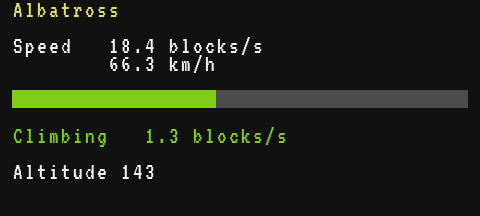
On board, the same function is called four times a second with the real values (put this loop under the function, in the same file):
while true do
  local v = vehicle.velocity()
  show(vehicle.name(), vehicle.speed(), v.y, vehicle.position().y)
  sleep(0.25)
end
See also vehicle.velocity()
The vehicle
The name of the Create Aeronautics vehicle carrying the computer, or nil on the ground (and always nil without Create Aeronautics).
- string|nil
- the name of the vehicle, or
nilwhen the computer is not on one
local name = vehicle.name()
if name then
  print("Aboard " .. name)
else
  print("Not on a vehicle")
end
A name is handy in messages: a ship that reports to the base says who it is. nil cannot be the value of a field in a table, so give a fallback:
local me = vehicle.name() or os.label() or ("#" .. net.id())See also vehicle.on_vehicle()
true when the computer is on board a vehicle. It is the same as vehicle.name() ~= nil.
- boolean
truewhen the computer is on a Create Aeronautics vehicle
An autopilot has nothing to steer on the ground: it can refuse to start there.
if not vehicle.on_vehicle() then
  print("Place me on an airship first.")
  return
end
print("Autopilot ready")
It also tells a program that moves between the ship and the ground what to do: show the flight screen on board, the cargo list once the ship is unloaded at the dock.
Common patterns
Returning home. Once a second, the program compares the bearing of home with the course of the ship and tells the pilot which way to steer. The two helpers are the ones of vehicle.velocity:
local HOME = {x = 250, z = -1200}   -- the landing pad, read with F3

local function bearing(dx, dz)
  local degrees = math.atan2(dx, -dz) * 180 / math.pi
  return (degrees + 360) % 360
end

local function turn(course, target)
  return (target - course + 540) % 360 - 180
end

while true do
  local p = vehicle.position()
  local dx, dz = HOME.x - p.x, HOME.z - p.z
  local distance = math.sqrt(dx * dx + dz * dz)
  term.clear()
  term.set_cursor(1, 1)
  if distance < 8 then
    print("Above the pad: land!")
  else
    local target = bearing(dx, dz)
    print(string.format("Home: %d blocks, bearing %d", math.floor(distance), math.floor(target)))
    local v = vehicle.velocity()
    if math.sqrt(v.x * v.x + v.z * v.z) < 1 then
      print("Get moving to know your course")
    else
      local t = turn(bearing(v.x, v.z), target)
      if t > 10 then
        print(string.format("Turn right %d degrees", math.floor(t)))
      elseif t < -10 then
        print(string.format("Turn left %d degrees", math.floor(-t)))
      else
        print("Straight ahead")
      end
    end
  end
  sleep(1)
end
The ship's course comes from its movement, not from where its bow points. A Navigation Table on the cable gives the angle to a target directly (navigation_table.angle()).
A fleet tracker. Each ship broadcasts its position every 2 seconds on the "fleet" channel. With a Wi-Fi Router on every ship and in the tower, all given the same SSID once with radio.set_ssid(), the routers form one network across the dimension, so the tower hears ships far beyond the 256 blocks of a single router (see Networks).
-- on each ship: a Microcontroller with a Wi-Fi Router on its cable
local me = vehicle.name() or os.label() or ("#" .. net.id())
while true do
  local p = vehicle.position()
  net.broadcast({type = "position", name = me, x = p.x, y = p.y, z = p.z, speed = vehicle.speed()}, "fleet")
  sleep(2)
end
The tower keeps the last report of each ship. On the ground, vehicle.position() gives the place of the tower itself, the centre of the map. One row of the table, built from sample reports:
local function row(s, here)
  local dx, dz = s.x - here.x, s.z - here.z
  return string.format("%-12.12s %5d %4d %5.1f", s.name, math.floor(math.sqrt(dx * dx + dz * dz)), math.floor(s.y), s.speed)
end

local here = {x = 0.5, y = 70.5, z = 0.5}   -- vehicle.position() of the tower
print(string.format("%-12s %5s %4s %5s", "SHIP", "DIST", "ALT", "SPEED"))
print(row({name = "Albatross", x = 300.5, y = 142.5, z = -399.5, speed = 18.4}, here))
print(row({name = "Cargo Lift 2", x = -59.5, y = 96.5, z = 80.5, speed = 0}, here))SHIP DIST ALT SPEED Albatross 500 142 18.4 Cargo Lift 2 100 96 0.0
The tower's loop (put it under row, in the same file) redraws every second, and marks a ship that has been silent for 10 seconds:
local here = vehicle.position()
local ships = {}
while true do
  local m = net.receive(1)
  if m and m.channel == "fleet" and type(m.data) == "table" and m.data.type == "position" then
    m.data.at = os.clock()
    ships[m.sender] = m.data
  end
  term.clear()
  term.set_cursor(1, 1)
  print(string.format("%-12s %5s %4s %5s", "SHIP", "DIST", "ALT", "SPEED"))
  for _, s in pairs(ships) do
    local line = row(s, here)
    if os.clock() - s.at > 10 then line = line .. "  lost" end
    print(line)
  end
end
For an autopilot that holds a balloon's height with the hot air burners, see Airship altitude hold and the built-in program balloon.
See also vehicle.name()