
 A project in several files
Split a larger program into a main file and libraries with import, read a settings file with defaults, keep a log, and update the program on many computers by floppy disk or over the network.
Past a hundred lines, a program in one file becomes hard to find your way in, and the same helpers (drawing a button, reading a setting, writing a log) end up copied from one program to the next. This recipe builds a small control panel the way larger programs are built: a short startup, a main file, and libraries in their own folder, imported with import. Then it answers the question that comes with success: how to install a new version on the twelve computers that run it.
The panel itself is simple on purpose: one button per redstone output, named in a settings file. The structure is the point; it fits every recipe of this cookbook.
The project
/startup              one line: import "panel/main"
/panel/main           the program: settings, buttons, main loop
/panel/lib/config     reads a "key = value" settings file, with defaults
/panel/lib/ui         drawing helpers: a title bar, buttons, a status line
/panel/lib/log        a log file of dated lines, kept small
/panel/lib/update     installs a new version sent over the network
/panel.cfg            the settings of THIS computer (not part of the program)
/panel.log            what happened, written by lib/log
Two choices make the rest easy:
- The program lives in its own folder. Copying, updating or deleting it is one folder; other programs can sit next to it.
- The settings live outside of it. Each computer keeps its own title and outputs in
/panel.cfg, and a new version of/panelcan replace every file of the program without touching them.
A Personal Computer suits it (colours, a floppy disk, a network port for the updates). Type edit panel to open the whole folder in the editor, with its tree on the left: every file is one click away.
How import works
import "path" runs another file and gives back what that file returns. The rules, all visible in the example below:
- The path is relative to the folder of the file that imports: in
/shop/main,import "lib/prices"loads/shop/lib/prices, and in/shop/lib/prices,import "money"loads/shop/lib/money, its neighbour. A path starting with/starts from the root. At the prompt (and in this page's examples) a relative path starts from the current folder. - A file runs once per program. Importing it again, from anywhere, gives the same value without running it again:
moneybelow prints "loading money" a single time although two files import it. Every file that imports a library shares the same table, and the same state. - **The file's
localvariables stay its own; its globals are seen everywhere.** A library therefore declares alocal M = {}table, puts its functions in it, and ends withreturn M.
-- three small files, written here so that the example runs anywhere
fs.write("/shop/lib/money", 'print("loading money")\nreturn {format = function(n) return n .. " coins" end}')
fs.write("/shop/lib/prices", 'local money = import "money"\nreturn {iron = money.format(4)}')
fs.write("/shop/main", 'local prices = import "lib/prices"\nlocal money = import "lib/money"\nprint("iron: " .. prices.iron)\nprint(money.format(12))')
import "/shop/main"
local r = pcall(import, "shop/gold")
print(r.error)loading money iron: 4 coins 12 coins snippet:6: cannot import 'shop/gold': no such file
require is the same function, for those coming from ComputerCraft. The other errors you may meet:
| error | cause |
|---|---|
cannot import 'lib/uii': no such file | a typo in the path, or the path is relative to another folder than you think |
cannot import 'lib': it is a folder | the path names a folder, not a file |
circular import: 'panel/main' is still being imported | two files import each other: move what they share into a third one |
panel/lib/ui:12: ... | an error inside the imported file: the message names that file and its line |
Only import is relative to the file. The paths given to fs are relative to the current folder: the folder of the shell when the program was started, the root at boot. In /panel/main, fs.read("panel.cfg") would look for /panel.cfg at boot, but for /panel/panel.cfg when started by hand from /panel. Write fs paths from the root, with a /, as this project does.
Libraries follow Brass's rule on functions: a function cannot use a local of the function around it. The state of a library (the path of the log, for example) is therefore kept in local variables of the file itself, which all its functions can read and change.
The files
startup
A single line: the boot runs startup, which hands over to the program.
-- startup: runs at boot. The whole program lives in the panel folder.
import "panel/main"panel/main
The program itself reads like a table of contents: it imports its libraries, loads the settings with their defaults, builds one button per side named in the settings, and waits for events. A click switches an output and writes a line in the log; a message goes to update.handle, which ignores everything but new versions.
-- panel/main: a control panel. Each side named in /panel.cfg gets a button
-- that switches its redstone output. Started by /startup.
local config = import "lib/config"
local ui = import "lib/ui"
local log = import "lib/log"
local update = import "lib/update"

local VERSION = 3

local settings = config.load("/panel.cfg", {
  title = "CONTROL PANEL",
  log_file = "/panel.log",
  log_size = 4000,
})
log.setup(settings.log_file, settings.log_size)

-- One button per side that has a name in the settings: left = Furnaces
local buttons = {}
for _, side in ipairs(rs.sides()) do
  if type(settings[side]) == "string" then
    table.insert(buttons, {x = 3, y = 3 + #buttons * 2, w = 26, label = settings[side], side = side, on = false})
  end
end

local function draw()
  ui.clear()
  ui.header(settings.title .. "   v" .. VERSION)
  for _, b in ipairs(buttons) do ui.button(b) end
  if #buttons == 0 then
    ui.status("No outputs yet: add 'left = Lamps' to /panel.cfg", term.colors.orange)
  else
    ui.status("Click a button. Log: " .. settings.log_file)
  end
end

log.info("panel v" .. VERSION .. " started")
draw()
while true do
  local e = os.pull_event()
  if e.name == "click" then
    for _, b in ipairs(buttons) do
      if ui.hit(b, e) then
        b.on = not b.on
        rs.set(b.side, b.on)
        ui.button(b)
        log.info(b.label .. (b.on and " on" or " off"))
      end
    end
  elseif e.name == "message" then
    update.handle(e)
  end
end
rs.sides() lists the six faces, so the settings can name any of them. Its value is checked with type(...) == "string": a line like left = 3 would give a number, not a button label.
panel/lib/config
The settings file is plain text that the player edits with edit /panel.cfg. parse reads it line by line: it skips blank lines, comments (#) and lines without =, cuts each line at the first =, trims the spaces, and converts numbers and true/false. load completes the result with the defaults, and writes a first file made of the defaults when there is none, so that the player has something to start from.
-- panel/lib/config: reads a settings file of "key = value" lines.
-- Lines starting with # are comments; numbers and true/false are converted.
local M = {}

-- "12" gives 12, "true" gives true, anything else stays text
local function convert(text)
  if text == "true" then return true end
  if text == "false" then return false end
  local n = tonumber(text)
  if n then return n end
  return text
end

-- The settings written in a text, as a table
function M.parse(text)
  local settings = {}
  for _, raw in ipairs(string.split(text, "\n")) do
    local line = string.trim(raw)
    local eq = string.find(line, "=")
    if eq and not string.starts(line, "#") then
      local key = string.trim(string.sub(line, 1, eq - 1))
      settings[key] = convert(string.trim(string.sub(line, eq + 1)))
    end
  end
  return settings
end

-- Writes settings as a file the player can edit
function M.save(path, settings)
  local lines = {"# Settings: one 'key = value' per line"}
  for k, v in pairs(settings) do
    table.insert(lines, k .. " = " .. tostring(v))
  end
  fs.write(path, table.concat(lines, "\n") .. "\n")
end

-- The settings of path, completed with defaults. A missing file is created
-- from the defaults, so there is something to edit.
function M.load(path, defaults)
  local text = fs.read(path)
  if text == nil then
    M.save(path, defaults)
    text = ""
  end
  local settings = M.parse(text)
  for k, v in pairs(defaults) do
    if settings[k] == nil then settings[k] = v end
  end
  return settings
end

return M
M.load calls M.save, defined above it in the file. Both are fields of M, looked up when the call happens, so the order of the definitions would not even matter.
After a first run, and three lines added by hand, /panel.cfg reads:
# Settings: one 'key = value' per line
title = SMELTING HALL
log_file = /panel.log
log_size = 4000
left = Furnaces
right = Conveyor
top = Hall lightspanel/lib/ui
Small drawing functions for a text screen, the same in every program: a title bar, a button that knows if it is on, a test for clicks, a status line. A button is a table, so the program can keep its state (on) in it, and M.hit compares a click with the button's own position.
-- panel/lib/ui: drawing helpers for text screens.
local M = {}
local colors = term.colors

function M.clear()
  term.set_bg(colors.black)
  term.clear()
end

-- A blue bar across the top of the screen
function M.header(title)
  term.set_cursor(1, 1)
  term.set_bg(colors.blue)
  term.set_fg(colors.white)
  term.write(" " .. title .. string.rep(" ", term.get_size().w))   -- cut at the edge
  term.set_bg(colors.black)
end

-- A button is a table {x =, y =, w =, label =, on =}: green when on, red when off
function M.button(b)
  local state = b.on and "ON" or "OFF"
  local text = " " .. b.label
  term.set_cursor(b.x, b.y)
  term.set_bg(b.on and colors.green or colors.red)
  term.set_fg(colors.white)
  term.write(text .. string.rep(" ", b.w - #text - #state - 1) .. state .. " ")
  term.set_bg(colors.black)
end

-- Did the click event e land on the button?
function M.hit(b, e)
  return e.y == b.y and e.x >= b.x and e.x < b.x + b.w
end

-- A line of text at the bottom of the screen
function M.status(text, color)
  term.set_cursor(1, term.get_size().h)
  term.set_bg(colors.black)
  term.clear_line()
  term.set_fg(color or colors.light_gray)
  term.write(text)
end

return Mpanel/lib/log
A log answers "who stopped the conveyor last night?". Each line starts with the time of the world. When the file passes max_bytes, it is renamed with .old (replacing the previous old one) and a new one starts: the log never takes more than twice its size on the disk.
-- panel/lib/log: a log file of dated lines that never grows too big.
local M = {}
local path = "/program.log"   -- changed by M.setup
local max_bytes = 4000

function M.setup(file, size)
  path, max_bytes = file, size
end

local function clock()
  local t = (os.day_time() + 6000) % 24000
  return string.format("%02d:%02d", t // 1000, t % 1000 * 60 // 1000)
end

local function append(line)
  local size = fs.size(path)
  if size and size > max_bytes then
    fs.move(path, path .. ".old")   -- replaces the previous old log
  end
  fs.append(path, line .. "\n")
end

-- A full disk must not stop the program: the line is lost, that is all
function M.write(level, text)
  pcall(append, clock() .. " " .. level .. " " .. text)
end

function M.info(text)
  M.write("INFO", text)
end

function M.warn(text)
  M.write("WARN", text)
end

return M
M.setup changes path and max_bytes, two local variables of the file: every function of the library sees the new values. And since a library runs once, lib/update, which imports log too, writes into the file chosen by panel/main.
Writing goes through pcall: a full disk loses a line of log rather than stopping the panel.
panel/lib/update
It waits for a message on the channel update that carries the secret word and a table of files, writes every file, answers, and reboots so that the new version starts from the beginning. The answer goes back to the sender before the reboot: net.send hands the message over at once, and os.reboot only takes effect at the end of the tick.
-- panel/lib/update: installs a new version of the program sent by "push".
local log = import "log"   -- panel/lib/log: the same module as main's

local M = {}
local SECRET = "brass-workshop-7"
local CHANNEL = "update"

local function install(files)
  for path, text in pairs(files) do
    fs.write("/" .. path, text)
  end
end

-- Called by main for each "message" event: true when it was a new version
function M.handle(e)
  local d = e.data
  if e.channel ~= CHANNEL or type(d) ~= "table" or d.secret ~= SECRET or type(d.files) ~= "table" then
    return false
  end
  local r = pcall(install, d.files)
  if not r.ok then
    log.warn("update " .. tostring(d.version) .. " failed: " .. r.error)
    net.send(e.sender, {secret = SECRET, version = d.version, ok = false, error = r.error}, CHANNEL)
    return true
  end
  log.info("updated to version " .. tostring(d.version) .. " by #" .. e.sender)
  net.send(e.sender, {secret = SECRET, version = d.version, ok = true}, CHANNEL)
  os.reboot()   -- the new files run from the start
  return true
end

return M
If writing fails half-way (not enough space), some files are new and others old. The library then answers with the error instead of rebooting: the old version keeps running in memory, and you can make room and push again.
What it looks like
The screen of the panel, drawn by the functions of lib/ui (copied into the example, since this page has no disk to import from) with the three outputs of the settings above:
local M = {}
local colors = term.colors
function M.clear()
  term.set_bg(colors.black)
  term.clear()
end
function M.header(title)
  term.set_cursor(1, 1)
  term.set_bg(colors.blue)
  term.set_fg(colors.white)
  term.write(" " .. title .. string.rep(" ", term.get_size().w))
  term.set_bg(colors.black)
end
function M.button(b)
  local state = b.on and "ON" or "OFF"
  local text = " " .. b.label
  term.set_cursor(b.x, b.y)
  term.set_bg(b.on and colors.green or colors.red)
  term.set_fg(colors.white)
  term.write(text .. string.rep(" ", b.w - #text - #state - 1) .. state .. " ")
  term.set_bg(colors.black)
end
function M.status(text, color)
  term.set_cursor(1, term.get_size().h)
  term.set_bg(colors.black)
  term.clear_line()
  term.set_fg(color or colors.light_gray)
  term.write(text)
end

local ui = M
ui.clear()
ui.header("SMELTING HALL   v3")
ui.button({x = 3, y = 3, w = 26, label = "Furnaces", on = true})
ui.button({x = 3, y = 5, w = 26, label = "Conveyor", on = false})
ui.button({x = 3, y = 7, w = 26, label = "Hall lights", on = true})
ui.status("Click a button. Log: /panel.log")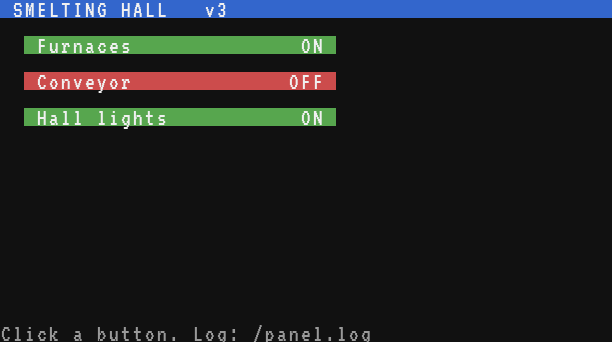
Testing it
- Create the folders and files:
mkdir panel,mkdir panel/lib, thenedit paneland the + File button for each file (oredit panel/lib/uifor each). Writestartupat the root. - Reboot (Ctrl+R). The first run creates
/panel.cfgand shows "No outputs yet". Edit it, addleft = Furnaces, reboot: the button appears. Click it: the output switches, and the log tells you so:
> cat panel.log
18:02 INFO panel v3 started
18:03 INFO Furnaces on
18:05 INFO Furnaces off
- Make a mistake on purpose: rename
panel/lib/uitopanel/lib/uiiwithmv. The boot stops withpanel/main:4: cannot import 'lib/ui': no such file: the message names the file and the line of theimport.
Updating many computers
Once the panel runs in every hall of the factory, each fix has to reach every copy. Two ways.
With a floppy disk: clone
The files of a computer live on its disk, and each computer keeps its disk in its drive. clone copies files from one disk onto others, on a single computer. It reads everything into memory while the original disk is in the drive, then waits for you to swap disks: the program keeps running when its disk is ejected, since it is already loaded, and a disk event tells it when a disk leaves (e.inserted is false) and when one comes in (true). Then carry each new disk to its computer.
-- clone: copies files and folders onto other disks.
-- Usage, from the root: clone startup panel   then swap the disks when asked.
if #arg == 0 then
  print("Usage: clone <file or folder> ...")
  return
end

-- 1. Everything is read into memory, while the original disk is in the drive
local files = {}
local count, bytes = 0, 0
local function collect(path)
  if fs.is_dir(path) then
    for _, name in ipairs(fs.list(path)) do
      collect(path .. "/" .. name)
    end
  else
    local text = fs.read(path)
    if text == nil then error("no file '" .. path .. "'") end
    files[path] = text
    count, bytes = count + 1, bytes + #text
  end
end
for _, name in ipairs(arg) do
  collect(name)
end
print(count .. " files read, " .. bytes .. " bytes.")

local function write_all()
  for path, text in pairs(files) do
    fs.write(path, text)
  end
end

-- 2. A "disk" event comes when a disk leaves the drive and when one comes in
while true do
  print("Eject the disk (sneak + right-click with an empty hand) and insert a new one. Ctrl+T to stop.")
  repeat
    local e = os.pull_event("disk")
  until e.inserted
  local r = pcall(write_all)
  if r.ok then
    print("Copied. " .. fs.free() .. " bytes left on this disk.")
  else
    print("Failed: " .. r.error)
  end
end
Run it from the root with the names to copy: clone startup panel. It does not copy /panel.cfg, so each disk keeps its own settings. A computer only takes disks of its age or older (a Personal Computer reads floppy disks), and the Microcontroller has no drive at all: for it, use the network.
Over the network: push and receive
The workshop computer holds the master copy. push gathers startup and every file under /panel into one table, finds the computers whose label starts with panel (net.computers gives each one's label), and sends the table to each of them with net.send. Then it waits for their answers and sends again to the silent ones, three times at most: the same protocol of answers, timeouts and retries as in Remote control over the network.
-- push: sends the program to every computer whose label starts with "panel",
-- and waits for each one to answer. Usage: push 4   (the version number)
local SECRET = "brass-workshop-7"
local CHANNEL = "update"
local PREFIX = "panel"     -- the labels of the computers to update
local TIMEOUT = 3          -- seconds to wait for the answers
local TRIES = 3

local version = tonumber(arg[1])
if version == nil then
  print("Usage: push <version number>")
  return
end

-- Every file of a folder and of its folders: files["panel/lib/ui"] = "..."
local function collect(dir, files)
  for _, name in ipairs(fs.list("/" .. dir)) do
    local path = dir .. "/" .. name
    if fs.is_dir("/" .. path) then
      collect(path, files)
    else
      files[path] = fs.read("/" .. path)
    end
  end
end

local files = {startup = fs.read("/startup")}
collect("panel", files)
local size = 0
for _, text in pairs(files) do size = size + #text end
if size > 30000 then error("the program is too big for one message: " .. size .. " characters") end

-- The computers to update, found by their labels
local targets = {}
local count = 0
for _, c in ipairs(net.computers()) do
  if c.label and string.starts(c.label, PREFIX) then
    targets[c.id] = {label = c.label, tries = 0, done = false}
    count = count + 1
  end
end
print("Version " .. version .. ", " .. size .. " characters, to " .. count .. " computer(s)")

local message = {secret = SECRET, version = version, files = files}

-- Sends to those that have not answered; returns how many were sent
local function send_round()
  local sent = 0
  for id, t in pairs(targets) do
    if not t.done and t.tries < TRIES then
      t.tries = t.tries + 1
      net.send(id, message, CHANNEL)
      sent = sent + 1
    end
  end
  return sent
end

local function all_done()
  for _, t in pairs(targets) do
    if not t.done then return false end
  end
  return true
end

-- An answer: {secret =, version =, ok =, error =} from one of the targets
local function on_answer(e)
  local d = e.data
  if e.name ~= "message" or e.channel ~= CHANNEL or targets[e.sender] == nil then return end
  if type(d) ~= "table" or d.secret ~= SECRET or d.version ~= version then return end
  local t = targets[e.sender]
  t.done = true
  if d.ok then
    print("#" .. e.sender .. " " .. t.label .. ": updated")
  else
    print("#" .. e.sender .. " " .. t.label .. ": failed, " .. tostring(d.error))
  end
end

while send_round() > 0 do
  local timer = os.start_timer(TIMEOUT)
  while not all_done() do
    local e = os.pull_event()
    if e.name == "timer" and e.id == timer then break end
    on_answer(e)
  end
end

for id, t in pairs(targets) do
  if not t.done then print("#" .. id .. " " .. t.label .. ": no answer") end
end
A message can carry 32,768 characters at most (message too large otherwise), hence the size check: past that, send one file per message. A computer that receives a large message also needs room for it in its event queue, which can take a quarter of its memory: about 30 KB of text on a Microcontroller, whose own memory holds 16 KB anyway.
On the computers that already run the panel, lib/update receives the new version. A brand new computer has nothing to receive it with yet: type this short receive program once, give the computer a label, and run it.
-- receive: type this once on a new computer, give it a label (label panel-4),
-- then run push in the workshop. It installs the program and reboots.
local SECRET = "brass-workshop-7"
print("Waiting for the program, I am #" .. net.id())
while true do
  local m = net.receive()
  local d = m.data
  if m.channel == "update" and type(d) == "table" and d.secret == SECRET and type(d.files) == "table" then
    for path, text in pairs(d.files) do
      fs.write("/" .. path, text)
    end
    net.send(m.sender, {secret = SECRET, version = d.version, ok = true}, "update")
    os.reboot()
  end
end> label panel-4 > receive Waiting for the program, I am #23
Then, in the workshop:
> push 4
Version 4, 6174 characters, to 4 computer(s)
#23 panel-4: updated
#12 panel-1: updated
#15 panel-2: updated
#17 panel-3: no answer
Here panel-3 did not answer three times: it is off, out of reach, or its chunk is not loaded, or its panel is not running (a computer back at the shell prompt loses the message, although net.send returns true). Push again later; the others will simply install the same version once more.
Whoever knows the secret word can install any program on your computers. Keep it long, never send it with net.broadcast, and change it in push, receive and lib/update together.
Tips for larger programs
- **Keep
mainshort.** When a part of it grows, move it into a library with a name that says what it does. A good library can be explained in one sentence. - No globals. A global set in one file is seen by all the others, and two libraries that both use
countwill overwrite each other. Uselocal, and return a table. - A version number shown on the screen (
v3in the title bar) tells you at a glance which computers are up to date. - Test a library alone at the
brassprompt:ui = import "/panel/lib/ui", then call its functions one by one. Each line of the prompt is its own chunk, so use a global there, not alocal.