
Built-in programs

shapes
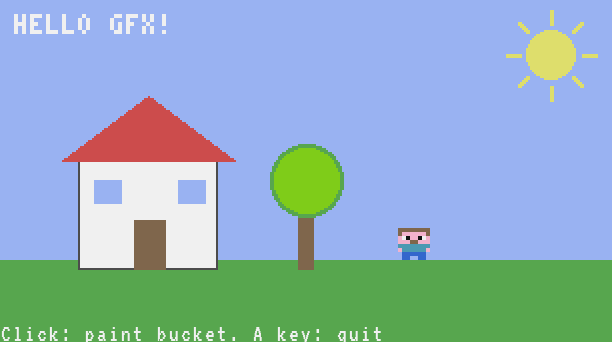
draws a scene with gfx
Type this at the prompt of a computer to copy it onto the medium:
> examples shapes
> edit shapes
The program
-- Drawing with gfx: each shape of the scene shows one function.
-- Coordinates are pixels, (1, 1) is the top left; colours are a name
-- ("red") or a number 0..15 (term.colors.red).
local size = gfx.size()
local W = size.w
local H = size.h
term.set_bg(term.colors.black)
term.clear()
gfx.clear("light_blue")  -- the sky
gfx.circle(W - 30, 28, 12, "yellow", true)  -- the sun: a filled circle
for i = 0, 7 do
  -- its rays: lines 2 pixels thick
  local a = i * math.pi / 4
  gfx.line(W - 30 + math.cos(a) * 16, 28 + math.sin(a) * 16,
    W - 30 + math.cos(a) * 22, 28 + math.sin(a) * 22, "yellow", 2)
end
gfx.rect(1, H - 40, W, 41, "green", true)  -- the grass: a filled rectangle
gfx.rect(40, H - 90, 70, 55, "white", true)  -- the house
gfx.rect(40, H - 90, 70, 55, "gray")  -- its outline: no fill
gfx.triangle(32, H - 90, 75, H - 122, 118, H - 90, "red", true)  -- the roof
gfx.rect(68, H - 60, 16, 25, "brown", true)  -- the door
gfx.rect(48, H - 80, 14, 12, "light_blue", true)  -- two windows
gfx.rect(90, H - 80, 14, 12, "light_blue", true)
gfx.rect(150, H - 70, 8, 35, "brown", true)  -- a tree
gfx.circle(154, H - 80, 18, "lime", true)
gfx.circle(154, H - 80, 18, "green", 2)  -- a border 2 pixels thick
-- a sprite: one hex colour per pixel ("." is empty), drawn twice as big
local steve = {
  "cccccccc",
  "c666666c",
  "60f66f06",
  "666cc666",
  "99999999",
  "69999996",
  ".bbbbbb.",
  ".bb..bb.",
}
gfx.image(200, H - 56, steve, 2)
gfx.text(8, 8, "HELLO GFX!", "white", 2)  -- text made of pixels, twice as big
term.set_cursor(1, term.get_size().h)
term.write("Click: paint bucket. A key: quit")
while true do
  local e = os.pull_event()
  if e.name == "click" then
    -- e.px, e.py: the pixel clicked
    gfx.fill(e.px, e.py, "orange")
  elseif e.name == "key" or e.name == "char" then
    break
  end
end