
 Factory dashboard
A wall of LCD Monitors that shows your stock as bar charts and the stress of the kinetic network, refreshed on a timer.
A big screen in the middle of the factory that answers the questions you keep running to the vaults for: how much iron is left, is the brass line keeping up, how close is the network to overstressing? This recipe builds it: one bar per resource, coloured by how full it is, and a stress gauge for the kinetic network, refreshed every five seconds on a wall of LCD Monitors.
It is also a good model for any screen that runs all day: a timer instead of a busy loop, readings that survive a broken chest, and a screen that only redraws what changed.
What you need
- A Modern Computer, or a Personal Computer. Both have colours, the
gfxlibrary and a network port for the Data Cable. The program adapts to the screen: 384 × 216 pixels on the Modern Computer, 306 × 171 on the Personal Computer. Reading inventories costs one instruction per slot (see@inventory.list), so a big storage is more comfortable on the Modern Computer (100,000 instructions per second at 256 RPM, against 24,000). A Minicomputer would run it too, but on its amber screen every bar has the same colour. - LCD Monitors: a wall of up to 8 × 6, touching the computer. The wall shows the computer's own screen, stretched to fill it: more monitors make the picture bigger, not sharper. A wall close to 16:9, like 7 × 4, keeps the letters in shape.
- Data Cable from the computer to your storage (chests, barrels, Item Vaults) and to one kinetic block of the factory's network. A Create Stressometer is ideal. Plain shafts, cogwheels and gearboxes are not devices of a cable (see
Peripherals), so the cable must touch a real machine or gauge. - Rotation at the back of the computer, as always.
Seen from above (the screens face the bottom of the page):

  [L][L][L][L][L][L][L]      L  LCD Monitor, a wall of 7 x 4
           [M]==== shaft     M  Modern Computer, touching the back of the wall
            #                #  Data Cable
  [V]#######+#######[V]      V  Item Vaults or chests (iron, copper, brass...)
            #
[S] S Stressometer, on a shaft of the factoryLet the cable touch each vault or double chest through one block only. Every block of a Create vault answers for the whole vault, so a cable running along three blocks of it would count its contents three times.
How it works
1. Settings
The list of resources is a table at the top of the file: a label for the screen, the item id to count, and a goal, the amount you consider "full". The bar is red under a quarter of the goal, yellow under half, green above.
local STOCK = {
  {label = "IRON", item = "minecraft:iron_ingot", goal = 2048},
  {label = "COPPER", item = "minecraft:copper_ingot", goal = 2048},
  {label = "ANDESITE", item = "create:andesite_alloy", goal = 1024},
  {label = "BRASS", item = "create:brass_ingot", goal = 512},
  {label = "COAL", item = "minecraft:coal", goal = 1024},
}
local GAUGE = nil   -- nil: the first kinetic block on the cable, or "kinetic@x,y,z"
local REFRESH = 5   -- seconds between two readings
Item ids are the ones of the F3 + H tooltips or of @inventory.list: minecraft:iron_ingot, create:brass_ingot. Labels are drawn with the 3 × 5 pixel font of gfx.text, in capitals, so keep them to eight letters.
2. Layout
Every position is computed from gfx.size, so the same program fits a Personal Computer and a Modern Computer. The labels take the left 80 pixels, the numbers the right 56, the bars the rest. The stress bar sits at the bottom, and the rows share the height left between the title and it.
local size = gfx.size()
local W, H = size.w, size.h
local LEFT = 8
local BAR_X = 80
local BAR_W = W - BAR_X - 56
local BAR_H = 14
local TEXT_X = BAR_X + BAR_W + 8
local TOP = 34
local STRESS_Y = H - 44
local ROW_H = math.min(26, (STRESS_Y - 10 - TOP) // #STOCK)3. Reading the factory
read_stock walks every inventory of the cable once, with peripheral.list and @inventory.list, and adds up all the stacks in a table indexed by item id. One pass gives the count of every resource, however many are listed in STOCK: much cheaper than calling @inventory.count once per resource and per chest.
local function read_stock()
  local totals = {}
  for _, name in ipairs(peripheral.list("inventory")) do
    local inv = peripheral.wrap(name)
    local r = {ok = false}
    if inv then r = pcall(inv.list) end   -- the chest may have been broken
    if r.ok then
      for _, stack in pairs(r.value) do
        totals[stack.name] = (totals[stack.name] or 0) + stack.count
      end
    end
  end
  return totals
end
Two details make it survive the life of a factory. The list of inventories is read again at every refresh, so a new chest on the cable is counted at once. And each list() goes through pcall: a chest broken between the two calls raises an error (not an inventory anymore) that would stop the program, while here it only skips that chest. The list that list() returns has holes (only the slots that hold something), so it is walked with pairs, not ipairs.
For the stress, any kinetic block of the network gives the same numbers: @kinetic.stress and @kinetic.capacity add up the whole network it belongs to. find_gauge takes the first kinetic device whose name contains an @, which means it is on the cable: the faces of the computer come first in peripheral.list, and the shaft that powers the computer is a kinetic block too, of a network that may not be the factory's.
local function find_gauge()
  if GAUGE then return peripheral.wrap(GAUGE) end
  for _, name in ipairs(peripheral.list("kinetic")) do
    if string.find(name, "@") then return peripheral.wrap(name) end
  end
  return nil
end

local function read_stress()
  local gauge = find_gauge()
  if gauge == nil then return nil end
  local used = pcall(gauge.stress)
  local capacity = pcall(gauge.capacity)
  local over = pcall(gauge.overstressed)
  if not (used.ok and capacity.ok and over.ok) then return nil end
  return {used = used.value, capacity = capacity.value, over = over.value}
end
A Brass function returns a single value, so read_stress returns a table, or nil when there is nothing to read.
4. Drawing only what changed
The screen is not cleared at each refresh. The table shown remembers what every bar and every text shows now, and draw_bar and draw_text touch the pixels only when the new value differs. When nothing moved in the factory, a refresh draws nothing at all.
local shown = {}

local function draw_text(key, x, y, w, text, color, scale)
  local old = shown[key]
  if old and old.text == text and old.color == color then return end
  gfx.rect(x, y, w, 5 * scale, "black", true)
  gfx.text(x, y, text, color, scale)
  shown[key] = {text = text, color = color}
end

local function draw_bar(key, y, ratio, color, text)
  local fill = math.floor((BAR_W - 2) * math.max(0, math.min(ratio, 1)))
  local old = shown[key] or {}
  if old.fill ~= fill or old.color ~= color then
    gfx.rect(BAR_X + 1, y + 1, BAR_W - 2, BAR_H - 2, "black", true)
    if fill > 0 then
      gfx.rect(BAR_X + 1, y + 1, fill, BAR_H - 2, color, true)
    end
    shown[key] = {fill = fill, color = color}
  end
  draw_text(key .. "_text", TEXT_X, y + 2, W - TEXT_X, text, "white", 2)
end
This matters more than it looks. Only the rows of pixels drawn since the last update travel to the players who see the wall, so a still screen costs no network traffic. Drawing costs instructions (one per 64 pixels touched). And a program that clears everything, then redraws, can be caught half-way by a player when its work spreads over more than one tick.
What never changes (the title, the labels, the frames of the bars) is drawn once by draw_static, before the loop. It starts with term.clear(): the text printed at boot (the Brass OS banner, the prompt) sits on a layer above the drawing and would stay over it. gfx.rect without its last argument draws a frame one pixel thick, with true a filled rectangle.
5. The main loop
The program spends its life waiting in os.pull_event. A timer started with os.start_timer wakes it every REFRESH seconds; its id is checked, because other timers could exist. A click on the screen reads the factory at once.
draw_static()
refresh()
local timer = os.start_timer(REFRESH)
while true do
  local e = os.pull_event()
  if e.name == "timer" and e.id == timer then
    refresh()
    timer = os.start_timer(REFRESH)
  elseif e.name == "click" then
    refresh()
  end
end
Because the program waits for every event, including clicks, a right-click on the wall presses the screen instead of opening the terminal. Sneak and right-click to open the terminal (see Screens and monitors).
The whole program
Save it as startup, so the dashboard comes back on its own after a reboot or a server restart.
-- Factory dashboard: stock bars and kinetic stress on a wall of monitors.
-- Modern Computer (or Personal Computer), LCD Monitors touching it,
-- chests and vaults plus one Stressometer on its Data Cable.

-- 1. Settings
local STOCK = {
  {label = "IRON", item = "minecraft:iron_ingot", goal = 2048},
  {label = "COPPER", item = "minecraft:copper_ingot", goal = 2048},
  {label = "ANDESITE", item = "create:andesite_alloy", goal = 1024},
  {label = "BRASS", item = "create:brass_ingot", goal = 512},
  {label = "COAL", item = "minecraft:coal", goal = 1024},
}
local GAUGE = nil   -- nil: the first kinetic block on the cable, or "kinetic@x,y,z"
local REFRESH = 5   -- seconds between two readings

-- 2. Layout, computed from the size of the screen
local size = gfx.size()
local W, H = size.w, size.h
local LEFT = 8                    -- margin
local BAR_X = 80                  -- the bars start after the labels
local BAR_W = W - BAR_X - 56      -- room for a number on the right
local BAR_H = 14
local TEXT_X = BAR_X + BAR_W + 8
local TOP = 34                    -- first row, under the title
local STRESS_Y = H - 44           -- the stress bar, at the bottom
local ROW_H = math.min(26, (STRESS_Y - 10 - TOP) // #STOCK)

local shown = {}    -- what is on the screen now, to redraw only what changed

-- 3. Reading the factory
-- Every inventory of the cable in one pass: totals["minecraft:iron_ingot"] = 1234
local function read_stock()
  local totals = {}
  for _, name in ipairs(peripheral.list("inventory")) do
    local inv = peripheral.wrap(name)
    local r = {ok = false}
    if inv then r = pcall(inv.list) end   -- the chest may have been broken
    if r.ok then
      for _, stack in pairs(r.value) do
        totals[stack.name] = (totals[stack.name] or 0) + stack.count
      end
    end
  end
  return totals
end

-- The kinetic block to read: GAUGE, or the first one whose name has an @
-- (on the cable). The shaft behind the computer is kinetic too: skipped.
local function find_gauge()
  if GAUGE then return peripheral.wrap(GAUGE) end
  for _, name in ipairs(peripheral.list("kinetic")) do
    if string.find(name, "@") then return peripheral.wrap(name) end
  end
  return nil
end

-- {used =, capacity =, over =}, or nil when there is nothing to read
local function read_stress()
  local gauge = find_gauge()
  if gauge == nil then return nil end
  local used = pcall(gauge.stress)
  local capacity = pcall(gauge.capacity)
  local over = pcall(gauge.overstressed)
  if not (used.ok and capacity.ok and over.ok) then return nil end
  return {used = used.value, capacity = capacity.value, over = over.value}
end

-- 4. Drawing
local function level_color(ratio)
  if ratio < 0.25 then return "red" end
  if ratio < 0.5 then return "yellow" end
  return "lime"
end

-- 12345 becomes "12.3K": a number always fits in five characters
local function short(n)
  if n >= 100000 then return (n // 1000) .. "K" end
  if n >= 10000 then return string.format("%.1fK", n / 1000) end
  return tostring(n)
end

-- A line of text, erased and written again only when it changes
local function draw_text(key, x, y, w, text, color, scale)
  local old = shown[key]
  if old and old.text == text and old.color == color then return end
  gfx.rect(x, y, w, 5 * scale, "black", true)
  gfx.text(x, y, text, color, scale)
  shown[key] = {text = text, color = color}
end

-- A bar: its fill is drawn again only when its length or colour changed
local function draw_bar(key, y, ratio, color, text)
  local fill = math.floor((BAR_W - 2) * math.max(0, math.min(ratio, 1)))
  local old = shown[key] or {}
  if old.fill ~= fill or old.color ~= color then
    gfx.rect(BAR_X + 1, y + 1, BAR_W - 2, BAR_H - 2, "black", true)
    if fill > 0 then
      gfx.rect(BAR_X + 1, y + 1, fill, BAR_H - 2, color, true)
    end
    shown[key] = {fill = fill, color = color}
  end
  draw_text(key .. "_text", TEXT_X, y + 2, W - TEXT_X, text, "white", 2)
end

-- What never changes: drawn once
local function draw_static()
  term.clear()          -- the lines printed at boot would stay over the drawing
  gfx.clear("black")
  gfx.text(LEFT, 6, "FACTORY", "yellow", 3)
  gfx.line(LEFT, 26, W - LEFT, 26, "gray")
  for i, s in ipairs(STOCK) do
    local y = TOP + (i - 1) * ROW_H
    gfx.text(LEFT, y + 2, s.label, "light_gray", 2)
    gfx.rect(BAR_X, y, BAR_W, BAR_H, "gray")
  end
  gfx.line(LEFT, STRESS_Y - 8, W - LEFT, STRESS_Y - 8, "gray")
  gfx.text(LEFT, STRESS_Y + 2, "STRESS", "light_gray", 2)
  gfx.rect(BAR_X, STRESS_Y, BAR_W, BAR_H, "gray")
end

-- The time of the world, "18:30" (day_time 0 is 6 in the morning)
local function clock_text()
  local t = (os.day_time() + 6000) % 24000
  return string.format("%02d:%02d", t // 1000, t % 1000 * 60 // 1000)
end

-- 5. One reading of the factory, and the screen brought up to date
local function refresh()
  local totals = read_stock()
  for i, s in ipairs(STOCK) do
    local count = totals[s.item] or 0
    local ratio = count / s.goal
    draw_bar("row" .. i, TOP + (i - 1) * ROW_H, ratio, level_color(ratio), short(count))
  end
  local stress = read_stress()
  local detail, detail_color = "NO GAUGE ON THE CABLE", "red"
  if stress == nil then
    draw_bar("stress", STRESS_Y, 0, "gray", "--")
  else
    local ratio = 0
    if stress.capacity > 0 then ratio = stress.used / stress.capacity end
    local color = "lime"
    if stress.over or ratio >= 0.9 then
      color = "red"
    elseif ratio >= 0.75 then
      color = "yellow"
    end
    draw_bar("stress", STRESS_Y, ratio, color, math.floor(ratio * 100) .. "%")
    detail = short(stress.used) .. " OF " .. short(stress.capacity) .. " SU"
    detail_color = "light_gray"
    if stress.over then detail, detail_color = "OVERSTRESSED!", "red" end
  end
  draw_text("detail", BAR_X, STRESS_Y + BAR_H + 6, W - BAR_X, detail, detail_color, 2)
  draw_text("clock", W - LEFT - 38, 8, 38, clock_text(), "white", 2)
end

-- 6. Main loop: a timer for the readings; a tap on the screen reads at once
draw_static()
refresh()
local timer = os.start_timer(REFRESH)
while true do
  local e = os.pull_event()
  if e.name == "timer" and e.id == timer then
    refresh()
    timer = os.start_timer(REFRESH)
  elseif e.name == "click" then
    refresh()
  end
endWhat it looks like
The documentation has no factory to read, so this demo keeps the drawing code of the program as it is and replaces the two reading functions with fixed numbers. On a Modern Computer:
local STOCK = {
  {label = "IRON", item = "minecraft:iron_ingot", goal = 2048},
  {label = "COPPER", item = "minecraft:copper_ingot", goal = 2048},
  {label = "ANDESITE", item = "create:andesite_alloy", goal = 1024},
  {label = "BRASS", item = "create:brass_ingot", goal = 512},
  {label = "COAL", item = "minecraft:coal", goal = 1024},
}
local size = gfx.size()
local W, H = size.w, size.h
local LEFT, BAR_X, BAR_H, TOP = 8, 80, 14, 34
local BAR_W = W - BAR_X - 56
local TEXT_X = BAR_X + BAR_W + 8
local STRESS_Y = H - 44
local ROW_H = math.min(26, (STRESS_Y - 10 - TOP) // #STOCK)
local shown = {}

-- sample readings instead of the peripherals
local function read_stock()
  return {["minecraft:iron_ingot"] = 1730, ["minecraft:copper_ingot"] = 900,
    ["create:andesite_alloy"] = 12480, ["create:brass_ingot"] = 40, ["minecraft:coal"] = 310}
end
local function read_stress()
  return {used = 1536, capacity = 2048, over = false}
end

local function level_color(ratio)
  if ratio < 0.25 then return "red" end
  if ratio < 0.5 then return "yellow" end
  return "lime"
end
local function short(n)
  if n >= 100000 then return (n // 1000) .. "K" end
  if n >= 10000 then return string.format("%.1fK", n / 1000) end
  return tostring(n)
end
local function draw_text(key, x, y, w, text, color, scale)
  local old = shown[key]
  if old and old.text == text and old.color == color then return end
  gfx.rect(x, y, w, 5 * scale, "black", true)
  gfx.text(x, y, text, color, scale)
  shown[key] = {text = text, color = color}
end
local function draw_bar(key, y, ratio, color, text)
  local fill = math.floor((BAR_W - 2) * math.max(0, math.min(ratio, 1)))
  local old = shown[key] or {}
  if old.fill ~= fill or old.color ~= color then
    gfx.rect(BAR_X + 1, y + 1, BAR_W - 2, BAR_H - 2, "black", true)
    if fill > 0 then gfx.rect(BAR_X + 1, y + 1, fill, BAR_H - 2, color, true) end
    shown[key] = {fill = fill, color = color}
  end
  draw_text(key .. "_text", TEXT_X, y + 2, W - TEXT_X, text, "white", 2)
end
local function draw_static()
  term.clear()
  gfx.clear("black")
  gfx.text(LEFT, 6, "FACTORY", "yellow", 3)
  gfx.line(LEFT, 26, W - LEFT, 26, "gray")
  for i, s in ipairs(STOCK) do
    local y = TOP + (i - 1) * ROW_H
    gfx.text(LEFT, y + 2, s.label, "light_gray", 2)
    gfx.rect(BAR_X, y, BAR_W, BAR_H, "gray")
  end
  gfx.line(LEFT, STRESS_Y - 8, W - LEFT, STRESS_Y - 8, "gray")
  gfx.text(LEFT, STRESS_Y + 2, "STRESS", "light_gray", 2)
  gfx.rect(BAR_X, STRESS_Y, BAR_W, BAR_H, "gray")
end
local function clock_text()
  local t = (os.day_time() + 6000) % 24000
  return string.format("%02d:%02d", t // 1000, t % 1000 * 60 // 1000)
end
local function refresh()
  local totals = read_stock()
  for i, s in ipairs(STOCK) do
    local count = totals[s.item] or 0
    local ratio = count / s.goal
    draw_bar("row" .. i, TOP + (i - 1) * ROW_H, ratio, level_color(ratio), short(count))
  end
  local stress = read_stress()
  local ratio = stress.used / stress.capacity
  local color = "lime"
  if stress.over or ratio >= 0.9 then color = "red" elseif ratio >= 0.75 then color = "yellow" end
  draw_bar("stress", STRESS_Y, ratio, color, math.floor(ratio * 100) .. "%")
  draw_text("detail", BAR_X, STRESS_Y + BAR_H + 6, W - BAR_X,
    short(stress.used) .. " OF " .. short(stress.capacity) .. " SU", "light_gray", 2)
  draw_text("clock", W - LEFT - 38, 8, 38, clock_text(), "white", 2)
end

draw_static()
refresh()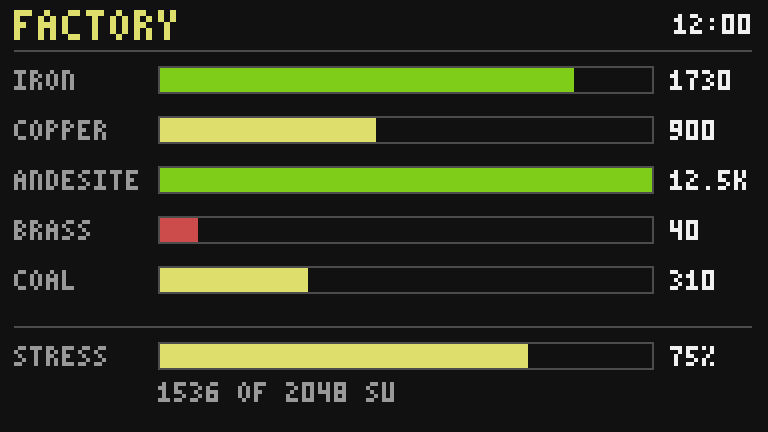
Testing it
Before the monitors, run the program in the terminal:
edit startup, paste, Ctrl+S, Esc, thenstartup. Ask the computer what it sees with one line at thebrassprompt:> brass brass> for _, n in ipairs(peripheral.list()) do print(n) end front back inventory@-112,64,230 inventory@-108,64,230 kinetic@-110,63,233
frontis the monitor wall,backthe shaft that powers the computer, the names with an@are on the cable. Nokinetic@line means the cable touches no machine: move the Stressometer against it.- Drop a stack of iron into a vault: its bar grows at the next refresh, or at once if you click the screen.
- Break the Stressometer: the stress bar turns grey and the line under it reads NO GAUGE ON THE CABLE. Put it back: the gauge returns, without restarting anything.
- Load the network with machines until it overstresses: the bar and its text turn red.
- Place the monitor wall. If a right-click opens the terminal instead of refreshing, the program is not running (look for an error in the terminal).
Variations
- An alarm too. At the end of
refresh, light a lamp or a bell when any resource is in the red:rs.set("top", low), withlowset totruein the loop whenratio < 0.25. TheStock alarm and display boardrecipe goes further. - A Display Link as well.
display.set({"Iron: " .. totals["minecraft:iron_ingot"]})sends the same numbers to a Create Display Board, through a Display Link placed against the computer (display), for a second screen far away. - Fluids. Tanks on the cable show up in
peripheral.list("tank");@tank.tanksgivesfluid,amountandcapacityin millibuckets, ready for a bar:ratio = amount / capacity. - Trends. Keep the counts of the previous refresh in a table and draw a small arrow (
gfx.triangle) up or down next to each number. - History. The
Data logger and graphrecipe records a value every minute and draws its curve: a second page of the dashboard, shown on a click.