
 Stock alarm and display board
Watch a Create vault, show the stock on a monitor and a Display Board, and light a lamp and ring a bell when an item runs low.
Your factory fills a Create Item Vault with iron, copper, andesite alloy and brass, and the rest of the base takes from it. One day the brass runs out, the Mechanical Crafters stop, and you only notice an hour later. This project puts a computer next to the vault that counts every item you care about, shows the counts on its screen (and on a monitor wall), copies them to a Create Display Board through a Display Link, lights a lamp while anything is below its threshold and rings a bell the moment an item drops below it.
It is the first project of the cookbook because it uses the basic tools of every factory program: an inventory peripheral (Inventories), the redstone outputs (rs), a Redstone Link frequency (link), the Display Link lines (display), a coloured screen (term) and an event loop driven by timers (Events).
What you need
- A computer with a screen. The libraries used here (
peripheral,rs,link,display) exist on every computer. A Personal Computer shows the colours; a Transistor Mainframe or a Minicomputer shows the same screen in green or amber. With a Minicomputer or newer, the vault can also sit anywhere on a Data Cable instead of touching the computer. - A Create Item Vault (a chest, a barrel or a Create depot work the same way: anything with an inventory).
- A CRT Monitor or LCD Monitor wall touching the computer: it shows the computer's screen in big. Optional.
- A Redstone Lamp against the computer.
- A Bell with a Redstone Link set to receive, anywhere in range: the alarm reaches it without any wire.
- A Display Link and a Display Board. Right-click the Display Board with the Display Link to target it, then place the link against the computer, the block it reads from (
displayshows the setup). The board then shows the lines the program writes withdisplay.set.
Seen from the front, facing the screen:
            +----------+----------+
            | Monitor  | Monitor  |      monitor wall, touching the computer
 +--------+ +----------+----------+
 | Vault  | | Computer |  Lamp    |      vault on the left, lamp on the right
 +--------+ +----------+----------+
                 shaft at the back

 Somewhere else:  [Redstone Link, receiver] [Bell]
                  frequency: Iron Ingot + Bell
Put an Iron Ingot and a Bell in the two frequency slots of the receiving Redstone Link: that is the frequency the program transmits on.
The program, step by step
1. The settings
Everything you may want to change sits at the top: where the vault and the lamp are, the frequency of the bell, how often to read, and the list of watched items with their threshold. An item is "low" when the vault holds fewer than low of it.
local VAULT = "left"       -- a side, or a cable name like "inventory@12,64,-3"
local LAMP = "right"       -- side of the Redstone Lamp
local BELL = {"minecraft:iron_ingot", "minecraft:bell"}  -- Redstone Link frequency
local REFRESH = 2          -- seconds between two readings
local BAR = 13             -- width of the level bars, in characters

local WATCH = {
  {id = "minecraft:iron_ingot", label = "Iron ingots", low = 256},
  {id = "minecraft:copper_ingot", label = "Copper ingots", low = 128},
  {id = "create:andesite_alloy", label = "Andesite alloy", low = 64},
  {id = "create:brass_ingot", label = "Brass ingots", low = 32},
  {id = "minecraft:coal", label = "Coal", low = 64},
}
To know the id of an item, put it in the vault and look at the name field of vault.list() (see below), or press F3+H in Minecraft to see ids in the tooltips.
2. Finding and reading the vault
peripheral.wrap gives an object to drive the block on a side (or on the cable), or nil when there is nothing there. If the configured side holds no inventory, the program falls back on peripheral.find("inventory"), the first inventory it can reach.
local vault = nil  -- the wrapped vault, nil while it cannot be found

local function connect()
  vault = peripheral.wrap(VAULT)
  if vault == nil or vault.list == nil then
    vault = peripheral.find("inventory")
  end
end
To count, the program could call vault.count(id) once per watched item. But a big vault has hundreds of slots, and each count walks all of them. One vault.list() call reads every slot once; the program then adds up the stacks itself:
local function read_stock()
  local totals = {}
  for _, stack in pairs(vault.list()) do
    totals[stack.name] = (totals[stack.name] or 0) + stack.count
  end
  return totals
end
vault.list() returns a table indexed by slot number, with holes where slots are empty: it must be walked with pairs, not ipairs. Each stack is a table {name = "minecraft:iron_ingot", count = 64, display = "Iron Ingot"}.
If the vault is broken or its chunk unloads, the call raises an error (not an inventory anymore, peripheral is not loaded). The program runs it through pcall (see step 4), so a missing vault shows a message and the program keeps trying instead of stopping.
3. Drawing the screen
The screen has a title bar, one line per item (name, stock, threshold, a level bar and a state), and a summary at the bottom. The bar is a row of spaces with a coloured background: full when the vault holds four times the threshold, so the threshold sits at a quarter of the bar.
local last_bell = nil  -- the time the bell last rang, as text

local function clock_text()
  local t = (os.day_time() + 6000) % 24000  -- 0 is 6 am
  return string.format("%02d:%02d", t // 1000, t % 1000 * 60 // 1000)
end

local function bar(fraction, color)
  local filled = math.floor(math.max(0, math.min(1, fraction)) * BAR + 0.5)
  term.set_bg(color)
  term.write(string.rep(" ", filled))
  term.set_bg(term.colors.gray)
  term.write(string.rep(" ", BAR - filled))
  term.set_bg(term.colors.black)
end

local function draw(totals)
  term.set_bg(term.colors.black)
  term.clear()
  term.set_cursor(1, 1)
  term.set_bg(term.colors.blue)
  term.set_fg(term.colors.white)
  term.write(string.format(" %-43s%6s ", "STOCK ALARM", clock_text()))
  term.set_bg(term.colors.black)
  term.set_fg(term.colors.light_gray)
  term.set_cursor(1, 3)
  term.write(string.format(" %-16s%7s%7s %-13s %-5s", "Item", "Stock", "Low at", "Level", "State"))
  local lows = 0
  for i, item in ipairs(WATCH) do
    local count = totals[item.id] or 0
    local low = count < item.low
    term.set_cursor(1, 3 + i * 2)
    term.set_fg(term.colors.white)
    term.write(string.format(" %-16s%7d%7d ", item.label, count, item.low))
    if low then
      lows = lows + 1
      bar(count / (item.low * 4), term.colors.red)
      term.set_fg(term.colors.red)
      term.write(" LOW")
    else
      bar(count / (item.low * 4), term.colors.green)
      term.set_fg(term.colors.green)
      term.write(" OK")
    end
  end
  term.set_cursor(2, 18)
  if lows == 0 then
    term.set_fg(term.colors.green)
    term.write("All stocks are above their threshold.")
  else
    term.set_fg(term.colors.red)
    local text = lows .. " item(s) low, lamp on"
    if last_bell then text = text .. ", bell rang at " .. last_bell end
    term.write(text .. ".")
  end
  term.set_cursor(2, 19)
  term.set_fg(term.colors.gray)
  term.write("Reading every " .. REFRESH .. " s. Click the screen to read now.")
end
term.write writes at the cursor without moving to the next line, which is what a fixed layout needs; string.format pads each column (%-16s is "text on 16 characters, aligned left", %7d "a whole number on 7, aligned right").
When the vault cannot be read, a short message replaces the table:
local function draw_missing()
  term.set_bg(term.colors.black)
  term.clear()
  term.set_cursor(2, 2)
  term.set_fg(term.colors.red)
  term.write("No vault found on '" .. VAULT .. "'.")
  term.set_cursor(2, 4)
  term.set_fg(term.colors.light_gray)
  term.write("Retrying every " .. REFRESH .. " s.")
end
The Display Board gets shorter lines, one per item, with LOW at the end of those under their threshold:
local function board_lines(totals)
  local lines = {}
  for _, item in ipairs(WATCH) do
    local count = totals[item.id] or 0
    local line = item.label .. ": " .. count
    if count < item.low then line = line .. " LOW" end
    table.insert(lines, line)
  end
  return lines
end4. Deciding: lamp and bell
The lamp is simple: it is on while at least one item is low. The bell should not ring every two seconds for an hour, so it only rings when an item becomes low. The table was_low remembers which items were already low at the previous reading.
A bell rings on a rising edge of redstone, so the program sends a short pulse: power on the frequency, and a timer that switches it off half a second later.
local was_low = {}       -- item id -> true if it was low at the last reading
local bell_timer = nil   -- the timer that ends the bell pulse

local function ring_bell()
  link.set(BELL[1], BELL[2], 15)
  bell_timer = os.start_timer(0.5)
  last_bell = clock_text()
end

local function update()
  if vault == nil then connect() end
  local result = nil
  if vault ~= nil then result = pcall(read_stock) end
  if result == nil or not result.ok then
    vault = nil
    rs.set(LAMP, true)  -- a broken alarm must not look like "all is fine"
    draw_missing()
    display.set({"Stock alarm", "vault not found"})
    return
  end
  local totals = result.value
  local any_low, newly_low = false, false
  for _, item in ipairs(WATCH) do
    local low = (totals[item.id] or 0) < item.low
    if low then
      any_low = true
      if not was_low[item.id] then newly_low = true end
    end
    was_low[item.id] = low
  end
  rs.set(LAMP, any_low)
  if newly_low then ring_bell() end
  draw(totals)
  display.set(board_lines(totals))
end
pcall(read_stock) returns a table: {ok = true, value = totals} when the reading worked, {ok = false, error = "..."} when it failed. Note that rs.set takes true or false as well as a strength: true is 15.
5. The event loop
The program waits for events with os.pull_event(). Three kinds matter:
- the refresh timer: read the vault, then start the next timer;
- the bell timer: end the pulse;
- a click on the screen or on the monitor: read now, without waiting.
connect()
update()
local refresh_timer = os.start_timer(REFRESH)
while true do
  local e = os.pull_event()
  if e.name == "timer" and e.id == refresh_timer then
    update()
    refresh_timer = os.start_timer(REFRESH)
  elseif e.name == "timer" and e.id == bell_timer then
    link.set(BELL[1], BELL[2], 0)
  elseif e.name == "click" then
    update()
  end
end
Why timers rather than sleep(2) in a loop? During a sleep, the program cannot end the bell pulse or answer a click. With timers, every wait goes through one os.pull_event, and the program reacts to whatever comes first. The Events page explains this pattern in detail.
Because the program waits for every kind of event, including clicks, a right-click on the monitor presses the screen (and reads the vault) instead of opening the terminal. Sneak and right-click to open the terminal, then Ctrl+T to stop the program.
The whole program
Save it as startup so it starts with the computer (after a server restart too):
-- Stock alarm: watches a Create vault, shows the stock on the screen and on a
-- Display Board, lights a lamp and rings a bell when an item runs low.

local VAULT = "left"       -- a side, or a cable name like "inventory@12,64,-3"
local LAMP = "right"       -- side of the Redstone Lamp
local BELL = {"minecraft:iron_ingot", "minecraft:bell"}  -- Redstone Link frequency
local REFRESH = 2          -- seconds between two readings
local BAR = 13             -- width of the level bars, in characters

local WATCH = {
  {id = "minecraft:iron_ingot", label = "Iron ingots", low = 256},
  {id = "minecraft:copper_ingot", label = "Copper ingots", low = 128},
  {id = "create:andesite_alloy", label = "Andesite alloy", low = 64},
  {id = "create:brass_ingot", label = "Brass ingots", low = 32},
  {id = "minecraft:coal", label = "Coal", low = 64},
}

local vault = nil        -- the wrapped vault, nil while it cannot be found
local was_low = {}       -- item id -> true if it was low at the last reading
local bell_timer = nil   -- the timer that ends the bell pulse
local last_bell = nil    -- the time the bell last rang, as text

-- Finding and reading the vault ---------------------------------------------

local function connect()
  vault = peripheral.wrap(VAULT)
  if vault == nil or vault.list == nil then
    vault = peripheral.find("inventory")
  end
end

local function read_stock()
  local totals = {}
  for _, stack in pairs(vault.list()) do
    totals[stack.name] = (totals[stack.name] or 0) + stack.count
  end
  return totals
end

-- Drawing ----------------------------------------------------------------------

local function clock_text()
  local t = (os.day_time() + 6000) % 24000  -- 0 is 6 am
  return string.format("%02d:%02d", t // 1000, t % 1000 * 60 // 1000)
end

local function bar(fraction, color)
  local filled = math.floor(math.max(0, math.min(1, fraction)) * BAR + 0.5)
  term.set_bg(color)
  term.write(string.rep(" ", filled))
  term.set_bg(term.colors.gray)
  term.write(string.rep(" ", BAR - filled))
  term.set_bg(term.colors.black)
end

local function draw(totals)
  term.set_bg(term.colors.black)
  term.clear()
  term.set_cursor(1, 1)
  term.set_bg(term.colors.blue)
  term.set_fg(term.colors.white)
  term.write(string.format(" %-43s%6s ", "STOCK ALARM", clock_text()))
  term.set_bg(term.colors.black)
  term.set_fg(term.colors.light_gray)
  term.set_cursor(1, 3)
  term.write(string.format(" %-16s%7s%7s %-13s %-5s", "Item", "Stock", "Low at", "Level", "State"))
  local lows = 0
  for i, item in ipairs(WATCH) do
    local count = totals[item.id] or 0
    local low = count < item.low
    term.set_cursor(1, 3 + i * 2)
    term.set_fg(term.colors.white)
    term.write(string.format(" %-16s%7d%7d ", item.label, count, item.low))
    if low then
      lows = lows + 1
      bar(count / (item.low * 4), term.colors.red)
      term.set_fg(term.colors.red)
      term.write(" LOW")
    else
      bar(count / (item.low * 4), term.colors.green)
      term.set_fg(term.colors.green)
      term.write(" OK")
    end
  end
  term.set_cursor(2, 18)
  if lows == 0 then
    term.set_fg(term.colors.green)
    term.write("All stocks are above their threshold.")
  else
    term.set_fg(term.colors.red)
    local text = lows .. " item(s) low, lamp on"
    if last_bell then text = text .. ", bell rang at " .. last_bell end
    term.write(text .. ".")
  end
  term.set_cursor(2, 19)
  term.set_fg(term.colors.gray)
  term.write("Reading every " .. REFRESH .. " s. Click the screen to read now.")
end

local function draw_missing()
  term.set_bg(term.colors.black)
  term.clear()
  term.set_cursor(2, 2)
  term.set_fg(term.colors.red)
  term.write("No vault found on '" .. VAULT .. "'.")
  term.set_cursor(2, 4)
  term.set_fg(term.colors.light_gray)
  term.write("Retrying every " .. REFRESH .. " s.")
end

local function board_lines(totals)
  local lines = {}
  for _, item in ipairs(WATCH) do
    local count = totals[item.id] or 0
    local line = item.label .. ": " .. count
    if count < item.low then line = line .. " LOW" end
    table.insert(lines, line)
  end
  return lines
end

-- Lamp and bell ------------------------------------------------------------------

local function ring_bell()
  link.set(BELL[1], BELL[2], 15)
  bell_timer = os.start_timer(0.5)
  last_bell = clock_text()
end

local function update()
  if vault == nil then connect() end
  local result = nil
  if vault ~= nil then result = pcall(read_stock) end
  if result == nil or not result.ok then
    vault = nil
    rs.set(LAMP, true)  -- a broken alarm must not look like "all is fine"
    draw_missing()
    display.set({"Stock alarm", "vault not found"})
    return
  end
  local totals = result.value
  local any_low, newly_low = false, false
  for _, item in ipairs(WATCH) do
    local low = (totals[item.id] or 0) < item.low
    if low then
      any_low = true
      if not was_low[item.id] then newly_low = true end
    end
    was_low[item.id] = low
  end
  rs.set(LAMP, any_low)
  if newly_low then ring_bell() end
  draw(totals)
  display.set(board_lines(totals))
end

-- Main loop ------------------------------------------------------------------------

connect()
update()
local refresh_timer = os.start_timer(REFRESH)
while true do
  local e = os.pull_event()
  if e.name == "timer" and e.id == refresh_timer then
    update()
    refresh_timer = os.start_timer(REFRESH)
  elseif e.name == "timer" and e.id == bell_timer then
    link.set(BELL[1], BELL[2], 0)
  elseif e.name == "click" then
    update()
  end
endWhat the screen looks like
This is the drawing code of the program, fed with a sample reading instead of a real vault (coal and brass are low):
local REFRESH = 2
local BAR = 13
local WATCH = {
  {id = "minecraft:iron_ingot", label = "Iron ingots", low = 256},
  {id = "minecraft:copper_ingot", label = "Copper ingots", low = 128},
  {id = "create:andesite_alloy", label = "Andesite alloy", low = 64},
  {id = "create:brass_ingot", label = "Brass ingots", low = 32},
  {id = "minecraft:coal", label = "Coal", low = 64},
}
local last_bell = "11:40"

local function clock_text()
  local t = (os.day_time() + 6000) % 24000
  return string.format("%02d:%02d", t // 1000, t % 1000 * 60 // 1000)
end

local function bar(fraction, color)
  local filled = math.floor(math.max(0, math.min(1, fraction)) * BAR + 0.5)
  term.set_bg(color)
  term.write(string.rep(" ", filled))
  term.set_bg(term.colors.gray)
  term.write(string.rep(" ", BAR - filled))
  term.set_bg(term.colors.black)
end

local function draw(totals)
  term.set_bg(term.colors.black)
  term.clear()
  term.set_cursor(1, 1)
  term.set_bg(term.colors.blue)
  term.set_fg(term.colors.white)
  term.write(string.format(" %-43s%6s ", "STOCK ALARM", clock_text()))
  term.set_bg(term.colors.black)
  term.set_fg(term.colors.light_gray)
  term.set_cursor(1, 3)
  term.write(string.format(" %-16s%7s%7s %-13s %-5s", "Item", "Stock", "Low at", "Level", "State"))
  local lows = 0
  for i, item in ipairs(WATCH) do
    local count = totals[item.id] or 0
    local low = count < item.low
    term.set_cursor(1, 3 + i * 2)
    term.set_fg(term.colors.white)
    term.write(string.format(" %-16s%7d%7d ", item.label, count, item.low))
    if low then
      lows = lows + 1
      bar(count / (item.low * 4), term.colors.red)
      term.set_fg(term.colors.red)
      term.write(" LOW")
    else
      bar(count / (item.low * 4), term.colors.green)
      term.set_fg(term.colors.green)
      term.write(" OK")
    end
  end
  term.set_cursor(2, 18)
  if lows == 0 then
    term.set_fg(term.colors.green)
    term.write("All stocks are above their threshold.")
  else
    term.set_fg(term.colors.red)
    local text = lows .. " item(s) low, lamp on"
    if last_bell then text = text .. ", bell rang at " .. last_bell end
    term.write(text .. ".")
  end
  term.set_cursor(2, 19)
  term.set_fg(term.colors.gray)
  term.write("Reading every " .. REFRESH .. " s. Click the screen to read now.")
end

draw({
  ["minecraft:iron_ingot"] = 1830,
  ["minecraft:copper_ingot"] = 412,
  ["create:andesite_alloy"] = 96,
  ["create:brass_ingot"] = 9,
  ["minecraft:coal"] = 40,
})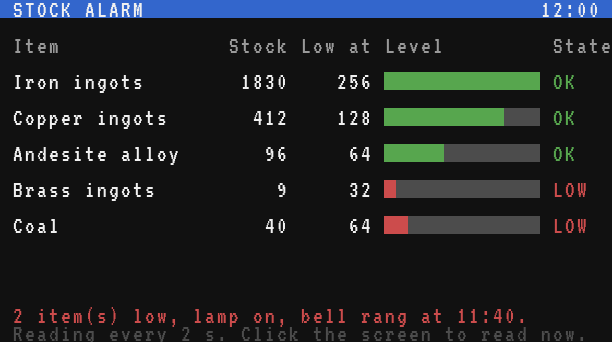
The Display Board shows the same reading in short lines:
Iron ingots: 1830
Copper ingots: 412
Andesite alloy: 96
Brass ingots: 9 LOW
Coal: 40 LOWTesting it
- Type the program with
edit startup, save with Ctrl+S, leave with Esc, and run it withstartup. - With an empty vault, every item is low: the lamp lights, the bell rings once, and every line shows
LOW. That is expected: the first reading finds everything "newly low". - Put a stack of coal in the vault and click the screen: the coal line turns green, the bell stays quiet.
- Take the coal out again: at the next reading the line turns red and the bell rings once more.
- Break the vault (or change
VAULTto a wrong side): the screen says the vault is missing and the lamp stays on. Put it back: the program finds it again on its own.
If the screen stays on "No vault found", check with the shell that the computer sees the vault:
> brass
Brass 1.0 - type 'exit' to leave.
brass> peripheral.type("left")
inventory
brass> exit
The devices example (devices) shows every block the computer can reach, with its name.
Variations
- More items, other thresholds. Add lines to
WATCH. The screen has room for 7 items; beyond that, show only the low ones, or split the list between two computers. - Several vaults. Wrap them all (
peripheral.list("inventory")on a Data Cable gives every name) and add their totals together before the comparison. - Restart production instead of ringing. A Redstone Link frequency can drive a Create clutch that starts the iron farm while iron is low. Mind that a powered clutch disconnects: transmit
not low, notlow. - A fluid tank. A Create Fluid Tank is a
tankperipheral:tank.tanks()gives the fluid and the amount in mB of each tank (Tanks). - Keep a history. Append the totals to a file every minute with
fs.append, and draw the curve later: seeData logger and graph. - A central screen. Send the totals to another computer with
net.send(Minicomputer and newer), which gathers all the vaults of the base: seeFactory dashboard.