
 Events
Every event a program can receive, with its fields, where it comes from, and how the waiting functions treat it.
An event is something that happened to the computer while the program was running: a redstone input changed, a key was pressed, a timer ran out, a message arrived. The computer puts each event in a queue, and the program takes them out one by one with os.pull_event. Each event comes as a table: its name field says what happened, and the other fields depend on the event.
local e = os.pull_event()  -- waits for the next event, whatever it is
print(e.name)              -- "redstone", "key", "click", "timer"...
The guide Events explains how to build a program around events. This page lists every event, field by field.
All the events
| Event | Fields | Sent when | Computers |
|---|---|---|---|
redstone | none | a redstone input of the computer changes | all |
timer | id | a timer started with os.start_timer runs out | all |
key | key | Enter, an arrow, Tab... is pressed in the terminal | all |
char | char | a character is typed in the terminal | all |
paste | text | Ctrl+V in the terminal | all |
click | x, y, px, py, button, source | a click on the terminal screen or on a monitor | terminal: all but the Tube Computer; monitor: all |
drag | x, y, px, py, button, source | the mouse moves with a button held, in the terminal | all but the Tube Computer |
message | sender, channel, data, via, distance | another computer sends a message | Minicomputer and newer |
link | a, b, power | a Redstone Link frequency the computer uses changes | all |
disk | inserted | a player inserts or ejects the storage medium | all but the Microcontroller |
| your own name | data | the program calls os.queue_event | all |
Every event table also has its name field. A field whose value would be nil is simply absent (a message sent without data has no data).
Waiting for events
Four functions put the program to sleep until something happens. They do not treat the other events the same way, and that matters as soon as a program listens to more than one thing.
| Function | Resumes on | The other events meanwhile |
|---|---|---|
os.pull_event() | the next event, whatever it is | none is lost: each call returns the next one |
os.pull_event(name) | the next event with that name | thrown away |
net.receive([timeout]) | the next message event, or nil after timeout seconds | thrown away |
read([mask]) | the Enter key | key, char and paste build the line; the others stay in the queue, in order |
sleep(seconds) | the end of the delay | stay in the queue |
os.pull_event with a name throws away everything else that arrives before the event it waits for. Here the alarm event is lost, while bell, queued after door, is still there for the next call:
os.queue_event("alarm")
os.queue_event("door", "open")
os.queue_event("bell")
local e = os.pull_event("door")
print(e.data)
print(os.pull_event().name)open bell
So a program that waits for several kinds of events calls os.pull_event() without a name and looks at e.name. sleep keeps what arrives during the pause:
os.queue_event("bell")
sleep(1)
print(os.pull_event().name)bell
os.pull_event has no time limit. To stop waiting after a while, start a timer and wait for either one:
local function wait_for(name, seconds)
  local timer = os.start_timer(seconds)
  while true do
    local e = os.pull_event()
    if e.name == name then return e end
    if e.name == "timer" and e.id == timer then return nil end
  end
end

local e = wait_for("redstone", 0.5)
print(e == nil)true
The queue
- It holds 256 events. When it is full, the oldest event is dropped to make room for the new one.
- Events pile up while the program computes or sleeps, and wait there until it calls
os.pull_event. - Messages from other computers are refused (the sender's
net.sendreturnsfalse) when the events waiting in the queue take more than a quarter of the computer's memory. - At the shell prompt, with no program running, events are thrown away (messages included): keys go to the command line.
- Rebooting or switching off empties the queue and forgets the timers.
- A computer without rotation is frozen: events wait in its queue, and its timers and
sleepwait with it.
redstone
| Field | Type | Value |
|---|---|---|
| (none) | only name |
Sent when the redstone signal coming into the computer changes on any of its six faces. The event does not say which face nor the new strength: read them with rs.get. One event may stand for several faces that changed together.
Counting the iron sheets of a Mechanical Press line, with an observer pulsing on the left face. The program keeps the last value to count each pulse once, on its rising edge:
local count = 0
local before = 0
while true do
  os.pull_event("redstone")
  local now = rs.get("left")
  if now > 0 and before == 0 then
    count = count + 1
    print("iron sheets: " .. count)
  end
  before = now
end
See rs and Redstone and Create links.
timer
| Field | Type | Value |
|---|---|---|
id | number | the number os.start_timer returned |
Sent once, when a timer started with os.start_timer(seconds) runs out. The delay is rounded up to whole ticks (1/20 s), one tick at least. Up to 256 timers can wait at the same time. Compare e.id with the number you kept to know which timer it is:
local short = os.start_timer(0.5)
local long = os.start_timer(1)
for i = 1, 2 do
  local e = os.pull_event("timer")
  if e.id == short then print("half a second") end
  if e.id == long then print("one second") end
endhalf a second one second
A timer fires only once: for a clock that ticks every second, start a new one each time it fires (see the main loop at the end of this page).
key
| Field | Type | Value |
|---|---|---|
key | string | "enter", "backspace", "delete", "up", "down", "left", "right", "home", "end" or "tab" |
Sent when one of these ten keys is pressed while a player has the terminal open. Letters, digits and the space bar do not send key events: they type characters, see char. The keypad Enter is "enter" too. The Keyboard page lists what the keyboard sends and what it does not.
A menu picked with the arrows, for the destination of a train:
local stations = {"Mine", "Farm", "Harbour"}
local choice = 1
while true do
  term.clear()
  for i, name in ipairs(stations) do
    term.set_cursor(2, i)
    if i == choice then term.write("> " .. name) else term.write("  " .. name) end
  end
  local e = os.pull_event("key")
  if e.key == "up" and choice > 1 then choice = choice - 1 end
  if e.key == "down" and choice < #stations then choice = choice + 1 end
  if e.key == "enter" then break end
end
print("")
print("Departure for " .. stations[choice])char
| Field | Type | Value |
|---|---|---|
char | string | the character typed, one character long: "a", "A", "7", " ", "é"... |
Sent for every character typed in the terminal: letters (upper or lower case, as typed), digits, punctuation, the space. Test letters with string.lower so that Caps Lock does not matter:
print("Press Q to stop the crushers")
while true do
  local e = os.pull_event("char")
  if string.lower(e.char) == "q" then
    rs.set("back", false)
    break
  end
endos.pull_event("key") throws away the char events, and os.pull_event("char") the key events. To read both (arrows and letters), call os.pull_event() and test e.name.
paste
| Field | Type | Value |
|---|---|---|
text | string | the text of the clipboard, 4096 characters at most, line breaks included |
Sent when the player presses Ctrl+V in the terminal with something in the clipboard. Longer text is cut at 4096 characters. Pasting a list of item ids, one per line:
local e = os.pull_event("paste")
local ids = string.split(e.text, "\n")
print(#ids .. " lines pasted")
During read(), a paste is typed into the line instead (up to its first line break).
click
| Field | Type | Value |
|---|---|---|
x | number | column of the character clicked, from 1 (left) |
y | number | row of the character clicked, from 1 (top) |
px | number | column of the pixel clicked in the gfx drawing, from 1 |
py | number | row of the pixel clicked, from 1 |
button | number | 1 left, 2 right, 3 middle (always 1 on a monitor) |
source | string | "terminal" or "monitor" |
A click comes from two places:
- The terminal: a click with the left, right or middle button on the screen of the terminal window. Every computer with a screen sends it, not the Tube Computer, whose terminal is paper.
- A monitor: a right-click on the front of a monitor showing the computer, on every computer. It only becomes a click when the running program waits for clicks: once it has called
os.pull_event()oros.pull_event("click"). Otherwise, or when the player sneaks, the right-click opens the terminal as usual.
x and y are for text buttons drawn with term, px and py for drawings made with gfx (a character is 6 pixels wide and 9 high). A door panel, with a Redstone Link of iron and gold driving the door:
term.clear()
term.set_cursor(2, 1)
term.write("Hangar door")
term.set_cursor(2, 3)
term.set_bg(term.colors.green)
term.write(" OPEN ")
term.set_cursor(10, 3)
term.set_bg(term.colors.red)
term.write(" CLOSE ")
term.set_bg(term.colors.black)
while true do
  local e = os.pull_event("click")
  if e.y == 3 and e.x >= 2 and e.x <= 7 then
    link.set("minecraft:iron_ingot", "minecraft:gold_ingot", 15)
  elseif e.y == 3 and e.x >= 10 and e.x <= 16 then
    link.set("minecraft:iron_ingot", "minecraft:gold_ingot", 0)
  end
end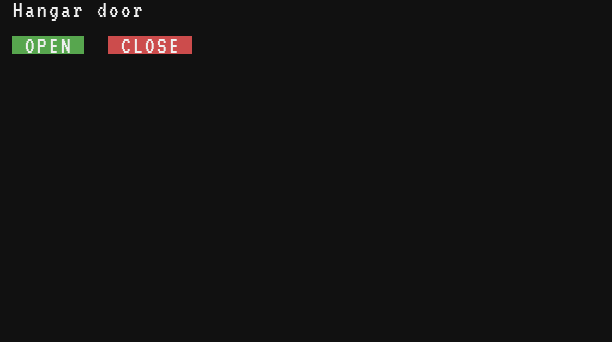
drag
| Field | Type | Value |
|---|---|---|
x, y, px, py | number | where the mouse is now, like click |
button | number | the button held: 1 left, 2 right, 3 middle |
source | string | always "terminal" |
Sent while the player moves the mouse over the terminal screen with a button held, after pressing it on the screen (the press itself is a click). Only the terminal sends it, not monitors. At most one drag every 50 ms, and only when the mouse moved to another pixel: a fast stroke leaves gaps, so join the points with a line.
local lastX, lastY
gfx.clear()
while true do
  local e = os.pull_event()
  if e.name == "click" then
    lastX, lastY = e.px, e.py
  elseif e.name == "drag" and lastX then
    local color = "orange"
    if e.button == 2 then color = "none" end  -- the right button erases
    gfx.line(lastX, lastY, e.px, e.py, color, 2)
    lastX, lastY = e.px, e.py
  end
endmessage
| Field | Type | Value |
|---|---|---|
sender | number | the id of the computer that sent it (its net.id()) |
channel | string | the channel given to net.send or net.broadcast, "default" without one |
data | any | a copy of the value sent (absent when nothing was sent) |
via | string | "cable", "radio" or "wifi" |
distance | number | the distance between the two computers in blocks, rounded to a tenth |
Sent when another computer reaches this one with net.send or net.broadcast. Only the Minicomputer and newer computers have net. net.receive waits for exactly this event and returns it: net.receive() is os.pull_event("message"), with an optional time limit.
The data is a copy: numbers, strings, booleans and tables of them arrive as they were sent, and changing them does not change the sender's. A station board receiving what the depots announce:
while true do
  local e = os.pull_event("message")
  if e.channel == "trains" then
    print("#" .. e.sender .. " (" .. e.via .. ", " .. e.distance .. " blocks): " .. tostring(e.data))
  end
end
The message is not delivered (and net.send returns false) when the receiver is off, in an unloaded chunk, or when its queue already holds more than a quarter of its memory in events. A receiver whose program has ended, back at the shell prompt, loses the message although net.send returned true: a receiver must keep running as a program (its startup). See Networks.
link
| Field | Type | Value |
|---|---|---|
a | string | first item of the frequency, as the program wrote it |
b | string | second item of the frequency |
power | number | the strength now received, 0 to 15 |
Sent when the strongest signal of the other Redstone Links on a frequency changes. The computer only listens to the frequencies it used since it booted, with link.get, link.set or the methods of a Redstone Link peripheral. Its own transmission never counts, and the first use sends no event: the program already got the value.
-- a lever far away, on a Redstone Link set to iron + redstone
local power = link.get("minecraft:iron_ingot", "minecraft:redstone")  -- starts listening
print("lever: " .. power)
while true do
  local e = os.pull_event("link")
  if e.a == "minecraft:iron_ingot" and e.b == "minecraft:redstone" then
    print("lever: " .. e.power)
  end
end
See link and Redstone Link.
disk
| Field | Type | Value |
|---|---|---|
inserted | boolean | true when a medium was inserted, false when it was ejected |
Sent when a player inserts a storage medium (right-click with it) or ejects it (sneak and right-click with an empty hand). The Microcontroller has no drive and never sends it. A running program keeps running when its medium leaves: it is in memory. Until a medium comes back, import and the fs functions (all but fs.cwd) stop with the error no storage medium.
while true do
  local e = os.pull_event("disk")
  if e.inserted then
    print("medium in: " .. table.concat(fs.list("/"), ", "))
  else
    print("medium out")
  end
endYour own events
| Field | Type | Value |
|---|---|---|
data | any | the second argument of os.queue_event (absent without it) |
os.queue_event(name, data) puts an event with any name in the computer's own queue, behind the events already there. Use it to hand work to the main loop, or to wake up a loop waiting in os.pull_event. The data is passed as it is, not copied:
os.queue_event("order", {item = "minecraft:iron_ingot", count = 16})
local e = os.pull_event("order")
print(e.name, e.data.item, e.data.count)order minecraft:iron_ingot 16
The queue belongs to the computer: to reach another one, send a message with net. Avoid the names of the built-in events (key, char...), which read() and the other programs would take for real ones.
A main loop for every event
Most real programs end up with one loop that waits for any event and dispatches on its name. A counter for a press line: pulses on the left face count the sheets, a timer redraws the screen every second, a click resets the count and the Q key stops the program.
local count = 0
local before = 0
local running = true

local function draw()
  term.clear()
  term.set_cursor(1, 1)
  print("Iron sheets: " .. count)
  print("Click: reset   Q: quit")
end

draw()
local timer = os.start_timer(1)
while running do
  local e = os.pull_event()
  if e.name == "redstone" then
    local now = rs.get("left")
    if now > 0 and before == 0 then count = count + 1 end
    before = now
  elseif e.name == "timer" and e.id == timer then
    draw()
    timer = os.start_timer(1)
  elseif e.name == "click" then
    count = 0
    draw()
  elseif e.name == "char" and string.lower(e.char) == "q" then
    running = false
  end
end
The loop calls os.pull_event() without a name, so no event is thrown away, and a click on a monitor reaches it.