
 Remote control over the network
Start, stop and watch a production line from another computer, with numbered orders, answers, timeouts, retries and a shared secret.
Your Mechanical Press line runs at the far end of the base, and you want to start it, stop it and see how much it made from the control room, the station or the airship. This recipe uses two computers: a controller with a menu, and a machine computer next to the line that carries out the orders and answers.
Sending a message is one line of code (net.send). The work is in everything that can go wrong on the way: the machine computer is rebooting, its chunk is unloaded, an answer comes late, someone else sends orders. The small protocol below handles all of that, and you can reuse it for any pair of computers that must talk reliably: doors, train stations, elevators, a fleet of airships.
What you need
- Two computers that can talk. A Minicomputer or newer for a Data Cable between them; a Personal Computer, a Microcontroller or a Modern Computer for radio. See
Networks. - A link between them: a Radio Modem against each computer (128 blocks), Wi-Fi Routers (256 blocks, and routers with the same SSID reach each other anywhere), or simply a Data Cable from one to the other.
- On the line: a Create Clutch on the shaft that drives the line, touching the left side of the machine computer (a powered clutch disconnects, so the line stops), and the chest the line fills against its right side. Left and right are seen from the front, facing the screen. The chest is optional: without it the status says so.
- Rotation for both computers, as always.
Machine computer, seen from above:

   shaft from the engine ==[Clutch][M][Chest]       M  machine computer (radio modem on top)
                              ||                    the clutch on its left, the chest on its right
                    [Mechanical Press line]

Controller: anywhere within radio range (or on the same cable), with a modem on top.The protocol
The two computers exchange tables on the channel "line". A request goes from the controller to the machine, the answer comes back to the controller:
| field | in the request | in the answer |
|---|---|---|
secret | the shared secret word | the same word |
id | a number, one more for each new order | the id of the request it answers |
cmd | "start", "stop" or "status" | |
ok | true, or false with error | |
running, items | the state of the line, the items in the output chest |
Why each field is there:
- The answer is the acknowledgement.
net.sendreturnstruewhen the message was put in the queue of the other computer, not when the order was carried out. A machine computer whose program has stopped, back at the shell prompt, even loses the message whilenet.sendreturnstrue. Only an answer proves that the machine read the order and did it. - A timeout and retries. When no answer comes within two seconds, the controller sends the same request again, at most three times, then tells you the machine does not answer.
net.sendreturnsfalseat once when the other computer is off, out of reach or in an unloaded chunk: that try counts too. - The id ties an answer to its request. A late answer to an old order must not be taken for the answer to the new one. The controller only accepts an answer with the
idit is waiting for. - The id also protects against doing an order twice. When the order arrived but its answer was lost, the controller sends it again. The machine remembers the last request of each controller: the same
idagain gets the same answer, and the order is not carried out a second time. With "start" and "stop" a double run would be harmless, but not with an order like "deliver one crate". - The secret word keeps other players' computers from driving your line. The machine ignores any request without it.
controller                                   machine
    | --- {id=41, cmd="start"} ------------->  |   machine rebooting: lost
    |      2 s, no answer                       |
    | --- {id=41, cmd="start"} ------------->  |   carries it out, remembers 41
    | <-------------- {id=41, ok=true} -------  |
    |                                           |
    | --- {id=42, cmd="stop"} -------------->  |   carries it out, remembers 42
    |        X <---- {id=42, ok=true} -------   |   answer lost
    | --- {id=42, cmd="stop"} -------------->  |   42 again: same answer, no second stop
| <-------------- {id=42, ok=true} ------- |The machine computer
How it works
Its settings come first. The secret word must be the same on both computers; choose something longer than a password someone could guess.
local SECRET = "copper-kettle-42"   -- the same word on both computers
local CHANNEL = "line"
local CLUTCH = "left"               -- a powered clutch stops the line
local OUTPUT = "right"              -- the chest the line fills (optional)
local STATE_FILE = "line.state"     -- on or off, kept across restarts
set_running switches the line and writes its state in a file. At boot, the program reads it back, so the line is in the same state after a server restart. (A reboot releases every redstone output for a moment, as a real reset would: the clutch lets go until the program sets it again, a fraction of a second later.)
local function set_running(on)
  running = on
  rs.set(CLUTCH, not on)
  fs.write(STATE_FILE, tostring(on))
end
status builds the answer: the state of the line, and the item count of the output chest when there is one. The chest is read through pcall, so a broken chest gives an answer without items instead of stopping the program.
execute carries out one order and returns the answer. An unknown order gets ok = false and an error, so the controller can say why nothing happened.
handle is the heart of it. It checks the channel, the shape of the message and the secret, then looks at the last request of that sender: same id, same answer, nothing done again. Otherwise it carries out the order, adds the id and the secret to the answer, remembers it, and sends it back with net.send to m.sender.
local seen = last[m.sender]
local reply
if seen and seen.id == d.id then
  reply = seen.reply   -- a retry: the same answer, nothing done twice
else
  reply = execute(d.cmd)
  reply.id = d.id
  reply.secret = SECRET
  last[m.sender] = {id = d.id, reply = reply}
end
net.send(m.sender, reply, CHANNEL)
The main loop is a single line: handle(net.receive()). net.receive waits for the next message; this computer has nothing else to wait for.
The whole program
-- Remote-controlled line: carries out the orders of the controller and answers.
-- Personal Computer with a Radio Modem (or any computer on a Data Cable),
-- a Create Clutch on the left, the chest the line fills on the right.

local SECRET = "copper-kettle-42"   -- the same word on both computers
local CHANNEL = "line"
local CLUTCH = "left"               -- a powered clutch stops the line
local OUTPUT = "right"              -- the chest the line fills (optional)
local STATE_FILE = "line.state"     -- on or off, kept across restarts

local running = false
local last = {}    -- last answer sent to each controller: last[sender] = {id =, reply =}

local function clock()
  local t = (os.day_time() + 6000) % 24000
  return string.format("%02d:%02d", t // 1000, t % 1000 * 60 // 1000)
end

local function set_running(on)
  running = on
  rs.set(CLUTCH, not on)
  fs.write(STATE_FILE, tostring(on))
end

-- What the controller wants to know: on or off, and the items made
local function status()
  local reply = {ok = true, running = running}
  local chest = peripheral.wrap(OUTPUT)
  if chest then
    local r = pcall(chest.count)
    if r.ok then reply.items = r.value end
  end
  return reply
end

-- Carries out one order and returns the answer
local function execute(cmd)
  if cmd == "start" then
    set_running(true)
  elseif cmd == "stop" then
    set_running(false)
  elseif cmd ~= "status" then
    return {ok = false, error = "unknown order"}
  end
  return status()
end

-- One request: checked, carried out once, answered
local function handle(m)
  local d = m.data
  if m.channel ~= CHANNEL then return end
  if type(d) ~= "table" or d.secret ~= SECRET or type(d.id) ~= "number" then
    print(clock() .. " refused a message from #" .. m.sender)
    return
  end
  local seen = last[m.sender]
  local reply
  if seen and seen.id == d.id then
    reply = seen.reply   -- a retry: the same answer, nothing done twice
  else
    reply = execute(d.cmd)
    reply.id = d.id
    reply.secret = SECRET
    last[m.sender] = {id = d.id, reply = reply}
    print(clock() .. " #" .. m.sender .. " " .. tostring(d.cmd) .. ": "
      .. (reply.ok and "done" or reply.error))
  end
  net.send(m.sender, reply, CHANNEL)
end

set_running(fs.read(STATE_FILE) == "true")
print("Line #" .. net.id() .. " ready, " .. (running and "running" or "stopped"))
while true do
  handle(net.receive())
end
Its screen is a log, one line per order, handy to see who drives the line:
Line #12 ready, stopped
18:02 #5 status: done
18:02 #5 start: done
18:40 refused a message from #31
18:41 #5 stop: done
The controller
How it works
The settings name the machine by its id: type id in the shell of the machine computer to read it (or see the variations to find it by its label).
local SECRET = "copper-kettle-42"
local CHANNEL = "line"
local MACHINE = 12      -- id of the line's computer: type "id" on it
local TIMEOUT = 2       -- seconds to wait for an answer
local TRIES = 3         -- sends before giving up
The state of the program fits in a few chunk-level variables. pending is the order waiting for its answer, or nil: one order at a time keeps things simple, and a key pressed meanwhile only shows "Busy". The first id is drawn at random: if the ids started from 1 at each boot, the first order after a reboot would carry the same id as an old one, and the machine would take it for a retry and answer without doing it.
local next_id = math.random(1, 1000000)   -- not 1 again after a reboot
local pending = nil      -- the order waiting for its answer: {id =, cmd =, tries =, timer =}
transmit sends the pending request and starts its timeout with os.start_timer. It is called for the first try and for each retry, with the same id. order refuses a new order while one is pending, otherwise numbers it and sends it.
local function transmit()
  pending.tries = pending.tries + 1
  local request = {secret = SECRET, id = pending.id, cmd = pending.cmd}
  local delivered = net.send(MACHINE, request, CHANNEL)
  pending.timer = os.start_timer(TIMEOUT)
  -- ... a note on the screen, "sent" or "not delivered"
end
on_message accepts an answer only if an order is pending and the answer comes from the machine, on the channel, with the secret and the pending id. Anything else (a late answer to an older order, a stranger) is ignored.
on_timer does the same with timers: the timer of a request that was already answered is still running, and its event arrives later. Only the timer of the pending try counts; then the request is sent again, or abandoned after TRIES tries.
local function on_timer(id)
  if pending == nil or id ~= pending.timer then return end   -- an old timer
  if pending.tries < TRIES then
    transmit()
  else
    say(pending.cmd .. ": no answer after " .. TRIES .. " tries", term.colors.red)
    line.state = "UNKNOWN"
    pending = nil
  end
end
The main loop reads every event with os.pull_event: keys (the char event of the digits), clicks on the menu, messages and timers. It must not wait with net.receive: that call waits for messages only and throws away the key presses and timer events that arrive in the meantime, so the menu and the timeouts would stop working.
The menu is drawn with term: each digit on a light grey background, the line state in green or red. The screen is redrawn after each event, which costs little: it is text only.
The whole program
-- Remote control for the line: a menu, orders numbered and acknowledged,
-- sent again when no answer comes. Personal Computer with a Radio Modem.

local SECRET = "copper-kettle-42"
local CHANNEL = "line"
local MACHINE = 12      -- id of the line's computer: type "id" on it
local TIMEOUT = 2       -- seconds to wait for an answer
local TRIES = 3         -- sends before giving up

local MENU = {
  {key = "1", cmd = "start", label = "Start the line"},
  {key = "2", cmd = "stop", label = "Stop the line"},
  {key = "3", cmd = "status", label = "Ask for the status"},
}

local W = term.get_size().w
local next_id = math.random(1, 1000000)   -- not 1 again after a reboot
local pending = nil      -- the order waiting for its answer: {id =, cmd =, tries =, timer =}
local line = {state = "UNKNOWN", items = nil, at = "--:--"}
local note, note_color = "", term.colors.light_gray

local function clock()
  local t = (os.day_time() + 6000) % 24000
  return string.format("%02d:%02d", t // 1000, t % 1000 * 60 // 1000)
end

local function say(text, color)
  note, note_color = text, color
end

-- 1. The screen
local function at(x, y, text, fg, bg)
  term.set_cursor(x, y)
  term.set_fg(fg)
  term.set_bg(bg or term.colors.black)
  term.write(text)
end

local function draw()
  term.set_bg(term.colors.black)
  term.clear()
  at(2, 1, "REMOTE CONTROL", term.colors.yellow)
  local target = "line #" .. MACHINE
  at(W - #target, 1, target, term.colors.gray)
  at(1, 2, string.rep("-", W), term.colors.gray)
  for i, item in ipairs(MENU) do
    at(3, 2 + i * 2, " " .. item.key .. " ", term.colors.black, term.colors.light_gray)
    at(7, 2 + i * 2, item.label, term.colors.white)
  end
  local state_color = term.colors.gray
  if line.state == "RUNNING" then state_color = term.colors.lime end
  if line.state == "STOPPED" then state_color = term.colors.red end
  at(3, 11, "Line", term.colors.light_gray)
  at(13, 11, line.state, state_color)
  at(3, 12, "Output", term.colors.light_gray)
  at(13, 12, line.items and (line.items .. " items") or "no chest", term.colors.white)
  at(3, 13, "Updated", term.colors.light_gray)
  at(13, 13, line.at, term.colors.white)
  at(1, 15, string.rep("-", W), term.colors.gray)
  at(2, 16, note, note_color)
end

-- 2. Sending: every try starts a new timeout
local function transmit()
  pending.tries = pending.tries + 1
  local request = {secret = SECRET, id = pending.id, cmd = pending.cmd}
  local delivered = net.send(MACHINE, request, CHANNEL)
  pending.timer = os.start_timer(TIMEOUT)
  local try = " (try " .. pending.tries .. "/" .. TRIES .. ")"
  if delivered then
    say(pending.cmd .. ": sent, waiting" .. try, term.colors.yellow)
  else
    say(pending.cmd .. ": not delivered" .. try, term.colors.orange)
  end
end

local function order(cmd)
  if pending then
    say("Busy: still waiting for " .. pending.cmd, term.colors.orange)
    return
  end
  next_id = next_id + 1
  pending = {id = next_id, cmd = cmd, tries = 0}
  transmit()
end

-- 3. Answers and timeouts
local function on_message(m)
  local d = m.data
  if pending == nil or m.sender ~= MACHINE or m.channel ~= CHANNEL then return end
  if type(d) ~= "table" or d.secret ~= SECRET or d.id ~= pending.id then return end
  if d.ok then
    line.state = d.running and "RUNNING" or "STOPPED"
    line.items = d.items
    line.at = clock()
    say(pending.cmd .. ": done", term.colors.lime)
  else
    say(pending.cmd .. ": refused, " .. tostring(d.error), term.colors.red)
  end
  pending = nil
end

local function on_timer(id)
  if pending == nil or id ~= pending.timer then return end   -- an old timer
  if pending.tries < TRIES then
    transmit()
  else
    say(pending.cmd .. ": no answer after " .. TRIES .. " tries", term.colors.red)
    line.state = "UNKNOWN"
    pending = nil
  end
end

-- 4. Main loop: keys, clicks, messages and timers all come through os.pull_event
order("status")
draw()
while true do
  local e = os.pull_event()
  if e.name == "char" then
    for _, item in ipairs(MENU) do
      if e.char == item.key then order(item.cmd) end
    end
  elseif e.name == "click" then
    for i, item in ipairs(MENU) do
      if e.y == 2 + i * 2 and e.x >= 3 and e.x <= 6 + #item.label then order(item.cmd) end
    end
  elseif e.name == "message" then
    on_message(e)
  elseif e.name == "timer" then
    on_timer(e.id)
  end
  draw()
endWhat it looks like
The same drawing code, with a state written by hand: the line runs, and a "stop" order waits for its answer after a first try without one.
local MACHINE, TRIES = 12, 3
local MENU = {
  {key = "1", cmd = "start", label = "Start the line"},
  {key = "2", cmd = "stop", label = "Stop the line"},
  {key = "3", cmd = "status", label = "Ask for the status"},
}
local W = term.get_size().w
local line = {state = "RUNNING", items = 1234, at = "18:02"}
local note, note_color = "stop: sent, waiting (try 2/3)", term.colors.yellow

local function at(x, y, text, fg, bg)
  term.set_cursor(x, y)
  term.set_fg(fg)
  term.set_bg(bg or term.colors.black)
  term.write(text)
end

local function draw()
  term.set_bg(term.colors.black)
  term.clear()
  at(2, 1, "REMOTE CONTROL", term.colors.yellow)
  local target = "line #" .. MACHINE
  at(W - #target, 1, target, term.colors.gray)
  at(1, 2, string.rep("-", W), term.colors.gray)
  for i, item in ipairs(MENU) do
    at(3, 2 + i * 2, " " .. item.key .. " ", term.colors.black, term.colors.light_gray)
    at(7, 2 + i * 2, item.label, term.colors.white)
  end
  local state_color = term.colors.gray
  if line.state == "RUNNING" then state_color = term.colors.lime end
  if line.state == "STOPPED" then state_color = term.colors.red end
  at(3, 11, "Line", term.colors.light_gray)
  at(13, 11, line.state, state_color)
  at(3, 12, "Output", term.colors.light_gray)
  at(13, 12, line.items and (line.items .. " items") or "no chest", term.colors.white)
  at(3, 13, "Updated", term.colors.light_gray)
  at(13, 13, line.at, term.colors.white)
  at(1, 15, string.rep("-", W), term.colors.gray)
  at(2, 16, note, note_color)
end

draw()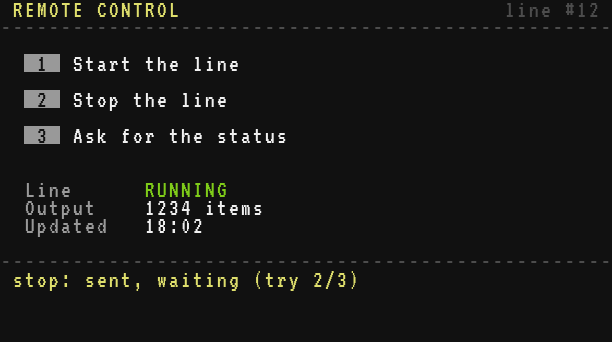
Testing it
- On the machine computer, type
idand note the number; put it inMACHINEon the controller. Start the machine computer first (startup), then the controller. - The controller asks for the status by itself at start: the line shows STOPPED, with the count of the chest. Press 1: the press line starts turning, the controller shows RUNNING, the machine logs
start: done. - Retries. Take the rotation away from the machine computer (break its shaft): it freezes, and the messages wait in its queue. Press 2 on the controller: "try 2/3", "try 3/3", then "no answer after 3 tries". Give the rotation back: the machine wakes up, carries out the stop once (its log shows one line) and answers each of the three copies; the controller is not waiting any more and ignores them. Press 3 to read the real state.
- Out of reach. Break the radio modem of the machine: the controller says "not delivered" at once on each try.
- The secret. Change one letter of
SECRETon the controller: the machine logsrefused a message from #5and the controller gets no answer. - Restart the server (or reboot the machine computer with Ctrl+R) while the line runs: it runs again after the boot, thanks to its state file
line.state.
About security
net.senddelivers to one computer: the others in range never see the message, so the secret word stays between the two. Never put the secret in anet.broadcast: every computer in reach would read it.- The machine refuses requests without the secret, and says so on its screen, so you can see someone trying.
- The secret is written in the files of both computers: a player who can open your computers can read it. On a server, keep them in a protected area.
- To go further, the machine can also accept only known controllers:
if m.sender ~= 5 then return endat the top ofhandle.
Variations
Find the machine by its label. Give the machine computer a name with
label line-press, then on the controller replace the fixed id:Brass for _, c in ipairs(net.computers()) do if c.label == "line-press" then MACHINE = c.id end end- Several lines. Make
MACHINEa list, add a line of the menu to choose the target, and keep onependingper machine. - An automatic status. A second timer every 30 seconds calls
order("status")when nothing is pending: the screen stays up to date without a key press. - A farther line. Put the clutch on a Redstone Link instead of the computer's side:
link.set("minecraft:iron_ingot", "minecraft:redstone", not on)inset_running(seelink). - Orders with a value. Add a field to the request, like
{cmd = "speed", rpm = 64}, and drive a Rotation Speed Controller with@kinetic.set_speedon the machine side. - Updating many computers. The same ideas (an answer per message, a timeout, retries) send whole programs to a fleet of computers in
A project in several files.