
 Tanks
Tanks
Create fluid tanks, basins, spouts and any block that holds fluids: which fluid, how much, and how much room.
Any block that holds fluids is a peripheral of type tank: Create Fluid Tanks, Basins, Spouts, Item Drains, and the tanks of other mods. A program reads which fluid each of its tanks holds, how much, and how much it can hold: enough to draw a level gauge, raise an alarm before the lava runs out, or start a pump when the water gets low.
local tank = peripheral.wrap("left")
local t = tank.tanks()[1]
print(t.fluid, t.amount .. " / " .. t.capacity .. " mB")tank.tanks() | What the block holds, tank by tank. |
Setting up
Reaching it. Put the block against a face of the computer (peripheral.wrap("left")), or against a Data Cable of the computer's network, from the Minicomputer on: it is then named like tank@120,64,-35. peripheral.find("tank") takes the first one. Like inventories, a block is seen through the face that touches the computer or the cable, which matters for blocks that show different tanks on different faces. See Peripherals.
Units. Fluids are measured in millibuckets (mB): a bucket is 1000 mB. A Create Fluid Tank holds 8000 mB per block (unless the server changed it), and a tall tank made of several blocks is one single tank of the whole size.
Blocks with several jobs. A Basin holds items and fluids: it is an inventory first (its name on a cable is inventory@...), with the tanks method as well, and peripheral.find("tank") finds it too.
Reading
What the block holds, tank by tank.
- table
- a list with one entry per tank of the block,
{fluid =, amount =, capacity =}
Each entry of the list is a table:
| field | content |
|---|---|
fluid | the fluid id, like "minecraft:water", "minecraft:lava" or "create:honey"; nil when the tank is empty |
amount | how much fluid it holds, in mB; 0 when empty |
capacity | how much it can hold, in mB |
Most blocks have a single tank, so tanks()[1] is the one you want. The list has no holes: walk it with ipairs.
local tank = peripheral.wrap("left")
for i, t in ipairs(tank.tanks()) do
  local fluid = t.fluid or "empty"
  print(i .. ": " .. fluid .. ", " .. t.amount .. " / " .. t.capacity .. " mB")
end
A Create Basin has four tanks of 1000 mB: its two output tanks come first, then its two input tanks. On a Basin holding the water of a mixing recipe, it prints something like:
1: empty, 0 / 1000 mB
2: empty, 0 / 1000 mB
3: minecraft:water, 750 / 1000 mB
4: empty, 0 / 1000 mB
fluid is nil when a tank is empty: test it before comparing or joining it with .., as above. When the block is not a tank any more (broken, replaced), the call stops the program with not a tank anymore.
Examples
A level gauge
A fluid tank drawn on the screen, filled to its level. Here the reading is written out so the picture can be made; in the world, the first line would be local t = tank.tanks()[1].
local t = {fluid = "minecraft:lava", amount = 5300, capacity = 8000}
local x, y, w, h = 30, 30, 70, 130
gfx.clear("black")
gfx.text(30, 8, "LAVA RESERVE", "white", 2)
local level = math.floor((h - 4) * t.amount / t.capacity)
gfx.rect(x + 2, y + h - 2 - level, w - 4, level, "orange", true)
gfx.rect(x, y, w, h, "light_gray", 2)
local percent = math.floor(t.amount / t.capacity * 100)
gfx.text(130, 60, percent .. " %", "orange", 4)
gfx.text(130, 110, t.amount .. " / " .. t.capacity .. " MB", "light_gray", 2)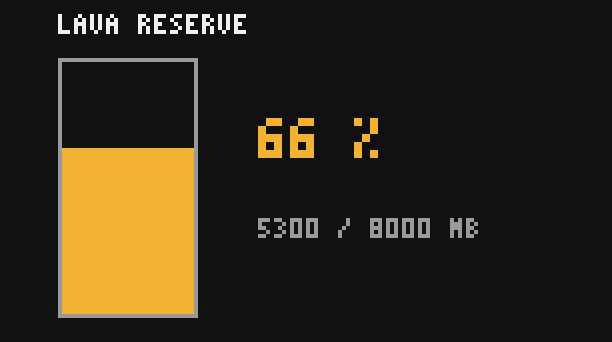
Put the drawing in a loop with sleep(1) and a monitor against the computer, and the gauge follows the tank.
An alarm when the lava runs low
A Create Fluid Tank of lava feeds a cobblestone generator. Below two buckets, a red lamp lights up on top of the computer and a message tells why; the alarm goes off again when the tank is refilled.
local tank = peripheral.wrap("left")
local LOW = 2000  -- mB
while true do
  local t = tank.tanks()[1]
  local lava = 0
  if t.fluid == "minecraft:lava" then
    lava = t.amount
  end
  local low = lava < LOW
  rs.set("top", low)
  if low then
    display.set({"LAVA LOW", lava .. " mB left"})
  else
    display.set({"Lava", lava .. " mB"})
  end
  sleep(5)
end
The test on t.fluid also raises the alarm when someone fills the tank with water by mistake. For a complete stock watcher, items and fluids together, see Stock alarm and display board and Factory dashboard.