
 Create Aeronautics sensors
Height, tilt, speed, obstacles and heading of a flying ship, read by a computer from the sensors of Create Aeronautics.
Everything on this page exists only when Create Aeronautics is installed (it comes with Create Simulated, which adds these blocks). Without it, there is no such block, and peripheral.find("gimbal_sensor") returns nil.
Create Aeronautics gives its flying ships a set of sensors. On their own they send redstone signals; a computer reads their exact values instead, as numbers it can compute with: the height of the ship, how much it leans, how fast it goes, what is in front of it, where its target is.
| Block (in game) | peripheral type | what it reads |
|---|---|---|
| Altitude Sensor | altitude_sensor | the height (world Y) and the air pressure |
| Gimbal Sensor | gimbal_sensor | how much the ship leans, in degrees |
| Velocity Sensor | velocity_sensor | the speed along one axis, in blocks per second |
| Optical Sensor | optical_sensor | the first block its laser beam hits, and how far |
| Navigation Table | navigation_table | the direction and the distance of a target |
| Swivel Bearing | swivel_bearing | the angle it turns its structure to |
| Torsion Spring | torsion_spring | its angle and its angle limit |
The Hot Air Burner of Aeronautics is a peripheral too: it has its own page, Hot Air Burner.
Reaching a sensor. Like every device, a sensor touching the computer is called by the side it is on ("left", "top"...), and a sensor touching a Data Cable (Minicomputer and newer) gets a network name such as altitude_sensor@12,70,-3. The easiest is to let peripheral.find look for it by type:
local alt = peripheral.find("altitude_sensor")
local gyro = peripheral.find("gimbal_sensor")
print("height " .. alt.height())
print("tilt X " .. gyro.angle_x() .. ", Z " .. gyro.angle_z())
Every computer can read a sensor placed against one of its faces. A sensor on a ship and a computer on the ground do not touch, so in practice the computer flies with the ship, often a Microcontroller (see Airship altitude hold).
What comes back. Numbers are rounded to 3 decimals (64.5, 0.871). Each call reads the block again, so a value is always fresh, and a wrapped sensor never goes stale. When something is wrong, the call stops the program with an error you can catch with pcall:
| error | when |
|---|---|
sensor removed | the block was broken or replaced since peripheral.wrap |
peripheral is not loaded | the chunk of the sensor is not loaded |
this version of Simulated has no getWorldHeight | your version of Create Simulated lacks that reading (the name at the end is the one missing) |
sensor error: ... | the sensor itself failed while answering |
If you know Simulated's own ComputerCraft peripherals: the readings are the same ones, under this mod's names (height() rather than getHeight()), and the gimbal angles come in degrees, one method per axis.
sensor.read() | Reads all the values of a sensor in one call, and returns them in a table whose keys are the names of its methods. |
alt.height() | The height of the sensor in the world, in blocks: the Y coordinate of the centre of the block. |
alt.pressure() | The air pressure where the sensor is: 1 at sea level, less and less as you climb. |
gyro.angle_x() | The tilt of the ship around its X axis (the east-west axis), in degrees: the "nose up, nose down" of a ship that flies north or south. |
gyro.angle_z() | The tilt of the ship around its Z axis (the north-south axis), in degrees: how much it rolls to one side. |
speedo.velocity() | The speed of the ship along the axis of the sensor, in blocks per second (Aeronautics writes m/s: the same thing). |
eye.hit() | Whether the beam hits a block within its range. |
eye.distance() | How far the block is, in blocks, measured from the centre of the sensor to the point where the beam touches the block. nil when the beam hits nothing. |
eye.block() | The id of the block the beam hits, such as "minecraft:oak_log" or "create:andesite_casing". nil when the beam hits nothing. |
eye.range() | The longest distance the beam reaches, in blocks: the value box on the sensor. A new sensor starts at the server's maximum, 15 blocks unless the server config optical_sensor_max_range says otherwise. |
eye.set_range(blocks) | Changes the length of the beam, like turning its value box. The value is kept between 1 and the server's maximum (15 by default), and the function returns nothing: read range() to see what was kept. |
nav.angle() | The direction of the target, in degrees from 0 to 360, measured flat in the plane of the table. It turns with the ship: when the ship turns, the angle changes. |
nav.distance() | The distance from the table to the target, in blocks, in a straight line. |
bearing.target_angle() | The angle the bearing is turning its structure to, in degrees. The structure follows it physically, a little behind. |
spring.angle() | How far the spring is wound now, in degrees. |
spring.limit() | The angle limit set on the value box of the spring, in degrees: 90 on a new spring, from 1 to 360. |
spring.running() | true while the spring moves (its angle changed during the last tick), false when it is at rest. |
spring.set_limit(degrees) | Changes the angle limit, only while the spring is at rest. When it turns, nothing changes and the function returns false, as in Simulated's own ComputerCraft peripheral: changing the range in the middle of a swing would make it jump. |
Every reading at once
Reads all the values of a sensor in one call, and returns them in a table whose keys are the names of its methods.
- table
- every reading of the sensor, by name
Every sensor on this page has it (and the Hot Air Burner too). The keys of the table are:
| sensor | keys of read() |
|---|---|
altitude_sensor | height, pressure |
gimbal_sensor | angle_x, angle_z |
velocity_sensor | velocity |
optical_sensor | hit, distance, block, range |
navigation_table | angle, distance |
swivel_bearing | target_angle |
torsion_spring | angle, limit, running |
hot_air_burner | output, signal, amount, filled, capacity |
A reading that is nil is simply missing from the table: an Optical Sensor that sees nothing has no distance and no block key.
local gyro = peripheral.find("gimbal_sensor")
local m = gyro.read()
print("X " .. m.angle_x .. "  Z " .. m.angle_z)
Two good reasons to prefer it in a loop: one call costs less than two or three, and all the values belong together. With separate calls, a long program can be paused by its instruction budget between two of them, and the second value then comes from a later tick.
Since read exists only on sensors, it also tells them apart from other devices. This lists every sensor the computer can reach, with all its readings:
for _, name in ipairs(peripheral.list()) do
  local p = peripheral.wrap(name)
  if p and p.read then
    print(name)
    for key, value in pairs(p.read()) do
      print("  " .. key, value)
    end
  end
endAltitude Sensor
The Altitude Sensor gives off a redstone signal that grows with its height, between two heights you set in its screen. The computer skips that scale and reads the height itself.
The height of the sensor in the world, in blocks: the Y coordinate of the centre of the block.
- number
- the height of the centre of the sensor, in blocks (world Y)
On the ground, a sensor sitting on top of a block at Y 64 is itself at Y 65, so it reads 65.5. On a flying ship, it reads the real height of the ship in the world, wherever the ship is. This is the reading an altitude autopilot holds (see Airship altitude hold).
local alt = peripheral.find("altitude_sensor")
print(string.format("Height: %.1f", alt.height()))
A low altitude alarm: a lamp on top of the computer lights up below Y 90.
local alt = peripheral.find("altitude_sensor")
while true do
  rs.set("top", alt.height() < 90)
  sleep(0.5)
end
The climb speed comes from two readings: the difference of height divided by the time between them.
local alt = peripheral.find("altitude_sensor")
local before = alt.height()
sleep(1)
local climb = alt.height() - before
print(string.format("climbing %+.1f blocks/s", climb))The air pressure where the sensor is: 1 at sea level, less and less as you climb.
- number
- the air pressure around the sensor, 1 at sea level
By default the air thins smoothly with height: about 0.71 at Y 150, 0.58 at Y 200, and 0 at the top of the world. Below sea level it goes above 1. Engineer's Goggles show the same value as a percentage. A data pack can change the curve of a dimension.
Pressure matters because balloons lift less in thin air: a ship that floats easily at Y 100 may not be able to climb past Y 250. Show it as a percentage:
local alt = peripheral.find("altitude_sensor")
print(string.format("Air: %.0f %%", alt.pressure() * 100))Gimbal Sensor
The Gimbal Sensor measures how much the ship leans. Its value boxes (the angle of maximum signal, the direction of the output) only change its redstone output, not what a computer reads.
Both angles are measured in the ship's own axes: "south" is the side of the ship that faced south (+Z) when it was built, and "east" the side that faced east (+X), whichever way the ship points now. The names of devices on the ship's Data Cable use the same axes, which makes them easy to combine (a burner at a larger X is on the east side).
On the ground, away from any assembled ship, both angles read 0.
The tilt of the ship around its X axis (the east-west axis), in degrees: the "nose up, nose down" of a ship that flies north or south.
- number
- the tilt around the X axis, in degrees; above 0 when the south side is low
0 means level. Above 0, the south side is lower than the north side; below 0, the north side is lower.
local gyro = peripheral.find("gimbal_sensor")
local x = gyro.angle_x()
if x > 1 then
  print("south side low by " .. x .. " degrees")
elseif x < -1 then
  print("north side low by " .. -x .. " degrees")
else
  print("level north-south")
end
See also gimbal_sensor.angle_z()
The tilt of the ship around its Z axis (the north-south axis), in degrees: how much it rolls to one side.
- number
- the tilt around the Z axis, in degrees; above 0 when the east side is low
0 means level. Above 0, the east side is lower than the west side; below 0, the west side is lower.
The two angles make a bubble level. The bubble floats to the high side, as in a real one, and turns yellow then red as the ship leans more. The drawing takes the table read() returns, so here it is tried with a reading typed by hand (the south side is low by 2.5 degrees, the west side by 4):
local function level(m)
  gfx.clear("black")
  term.clear()
  local cx, cy, r = 153, 90, 70
  gfx.circle(cx, cy, r, "gray", 2)
  gfx.circle(cx, cy, 12, "light_gray")
  gfx.line(cx - r, cy, cx + r, cy, "gray")
  gfx.line(cx, cy - r, cx, cy + r, "gray")
  -- north is up: east low moves the bubble west, south low moves it north
  local bx = cx - math.max(-60, math.min(60, m.angle_z * 6))
  local by = cy - math.max(-60, math.min(60, m.angle_x * 6))
  local tilt = math.sqrt(m.angle_x ^ 2 + m.angle_z ^ 2)
  local color = "lime"
  if tilt > 5 then
    color = "red"
  elseif tilt > 1 then
    color = "yellow"
  end
  gfx.circle(bx, by, 9, color, true)
  term.set_cursor(1, 1)
  term.write(string.format("X %+.1f", m.angle_x))
  term.set_cursor(1, 2)
  term.write(string.format("Z %+.1f", m.angle_z))
  gfx.text(cx - 1, cy - r - 9, "N", "white")
end

level({angle_x = 2.5, angle_z = -4})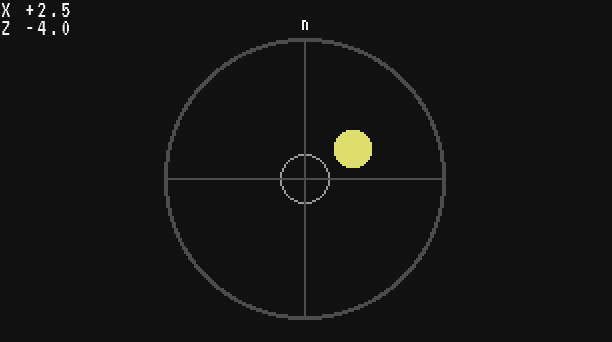
On the ship, feed it the real sensor a few times a second (with the level function above in the same file):
local gyro = peripheral.find("gimbal_sensor")
while true do
  level(gyro.read())
  sleep(0.2)
end
See also gimbal_sensor.angle_x()
Velocity Sensor
The speed of the ship along the axis of the sensor, in blocks per second (Aeronautics writes m/s: the same thing).
- number
- the speed of the ship along the sensor's axis, in blocks per second, with a sign
The sensor only measures along its own axis, the way its fan faces: placed along the length of the ship it gives the forward speed, placed upright it gives the climb speed. The sign tells which way along that axis: positive one way, negative the other. Fly forward once to see which sign your sensor gives.
Below 0.05 blocks per second it reads 0, and it always reads 0 away from an assembled ship. Its value box (the speed of maximum signal) only changes its redstone output.
local speedo = peripheral.find("velocity_sensor")
print(string.format("%.1f blocks/s", math.abs(speedo.velocity())))
A cruise control: the propellers turn through a Rotation Speed Controller behind the computer, and the program speeds them up or slows them down to hold 10 blocks per second. set_speed wants a whole number, hence math.floor. If your sensor reads a negative speed when the ship flies forward, write -speedo.velocity().
local speedo = peripheral.find("velocity_sensor")
local motor = peripheral.wrap("back")   -- Rotation Speed Controller of the propellers
local CRUISE = 10
local rpm = 64
while true do
  local v = speedo.velocity()
  rpm = math.max(0, math.min(256, rpm + (CRUISE - v) * 2))
  motor.set_speed(math.floor(rpm))
  sleep(0.5)
endA computer riding the ship also has vehicle (Personal Computer, Microcontroller, Modern Computer): vehicle.speed is the speed in every direction at once, vehicle.velocity gives it per world axis. The Velocity Sensor is the one to use for one axis of the ship, such as "forward".
See also vehicle.speed() vehicle.velocity()
Optical Sensor
The Optical Sensor shines a laser out of its face (straight up when it sits on a floor, straight down when it hangs under a ceiling), and reports the first block the beam hits. With an item in its filter slot, only matching blocks count: a beam that hits anything else reports nothing.
Point one forward on the bow to spot obstacles, or down under the hull to measure the height above the ground.
Whether the beam hits a block within its range.
- boolean
- true when the beam hits a block (one that passes the filter, if there is one)
local eye = peripheral.find("optical_sensor")
if eye.hit() then
  print("something ahead")
endHow far the block is, in blocks, measured from the centre of the sensor to the point where the beam touches the block. nil when the beam hits nothing.
- number|nil
- the distance from the centre of the sensor to the point hit, in blocks; nil when nothing is hit
Pointed down under a ship, it is the height above the ground, which the Altitude Sensor cannot give: handy to land gently.
local eye = peripheral.find("optical_sensor")
local d = eye.distance()
if d then
  print(string.format("ground %.1f blocks below", d))
else
  print("no ground in range")
endThe id of the block the beam hits, such as "minecraft:oak_log" or "create:andesite_casing". nil when the beam hits nothing.
- string|nil
- the id of the block hit, like "minecraft:stone"; nil when nothing is hit
A sensor pointing down finds the landing pad, a square of yellow concrete:
local eye = peripheral.find("optical_sensor")
if eye.block() == "minecraft:yellow_concrete" then
  print("right above the landing pad")
end
The beam goes through fluids, unless a fluid item is in the filter slot: with a water bucket there, it stops on water (block() gives "minecraft:water") and nothing else counts.
See also optical_sensor.hit()
The longest distance the beam reaches, in blocks: the value box on the sensor. A new sensor starts at the server's maximum, 15 blocks unless the server config optical_sensor_max_range says otherwise.
- number
- the length of the beam, in blocks
local eye = peripheral.find("optical_sensor")
print("beam: " .. eye.range() .. " blocks")
See also optical_sensor.set_range()
eye.set_range(blocks)
Changes the length of the beam, like turning its value box. The value is kept between 1 and the server's maximum (15 by default), and the function returns nothing: read range() to see what was kept.
blocksnumber- the new length of the beam, a whole number of blocks
The number must be whole: eye.set_range(7.5) stops the program with bad argument #1 to 'set_range' (number has no integer representation). Round it with math.floor first.
A short beam ignores what is far away, for example an alarm that only cares about the last 6 blocks:
local eye = peripheral.find("optical_sensor")
eye.set_range(6)
print(eye.range())
eye.set_range(1000)
print(eye.range())   -- the server maximum, 15 by default
An obstacle warning. A sensor on the bow looks ahead, and the computer rings a bell (or lights a lamp) on its top side when something is closer than 8 blocks. read() takes the three values of the same moment:
local eye = peripheral.find("optical_sensor")
while true do
  local m = eye.read()
  local danger = m.hit and m.distance < 8
  rs.set("top", danger)
  term.clear()
  term.set_cursor(1, 1)
  if danger then
    print("OBSTACLE " .. m.block .. " at " .. m.distance)
  else
    print("clear ahead")
  end
  sleep(0.25)
end
The same reading drawn as a gauge: the bar is the beam, filled up to the obstacle, red when it is close. Here with a reading typed by hand, a tree 6.4 blocks ahead:
local function radar(m)
  gfx.clear("black")
  term.clear()
  term.set_cursor(2, 2)
  term.write("BOW SENSOR, beam " .. m.range .. " blocks")
  gfx.rect(10, 40, 286, 30, "gray", 2)
  if m.hit then
    local w = math.floor(282 * m.distance / m.range)
    local color = "lime"
    if m.distance < 8 then
      color = "red"
    end
    gfx.rect(12, 42, w, 26, color, true)
    term.set_cursor(2, 10)
    term.write(string.format("%s at %.1f blocks", m.block, m.distance))
  else
    term.set_cursor(2, 10)
    term.write("clear ahead")
  end
end

radar({hit = true, distance = 6.4, block = "minecraft:oak_log", range = 15})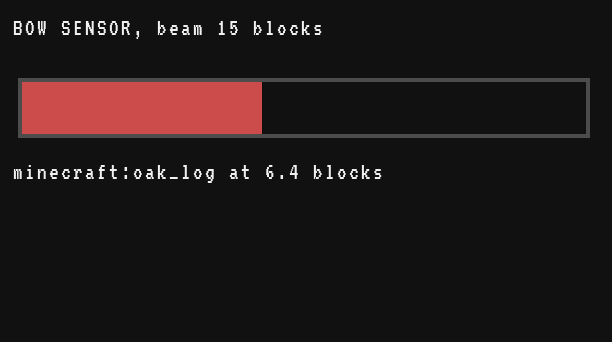
See also optical_sensor.range()
Navigation Table
The Navigation Table points to the target of the navigation item placed in it: a compass (the world spawn, or its lodestone), a recovery compass (your last death), a map (the nearest marker on it: a structure of an explorer map, or a banner you marked). On its own it sends redstone towards the target; the computer reads the direction and the distance.
The distance from the table to the target, in blocks, in a straight line.
- number
- the distance to the target in blocks, -1 when the item has no target
The table measures it about twice a second, only while an item is in it: without an item, the value stays where it was. It is -1 when the item has no target in this dimension (a map without markers, a recovery compass in another world).
local nav = peripheral.find("navigation_table")
local d = nav.distance()
if d < 0 then
  print("no target")
elseif d < 20 then
  print("arrived!")
else
  print(math.floor(d) .. " blocks to go")
end
A navigation display. An arrow in a compass rose, north up, and the distance below: since 0 is east and 90 south, the tip of the arrow is at cos and sin of the angle, exactly as on a map seen from above. Here with a reading typed by hand:
local function compass(m)
  gfx.clear("black")
  term.clear()
  local cx, cy, r = 90, 85, 70
  gfx.circle(cx, cy, r, "gray", 2)
  gfx.text(cx - 1, cy - r + 6, "N", "light_gray")
  gfx.text(cx + r - 10, cy - 2, "E", "light_gray")
  gfx.text(cx - 1, cy + r - 10, "S", "light_gray")
  gfx.text(cx - r + 8, cy - 2, "W", "light_gray")
  local a = m.angle * math.pi / 180
  local tx = cx + math.floor((r - 16) * math.cos(a) + 0.5)
  local ty = cy + math.floor((r - 16) * math.sin(a) + 0.5)
  gfx.line(cx, cy, tx, ty, "yellow", 3)
  gfx.circle(tx, ty, 5, "yellow", true)
  gfx.circle(cx, cy, 3, "white", true)
  term.set_cursor(30, 7)
  term.write("TARGET")
  term.set_cursor(30, 9)
  if m.distance < 0 then
    term.write("none")
  else
    term.write(math.floor(m.distance) .. " blocks")
  end
  term.set_cursor(30, 11)
  term.write(math.floor(m.angle) .. " degrees")
end

compass({angle = 305, distance = 412.6})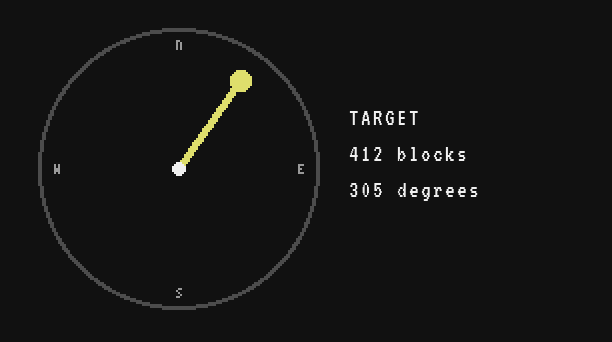
In the game, call compass(nav.read()) in a loop, as with the bubble level.
See also navigation_table.angle()
Swivel Bearing
The Swivel Bearing turns a structure glued in front of it (it assembles into a contraption when its cog is powered), like a turret or a rotating radar dish. It is also a Create kinetic block, so the wrapped bearing has the methods of Create kinetic blocks as well, such as speed().
The angle the bearing is turning its structure to, in degrees. The structure follows it physically, a little behind.
- number
- the angle the bearing turns its structure to, in degrees
The angle grows (or shrinks, depending on the direction) as the cog turns, and starts again after a full turn: it stays between -360 and 360. angle % 360 brings it between 0 and 360. It is 0 while the bearing is not assembled.
local bearing = peripheral.find("swivel_bearing")
print(string.format("aiming at %.1f degrees", bearing.target_angle() % 360))
Turning a turret to a heading: a Rotation Speed Controller behind the computer drives the bearing's cog slowly until the angle is within 3 degrees of the goal, then stops. With its cog at 8 RPM, the bearing turns 2.4 degrees per tick, so the loop, which checks every tick, cannot jump over the 6 degree window.
local bearing = peripheral.find("swivel_bearing")
local motor = peripheral.wrap("back")   -- Rotation Speed Controller of the cog
local GOAL = 90

local function gap(angle)
  return (GOAL - angle + 180) % 360 - 180
end

motor.set_speed(8)
repeat
  sleep(0.05)
until math.abs(gap(bearing.target_angle())) < 3
motor.set_speed(0)Torsion Spring
The Torsion Spring passes rotation on within a range of angles, then springs back to its starting angle when the input stops (unless redstone holds it). Its value box sets that range, the angle limit. Like the Swivel Bearing, it is also a kinetic block.
How far the spring is wound now, in degrees.
- number
- the current angle of the spring, in degrees
local spring = peripheral.find("torsion_spring")
print("wound to " .. spring.angle() .. " of " .. spring.limit() .. " degrees")
See also torsion_spring.limit()
The angle limit set on the value box of the spring, in degrees: 90 on a new spring, from 1 to 360.
- number
- the angle limit, from 1 to 360 degrees
See also torsion_spring.set_limit()
true while the spring moves (its angle changed during the last tick), false when it is at rest.
- boolean
- true while the spring is turning
local spring = peripheral.find("torsion_spring")
while spring.running() do
  sleep(0.1)
end
print("the spring is at rest")
See also torsion_spring.set_limit()
Changes the angle limit, only while the spring is at rest. When it turns, nothing changes and the function returns false, as in Simulated's own ComputerCraft peripheral: changing the range in the middle of a swing would make it jump.
degreesnumber- the new angle limit, a whole number of degrees
- boolean
- true when the limit was set, false when the spring was turning
The value is kept between 1 and 360. Like every whole-number argument, 90.5 stops the program with bad argument #1 to 'set_limit' (number has no integer representation).
Since it can refuse, try again until it accepts. A hatch driven by a spring opens 90 degrees for cargo, 30 for air:
local spring = peripheral.find("torsion_spring")

local function open_to(degrees)
  while not spring.set_limit(degrees) do
    sleep(0.1)   -- still moving: wait for it to rest
  end
end

open_to(90)
print("limit now " .. spring.limit())