
 Airship altitude hold
An autopilot for a Create Aeronautics balloon ship that holds the height you choose and keeps the ship level, explained step by step.
A balloon ship of Create Aeronautics floats at the height where the lift of its hot air equals its weight. Load a few crates, fly into thinner air, and that height changes: by hand, you keep turning the value boxes of the burners. In this project a computer on board does it for you. It reads the height of the ship, compares it with the height you asked for, and sets the amount of every Hot Air Burner a couple of times a second. With a Gimbal Sensor, it also gives more hot air to the low side, so the ship stays level.
You will learn to find devices on a Data Cable, to turn readings into a command, and above all to write a PID controller, the classic tool to hold a value steady, tuned for a system as slow as a balloon.
The ship, the burners and the sensors all come from Create Aeronautics (with Create Simulated). See Create Aeronautics sensors and Hot Air Burner for every method used here.
The program below is about 150 lines. The built-in program balloon, more than three times longer, is the complete version of the same idea (a map of the burners, a page of devices, settings saved in a file): read this page first, then its source will make sense.
The build
The ship. Start from a ship that already flies, with its balloons and their Hot Air Burners underneath (see "How a balloon flies" on Hot Air Burner).
- To hold a height, any number of burners will do, under one balloon or several.
- To keep the ship level as well, spread the burners out to the edges of the ship (four corners is best, three at least), each under its own balloon. Burners under the same balloon fill the same hot air and lift at the same place: giving one of them more would not lift its side.
The flames. Each burner needs redstone to burn: a lever or a Block of Redstone against it, or a Redstone Link. Leave every flame at full power (15). The program never touches the flames, it only changes the amounts.
The sensors. One Altitude Sensor and one Gimbal Sensor, anywhere on the ship: the gimbal reads the tilt of the whole hull, wherever it sits.
The computer. A Microcontroller suits a ship well: a colour screen of 40 by 12 characters, a Data Cable port, and 8,000 instructions a second at 256 RPM, far more than this program needs. Like every computer it runs on rotation (the Microcontroller takes it from below), so give it a shaft from the ship's engine. A Minicomputer or a Personal Computer works too.
The cable. One Data Cable network that touches the computer, every burner and both sensors. Each block touching the cable becomes a peripheral of the computer. Put the burners on the cable, not against the computer: the program uses the coordinates in their cable names.
Before writing the autopilot, check that the computer sees everything. Run the built-in program devices, or this short one:
for _, name in ipairs(peripheral.list()) do
  print(name)
end> run check gimbal_sensor@0,72,0 altitude_sensor@1,72,0 hot_air_burner@-3,70,-3 hot_air_burner@3,70,-3 hot_air_burner@-3,70,3 hot_air_burner@3,70,3
A missing burner is a cable that does not touch it (or a side of the cable cut with a wrench).
Step 1: read the sensors
peripheral.find wraps the first device of a type, so the sensors need no name at all:
local alt = peripheral.find("altitude_sensor")
local gyro = peripheral.find("gimbal_sensor")
print("height " .. alt.height())
local g = gyro.read()
print("tilt X " .. g.angle_x .. "  Z " .. g.angle_z)
altitude_sensor.height() is the height of the ship in the world (its Y). sensor.read() on the Gimbal Sensor gives both angles of the same moment, in degrees: angle_x above 0 means the south side is low, angle_z above 0 means the east side is low.
The climb speed. The autopilot needs to know whether the ship is going up or down, and how fast. Two heights and the time between them give it: os.clock counts the seconds since the computer started.
local alt = peripheral.find("altitude_sensor")
local before, t0 = alt.height(), os.clock()
sleep(0.5)
local climb = (alt.height() - before) / (os.clock() - t0)
print(string.format("climbing %+.2f blocks/s", climb))
Where each burner is. The name of a device on the cable ends with its coordinates. On a ship, those are the ship's own coordinates: they do not change while it flies, and they use the same axes as the Gimbal Sensor (a larger X is the east side, a larger Z the south side). Cutting the name at the @ gives them:
local name = "hot_air_burner@-3,70,4"
local at = string.find(name, "@", 1, true)
local xyz = string.split(string.sub(name, at + 1), ",")
print(tonumber(xyz[1]), tonumber(xyz[3]))-3 4
Step 2: from thrust to amounts
The controller will think in thrust: a number from 0 (as little hot air as possible) to 1 (balloons full). The program then turns it into an amount for each burner.
Remember that the amount is the volume of hot air the burner wants in its balloon, from 5 to 500 m³, and that anything above the capacity of the balloon is wasted. So thrust 0 is the minimum amount, 5, and thrust 1 is the capacity of the balloon: no thrust is wasted, every bit of it changes the lift.
local MIN, top = 5, 18   -- a balloon of 18 m3
for _, thrust in ipairs({0, 0.25, 0.5, 1}) do
  print(thrust, math.floor(MIN + thrust * (top - MIN) + 0.5))
end0 5 0.25 8 0.5 12 1 18
set_amount takes whole numbers only, hence the rounding (math.floor(x + 0.5)).
The top of a burner is the capacity of its balloon, but two things can change it:
- a burner without a balloon (
capacity()isnil) has no limit but the server maximum.set_amount(100000)finds it: the burner keeps the largest value it accepts, 500 by default, and returns it; - a flame below 15 asks for
amount × signal / 15, so it needs a larger amount to fill the same balloon.
-- the amount that fills a burner's balloon: more would be wasted
local function top(b, r)
  local t = b.max
  if r.capacity and r.signal > 0 then
    t = math.min(t, r.capacity * 15 / r.signal)
  end
  return math.max(t, MIN + 1)
end
Here b is the program's record of the burner (with b.max, the server maximum) and r is what the burner's read() returned. The last line keeps the top above the minimum, even for a tiny balloon.
Step 3: a PID controller in plain words
The controller answers one question, twice a second: how much thrust now? It adds up three ideas, each with its own gain (a number that says how strongly it acts).
P, the pull. The further below the target, the more thrust: P * err, where err (the error) is the target minus the height. With P alone the ship swings: by the time the hot air has arrived, the ship has climbed past the target, so it cuts the thrust, falls back below, and starts again.
D, the brake. The faster the ship climbs, the less thrust: - D * climb. It acts before the target is reached: the ship slows down as it comes near, instead of overshooting. With a balloon, this is the most important term.
I, the trim. Even at the right height, the ship needs some thrust to float. The trim learns it slowly: each step it adds a little of the error (I * err * dt), so if the ship stays a bit too low, the trim grows until it does not. Without it, the ship would hang a few blocks under the target forever, because P needs an error to give any thrust.
thrust = trim + P * err - D * climbOne step by hand: the ship is at 112, the target is 120, it climbs at half a block per second, and the trim has learned 0.4 so far. The step lasts half a second.
local P, I, D = 0.012, 0.003, 0.1
local target, height, climb, trim = 120, 112, 0.5, 0.4
local err = target - height
trim = trim + I * err * 0.5
local thrust = trim + P * err - D * climb
print("error  " .. err .. " blocks")
print("trim   " .. trim)
print("thrust " .. thrust)
print("amount " .. math.floor(5 + thrust * 13 + 0.5))error 8 blocks trim 0.412 thrust 0.458 amount 11
8 blocks too low adds 0.096 of thrust, climbing at 0.5 block per second takes 0.05 back: the ship keeps climbing, gently.
Step 4: tuning for the gas lag
A balloon is slow. Far from its target, the hot air needs about 9 seconds to close two thirds of the gap, so every correction shows up seconds later. Strong gains make things worse: the controller keeps pushing while the gas is still on its way, and the ship swings higher and lower each time. Gentle gains win. These ones, from the built-in autopilot, are a good start:
| gain | value | meaning |
|---|---|---|
P | 0.012 | 10 blocks too low: +12 % of thrust |
D | 0.1 | climbing at 1 block/s: -10 % of thrust |
I | 0.003 | 10 blocks too low for 10 s: +30 % of trim |
Two more safeguards:
- Limit the error to 15 blocks either way. A target 100 blocks up would otherwise slam the burners to full. Limited, P and D balance when the ship climbs at about 2 blocks per second (
0.012 × 15 / 0.1 = 1.8): a steady climb. - Keep thrust and trim between 0 and 1. Beyond that the amounts cannot follow anyway.
If your ship misbehaves, change one gain at a time, by half or by double:
| the ship... | try |
|---|---|
| swings above and below the target | lower P, or raise D |
| creeps very slowly to the target | raise P a little |
| stays a few blocks off for a long time | raise I a little |
| sits at 100 % thrust and still below | nothing to tune: the ceiling. Bigger balloons, or a lighter ship |
Step 5: keeping the ship level
With a Gimbal Sensor, each burner gets the thrust of the whole ship plus a correction for its side: more when its side is low, less when it is high.
The position of a burner, from the middle of all the burners, divided by the distance of the furthest one, gives two numbers between -1 and 1: ux (-1 west, 1 east) and uz (-1 north, 1 south). The tilt gives two corrections, with their own P and D (degrees and degrees per second):
tx = LP * angle_x + LD * (angle_x - last_x) / dt   -- south low: tx > 0
tz = LP * angle_z + LD * (angle_z - last_z) / dt   -- east low: tz > 0
thrust_of_burner = thrust + ux * tz + uz * tx
A burner on the east side (ux = 1) gets tz more when the east side is low; one on the west side (ux = -1) gets tz less. A burner in the middle gets the plain thrust. Gentle gains again: LP = 0.02 per degree and LD = 0.05, so a lean of 5 degrees changes the thrust of the burners at the edge by up to 10 %.
Step 6: safety
A program flying a ship must not crash it. What this one does:
- Amounts stay between 5 and the top of each burner: the thrust of every burner is kept between 0 and 1 before it becomes an amount.
- A lost sensor stops nothing. Every reading goes through
pcall. If the Altitude Sensor disappears (broken, cable cut), the step stops before changing any amount: the burners keep their last amounts, so the ship floats on at its balance height. The screen says so in red, and every half second the program looks for an Altitude Sensor again. A lost Gimbal Sensor only stops the levelling. - Unlit burners show up. A burner without redstone gives no hot air at all, whatever its amount: the screen counts them.
- If the program stops (Ctrl+T, an error, a computer without rotation), the burners keep their last amounts. The ship does not fall: it settles at the height those amounts hold.
- Missing devices stop it at once, with a clear message:
assertchecks there is an Altitude Sensor and at least one burner on the cable before anything is changed.
Save the program as startup: the computer runs it by itself every time it boots.
Step 7: a status screen
The Microcontroller's screen shows the height, the target, the climb speed, the thrust (with a bar) and the tilt. Each line is cleared and written again, so nothing is left over from the line before. With readings typed by hand, the screen looks like this:
local C = term.colors
local height, target, climb, lift, ax, az = 112.4, 120, 1.3, 0.62, 0.8, -1.6
local lost = false
local burners = {{signal = 15}, {signal = 15}, {signal = 15}, {signal = 15}}

local function show(y, color, text)
  term.set_cursor(1, y)
  term.clear_line()
  term.set_fg(color)
  term.write(text)
end

local function draw()
  show(1, C.yellow, "ALTITUDE HOLD")
  show(3, C.white, string.format("Height %6.1f   target %d", height, target))
  show(4, C.white, string.format("Climb  %+6.1f blocks/s", climb))
  show(5, C.white, string.format("Thrust %4.0f %%", lift * 100))
  gfx.rect(1, 56, 240, 6, "gray", true)
  gfx.rect(1, 56, math.floor(240 * lift), 6, "orange", true)
  show(8, C.white, string.format("Tilt   X %+.1f  Z %+.1f", ax, az))
  local unlit = 0
  for _, b in ipairs(burners) do
    if b.signal == 0 then
      unlit = unlit + 1
    end
  end
  if lost then
    show(10, C.red, "ALTITUDE SENSOR LOST")
  elseif unlit > 0 then
    show(10, C.red, unlit .. " burner(s) without redstone")
  else
    show(10, C.lime, #burners .. " burners lit")
  end
  show(12, C.light_gray, "Up/Down: target height")
end

draw()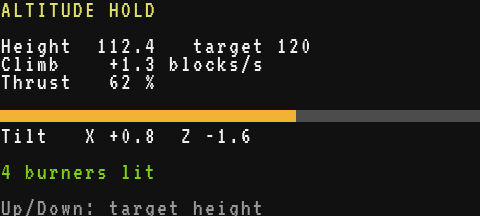
The whole program
Here it is in one piece. Type edit startup on the computer, paste it with Ctrl+V, save, and reboot with Ctrl+R.
-- Airship altitude hold (Create Aeronautics)
-- On the Data Cable: the hot air burners (lit by redstone), an
-- altitude sensor, and a gimbal sensor to keep the ship level.
-- Up/Down: height to hold.

local P, I, D = 0.012, 0.003, 0.1   -- height: per block, per block x s, per block/s
local LP, LD = 0.02, 0.05           -- level: per degree, per degree/s
local MIN = 5                       -- the smallest amount a burner takes
local C = term.colors

local alt = peripheral.find("altitude_sensor")
local gyro = peripheral.find("gimbal_sensor")
assert(alt, "no altitude sensor on the Data Cable")

local function clamp(x, low, high)
  return math.max(low, math.min(high, x))
end

-- the amount that fills a burner's balloon: more would be wasted
local function top(b, r)
  local t = b.max
  if r.capacity and r.signal > 0 then
    t = math.min(t, r.capacity * 15 / r.signal)
  end
  return math.max(t, MIN + 1)
end

-- every burner, and where it sits from the middle of the ship
local burners = {}
local cx, cz = 0, 0
for _, name in ipairs(peripheral.list("hot_air_burner")) do
  local at = string.find(name, "@", 1, true)
  assert(at, name .. ": put this burner on the Data Cable")
  local xyz = string.split(string.sub(name, at + 1), ",")
  local p = peripheral.wrap(name)
  local r = p.read()
  local b = {p = p, x = tonumber(xyz[1]), z = tonumber(xyz[3]), signal = r.signal}
  b.max = p.set_amount(100000)   -- it keeps the server maximum
  p.set_amount(r.amount)
  table.insert(burners, b)
  cx = cx + b.x
  cz = cz + b.z
end
assert(#burners > 0, "no hot air burner on the Data Cable")
cx = cx / #burners
cz = cz / #burners
local R = 1
for _, b in ipairs(burners) do
  R = math.max(R, math.sqrt((b.x - cx) ^ 2 + (b.z - cz) ^ 2))
end
for _, b in ipairs(burners) do
  b.ux = (b.x - cx) / R   -- -1 west ... 1 east
  b.uz = (b.z - cz) / R   -- -1 north ... 1 south
end

-- the state of the flight
local height = alt.height()
local target = math.floor(height + 0.5)
local climb, lift, ax, az = 0, 0, 0, 0
local lost = false
local last = os.clock()
local first = burners[1].p.read()
local trim = clamp((first.amount - MIN) / (top(burners[1], first) - MIN), 0, 1)
if gyro then
  local g = gyro.read()
  ax, az = g.angle_x, g.angle_z
end

local function step()
  local now = os.clock()
  local dt = math.max(0.05, now - last)
  last = now
  -- 1. the sensors: a lost one must not crash the ship
  local h = pcall(alt.height)
  lost = not h.ok
  if lost then
    return   -- the burners keep their amounts: the ship floats on
  end
  climb = (h.value - height) / dt
  height = h.value
  local tx, tz = 0, 0
  local g = gyro and pcall(gyro.read)
  if g and g.ok then
    tx = LP * g.value.angle_x + LD * (g.value.angle_x - ax) / dt
    tz = LP * g.value.angle_z + LD * (g.value.angle_z - az) / dt
    ax, az = g.value.angle_x, g.value.angle_z
  end
  -- 2. the height: the trim learns what holds the ship, P pulls, D brakes
  local err = clamp(target - height, -15, 15)
  trim = clamp(trim + I * err * dt, 0, 1)
  lift = clamp(trim + P * err - D * climb, 0, 1)
  -- 3. each burner: the thrust, plus more on the low side
  for _, b in ipairs(burners) do
    local r = pcall(b.p.read)
    if r.ok then
      b.signal = r.value.signal
      local f = clamp(lift + b.ux * tz + b.uz * tx, 0, 1)
      local t = top(b, r.value)
      pcall(b.p.set_amount, math.floor(MIN + f * (t - MIN) + 0.5))
    end
  end
end

local function show(y, color, text)
  term.set_cursor(1, y)
  term.clear_line()
  term.set_fg(color)
  term.write(text)
end

local function draw()
  show(1, C.yellow, "ALTITUDE HOLD")
  show(3, C.white, string.format("Height %6.1f   target %d", height, target))
  show(4, C.white, string.format("Climb  %+6.1f blocks/s", climb))
  show(5, C.white, string.format("Thrust %4.0f %%", lift * 100))
  gfx.rect(1, 56, 240, 6, "gray", true)
  gfx.rect(1, 56, math.floor(240 * lift), 6, "orange", true)
  show(8, C.white, string.format("Tilt   X %+.1f  Z %+.1f", ax, az))
  local unlit = 0
  for _, b in ipairs(burners) do
    if b.signal == 0 then
      unlit = unlit + 1
    end
  end
  if lost then
    show(10, C.red, "ALTITUDE SENSOR LOST")
  elseif unlit > 0 then
    show(10, C.red, unlit .. " burner(s) without redstone")
  else
    show(10, C.lime, #burners .. " burners lit")
  end
  show(12, C.light_gray, "Up/Down: target height")
end

term.clear()
gfx.clear()
draw()
local timer = os.start_timer(0.5)
while true do
  local e = os.pull_event()
  if e.name == "timer" and e.id == timer then
    timer = os.start_timer(0.5)
    if lost then
      alt = peripheral.find("altitude_sensor") or alt
    end
    step()
    draw()
  elseif e.name == "key" and e.key == "up" then
    target = target + 1
    draw()
  elseif e.name == "key" and e.key == "down" then
    target = target - 1
    draw()
  end
end
How it runs: the main loop waits for events (Events). A timer fires every half second: the program reads the sensors, computes the thrust, sets the amounts and redraws the screen. The arrow keys change the target at once, without waiting for the timer. Each function only uses its own locals and the variables of the file (height, trim, burners...), never the locals of another function, as Brass requires (Brass for Lua and ComputerCraft users).
Going further
- Glide to a new target. Change the target by 50 blocks and the error is limited to 15, but the trim still learns from it. The built-in
balloonmoves a set point towards the target at 1.5 blocks per second instead, and stops the trim from growing while the thrust is already at its limit. - Level with I too. A load off-centre leaves a small constant tilt, since P needs a tilt to act. A slow trim per axis, like the one for the height, removes it:
balloondoes it, limited to ±0.4. - No altitude sensor? On a Personal Computer, a Microcontroller or a Modern Computer,
vehicle.position().ygives the height of the ship (vehicle). - Remember the target. Write it to a file with
fs.writeon each change, and read it back at startup, so a reboot keeps the height you chose. - A remote control. Receive the target from another computer with
net: seeRemote control over the network.