

string
Text: cut, search, change case, format numbers, split and trim. Every text also has these as methods: s:upper().
The string library works on text: item names, lines typed by a player, lines of a file, messages from another computer. Every function returns a new text: a text itself never changes.
Method syntax. Every text value also has these functions as methods: name:upper() is string.upper(name), and line:sub(1, 3) is string.sub(line, 1, 3). It works on any expression that gives a text, read():trim() included. A text written directly in the code needs parentheses: ("iron"):upper(), because "iron":upper() does not compile.
local item = "minecraft:iron_ingot"
local colon = item:find(":")
print(item:sub(colon + 1))
print(#item, item:upper())
print(("brass"):rep(2, "+"))iron_ingot 20 MINECRAFT:IRON_INGOT brass+brass
Positions start at 1 for the first character. A negative position counts from the end: -1 is the last character, -2 the one before. Every character counts as one, accented letters included. A text cannot be indexed like a table: s[1] stops with attempt to index a string value with a number key, use s:sub(1, 1).
Operators. .. joins two texts and turns numbers into text by itself ("x" .. 3 is "x3"), but nil, true and tables are refused (attempt to concatenate a nil value): use tostring. #s is the length. == compares the characters, and < compares texts by character codes: "Zinc" < "apple" (capitals come first) and "10" < "9" (digit by digit). Text is never turned into a number by arithmetic: "10" + 1 is an error, use tonumber.
Writing texts. Between "..." or '...', with the escapes \n (new line), \t (tab), \\, \", \', \r, \0 and \xNN (a character by its hexadecimal code). A long text can span several lines between [[ and ]], where nothing is escaped.
A text holds at most 65536 characters. Going over, with .., string.rep, string.format or table.concat, stops the program with string too long. Every function of this page that takes a text also accepts a number, converted like tostring does it: string.len(1234) is 4.
string.len(s) | The number of characters of a text. |
string.upper(s) | Converts the text to capitals. |
string.lower(s) | Converts the text to small letters. |
string.sub(s, i [, j]) | The part of the text from position i to position j, both included. |
string.find(s, text [, init]) | Position of a text inside another, or nil. |
string.starts(s, prefix) | True if the text starts with prefix. |
string.ends(s, suffix) | True if the text ends with suffix. |
string.rep(s, n [, sep]) | The text repeated n times, with an optional separator between the copies. |
string.reverse(s) | The text backwards. |
string.format(fmt, ...) | Builds a text from a model and values: "%d items", "%.2f", "%5s"... |
string.split(s [, sep]) | Cuts the text into a list of pieces, at each separator. |
string.trim(s) | Removes the spaces, tabs and line breaks at both ends of the text. |
string.byte(s [, i]) | The code of one character of the text (the first by default). |
string.char(...) | Text made of character codes. |
Length and case
The number of characters of a text.
sstring- a text
- number
- its number of characters
#s gives the same and is shorter to write. A common use is centring a title on the screen:
print(string.len("Andesite"), #"Andesite", #"")
local title = "IRON FARM"
local width = term.get_size().w
print(string.rep(" ", math.floor((width - #title) / 2)) .. title)8 8 0
IRON FARMSee also string.sub()
Converts the text to capitals.
sstring- a text
- string
- the same text in capitals
Letters with accents follow: é becomes É. Other characters stay as they are.
local name = "brass casing"
print(name:upper())
print(string.upper("Gate 3: open"))BRASS CASING GATE 3: OPEN
See also string.lower()
Converts the text to small letters.
sstring- a text
- string
- the same text in small letters
Comparing texts is exact: "Yes" ~= "yes". Bring what a player typed to small letters before comparing it, so that YES, Yes and yes all work:
local function is_yes(answer)
  local a = answer:trim():lower()
  return a == "yes" or a == "y"
end
print(is_yes("YES"), is_yes(" y "), is_yes("no"))true true false
In a program: write("Open the gate? ") if is_yes(read()) then ... end.
See also string.upper() string.trim()
Cutting and searching
The part of the text from position i to position j, both included.
sstring- a text
inumber- the first position kept (negative counts from the end)
jnumber optional- the last position kept, included (
-1, the end, when left out)
- string
- the characters from
itoj
local s = "Mechanical Press"
print(s:sub(1, 10))
print(s:sub(12))
print(s:sub(-5))
print(s:sub(-5, -3))Mechanical Press Press Pre
It never fails on positions out of the text: a start before the first character starts at the first one, an end past the last character stops at the last one, and a start after the end gives "". Positions must be whole numbers (bad argument #2 to 'sub' (number has no integer representation)).
local s = "Saw"
print("[" .. s:sub(0, 2) .. "]", "[" .. s:sub(2, 99) .. "]", "[" .. s:sub(5) .. "]")[Sa] [aw] []
To fit a name in a column, cut it and mark the cut:
local function fit(name, width)
  if #name > width then
    return name:sub(1, width - 1) .. "~"
  end
  return name
end
print(fit("Andesite Alloy", 10))
print(fit("Zinc", 10))Andesite ~ Zinc
See also string.find() string.split()
Position of a text inside another, or nil.
sstring- the text to search in
textstring- the text to look for, taken as it is
initnumber optional- the position where the search starts (negative counts from the end)
- number|nil
- the position where
textfirst appears, or nil
The search is plain: every character means itself. Lua's patterns do not exist in Brass, so ., %, [ or ( have no special meaning (in Lua, ("v1.2"):find(".") finds any character, here it finds the dot). There is no string.match, gmatch or gsub either: find, sub and split do the same jobs. A fourth argument (the "plain" flag of Lua) is accepted and ignored.
Only the start position comes back. The match ends at start + #text - 1. The search is case sensitive: lower both texts first to ignore case.
print(("v1.2"):find("."))
print(("Iron Ingot"):find("Ingot"), ("Iron Ingot"):find("ingot"))
local id = "create:brass_ingot"
local colon = id:find(":")
print(id:sub(1, colon - 1), id:sub(colon + 1))3 6 nil create brass_ingot
init starts the search further on, which lets you find every occurrence. A start past the end gives nil:
local log = "jam at press; ok; jam at saw; ok"
local count, from = 0, 1
while true do
  local at = log:find("jam", from)
  if at == nil then
    break
  end
  count = count + 1
  from = at + 1
end
print("jams: " .. count)jams: 2
See also string.sub() string.starts() string.split()
True if the text starts with prefix.
sstring- a text
prefixstring- the beginning to look for
- boolean
- true if
sstarts withprefix
A Brass extension (Lua has none). Exact, case sensitive, and an empty prefix is always found. Handy to sort item ids by mod, or commands by their first word:
local items = {"create:brass_ingot", "minecraft:iron_ingot", "create:zinc_ingot"}
for _, id in ipairs(items) do
  if id:starts("create:") then
    print(id)
  end
endcreate:brass_ingot create:zinc_ingot
See also string.ends() string.find()
True if the text ends with suffix.
sstring- a text
suffixstring- the end to look for
- boolean
- true if
sends withsuffix
A Brass extension, like string.starts. Use it for families of items or for file names:
local ids = {"minecraft:iron_ingot", "minecraft:iron_nugget", "create:zinc_ingot"}
local ingots = 0
for _, id in ipairs(ids) do
  if id:ends("_ingot") then
    ingots = ingots + 1
  end
end
print(ingots .. " kinds of ingot")
print(("report.log"):ends(".log"), ("report.log"):ends(""))2 kinds of ingot true true
See also string.starts()
Building text
The text repeated n times, with an optional separator between the copies.
sstring- the text to repeat
nnumber- how many times (0 or less gives
"") sepstring optional- a text put between the copies
- string
- the copies, joined
print(string.rep("=", 20))
print(("ab"):rep(3, ", "))
print("[" .. ("x"):rep(0) .. "]")==================== ab, ab, ab []
n must be a whole number. A result over 65536 characters stops with string too long.
A progress bar made of characters: the filled part, then the empty part, always the same width.
local function bar(value, max, width)
  local filled = math.min(width, math.round(value / max * width))
  return "[" .. string.rep("#", filled) .. string.rep("-", width - filled) .. "]"
end
print(bar(750, 1000, 20) .. " 75%")
print(bar(0, 1000, 20))
print(bar(1200, 1000, 20) .. " full")[###############-----] 75% [--------------------] [####################] full
See also string.format()
The text backwards.
sstring- a text
- string
- the same characters, last first
A train line written as one letter per station is visited backwards on the return trip:
local route = "MSFD"   -- Mine, Smeltery, Factory, Depot
print("Outward: " .. route)
print("Return: " .. route:reverse())Outward: MSFD Return: DFSM
See also string.sub()
Builds a text from a model and values: "%d items", "%.2f", "%5s"...
fmtstring- the model, with a
%code where each value goes valuesany optional- one value for each code, in order
- string
- the model with the values written in
Each % code of the model is replaced by the next value, written the way the code says:
| code | takes | writes | example |
|---|---|---|---|
%d or %i | a whole number | the number | 42 |
%f | a number | with 6 decimals, or .N decimals | 3.141593, %.2f → 3.14 |
%s | any value | the value, like tostring | Iron, true, nil |
%x, %X | a whole number | in hexadecimal | ff, FF |
%% | nothing | a % sign | % |
Between the % and the letter, in this order, you can add:
- flags:
-pads on the right (the value goes left),0pads numbers with zeros,+always shows the sign of a number, a space puts a space where a positive number has no sign. - a width, one or two digits: the least number of characters, padded with spaces on the left.
%5dwrites42as42. - a precision, a dot and digits: the number of decimals for
%f, the most characters kept for%s(%.3scutsAndesitetoAnd).%dand%xignore it.
print(string.format("%d items in %d chests", 1250, 20))
print(string.format("Speed: %.1f RPM", 63.27))
print(string.format("[%5d] [%-5d] [%05d]", 42, 42, 42))
print(string.format("%+d / %+d", 5, -5))
print(string.format("%x %X 100%%", 255, 3054))
print(("%.3s"):format("Andesite"))1250 items in 20 chests Speed: 63.3 RPM [ 42] [42 ] [00042] +5 / -5 ff BEE 100% And
Columns. A width per column, - for the texts so they line up on the left, nothing for the numbers so they line up on the right:
local stock = {
  {name = "Iron Ingot", count = 1250},
  {name = "Copper Ingot", count = 87},
  {name = "Zinc Nugget", count = 4},
  {name = "Brass Ingot", count = 320},
}
print(string.format("%-14s %6s", "Item", "Count"))
print(string.rep("-", 21))
for _, row in ipairs(stock) do
  print(string.format("%-14s %6d", row.name, row.count))
endItem Count --------------------- Iron Ingot 1250 Copper Ingot 87 Zinc Nugget 4 Brass Ingot 320
A clock. os.day_time() counts the ticks of the Minecraft day, 0 being 6:00 in the morning. %02d writes two digits, with a leading zero:
local function clock(ticks)
  local t = (ticks + 6000) % 24000
  local h = math.floor(t / 1000)
  local m = math.floor(t % 1000 * 60 / 1000)
  return string.format("%02d:%02d", h, m)
end
print(clock(os.day_time()))
print(clock(0), clock(6500), clock(18000))
local seconds = 754
print(string.format("%d:%02d left", seconds // 60, seconds % 60))12:00 06:00 12:30 00:00 12:34 left
When it fails. string.format is strict, and the program stops:
| message | cause |
|---|---|
bad argument #2 to 'format' (number has no integer representation) | %d or %x with a number that has decimals: round it first (math.floor, math.round) |
bad argument #2 to 'format' (number expected, got string) | %d, %f or %x with a text, even "42": convert it with tonumber |
bad argument #3 to 'format' (no value) | fewer values than codes |
invalid conversion '%e' to 'format' | a code that does not exist in Brass (%c, %e, %g, %o, %q...), a width of three digits, a precision over 99, a % alone at the end (write %%), or flags that do not fit the code: - or 0 without a width, + with %s or %x |
Extra values are ignored. With %f, infinity and "not a number" are written Infinity and NaN (%s writes inf and nan), and with %x a negative number comes out as 16 hexadecimal digits (-1 gives ffffffffffffffff).
See also tostring() string.rep()
Splitting and cleaning
Cuts the text into a list of pieces, at each separator.
sstring- the text to cut
sepstring optional- the separator, taken as it is (a single space
" "when left out)
- table
- the pieces, a list of texts
A Brass extension that replaces Lua's patterns in most jobs. The separator can be several characters long (", "). The pieces keep everything between two separators, so:
- two separators in a row give an empty piece, and a separator at the start or the end gives an empty piece there;
- a text without the separator gives a list with the whole text, and an empty text gives
{""}; - an empty separator
""cuts between every character.
local parts = ("iron,gold,,copper"):split(",")
print(#parts, parts[3] == "", parts[4])
local letters = ("ABC"):split("")
print(#letters, letters[1], letters[3])
print(#("a b"):split(), #(""):split(","))4 true copper 3 A C 2 1
With table.concat, it replaces one piece of text by another everywhere:
print(table.concat(("iron_ingot"):split("_"), " "))iron ingot
Reading commands typed by the player. Without a separator, split cuts at every single space, so two spaces in a row give an empty word: trim the line and skip the empty words.
local function words(line)
  local out = {}
  for _, w in ipairs(line:trim():split(" ")) do
    if w ~= "" then
      table.insert(out, w)
    end
  end
  return out
end

local function run(line)
  local w = words(line)
  local command = w[1]
  if command == nil then
    return
  end
  if command == "speed" then
    local rpm = tonumber(w[2])
    if rpm == nil then
      print("usage: speed <rpm>")
    else
      print("speed set to " .. rpm .. " RPM")
    end
  elseif command == "open" or command == "close" then
    print(command .. " gate " .. (w[2] or "1"))
  else
    print("unknown command: " .. command)
  end
end

run("speed   128")
run("  open 3 ")
run("speed fast")
run("")
run("jump")speed set to 128 RPM open gate 3 usage: speed <rpm> unknown command: jump
In a real program the lines come from the keyboard: while true do write("> ") run(read()) end.
See also string.trim() table.concat()
Removes the spaces, tabs and line breaks at both ends of the text.
sstring- a text
- string
- the text without spaces at its ends
The spaces inside stay. Trim what a player typed and the lines of a file (a file written on another system may end its lines with an invisible \r).
local typed = "   Iron Ingot  \n"
print("[" .. typed:trim() .. "]")[Iron Ingot]
See also string.split()
Character codes
Every character has a number, its code: A is 65, a is 97, 0 is 48, é is 233 (the Unicode code). Codes help to turn letters into numbers and back.
The code of one character of the text (the first by default).
sstring- a text
inumber optional- the position of the character (1 when left out, negative counts from the end)
- number|nil
- the code of that character, nil past the end
Lua can return several codes at once. Brass returns one: call it once per position.
print(string.byte("A"), ("abc"):byte(2), ("abc"):byte(-1))
print(("abc"):byte(10))65 98 99 nil
Shelves of a storage wall named A1, B4, C12: the letter gives the column.
local function cell(code)
  local column = code:upper():byte(1) - string.byte("A") + 1
  local row = tonumber(code:sub(2))
  return {column = column, row = row}
end
local c = cell("c12")
print(c.column, c.row)3 12
See also string.char()
Text made of character codes.
codesnumber- one or more character codes, from 0 to 65535
- string
- the text made of these characters
string.char() with no code gives "". A code outside 0 to 65535 stops with bad argument #1 to 'char' (value out of range), a code with decimals with bad argument #1 to 'char' (number has no integer representation) (the number is the position of the bad code). Codes below 32 are control characters: the screen shows them as ?.
print(string.char(72, 105))
for i = 1, 5 do
  write(string.char(64 + i) .. " ")
end
print()
print(string.char(("A"):byte() + 1))Hi A B C D E B
See also string.byte()
Common patterns
A stock panel. string.format for the columns, string.rep for the bars, colours from term:
local vaults = {
  {name = "Iron Ingot", count = 3120, capacity = 4096},
  {name = "Copper Ingot", count = 860, capacity = 4096},
  {name = "Andesite Alloy", count = 3950, capacity = 4096},
  {name = "Brass Ingot", count = 140, capacity = 2048},
}
term.clear()
term.set_cursor(1, 1)
term.set_fg(term.colors.yellow)
print(string.format("%-15s %6s  %s", "ITEM", "COUNT", "LEVEL"))
for _, v in ipairs(vaults) do
  local ratio = v.count / v.capacity
  local filled = math.round(ratio * 20)
  term.set_fg(term.colors.white)
  write(string.format("%-15s %6d  ", v.name, v.count))
  if ratio >= 0.9 then
    term.set_fg(term.colors.red)      -- nearly full: the input will stop
  elseif ratio < 0.1 then
    term.set_fg(term.colors.orange)   -- nearly empty
  else
    term.set_fg(term.colors.lime)
  end
  print(string.rep("#", filled) .. string.rep(".", 20 - filled) .. string.format(" %3d%%", math.round(ratio * 100)))
end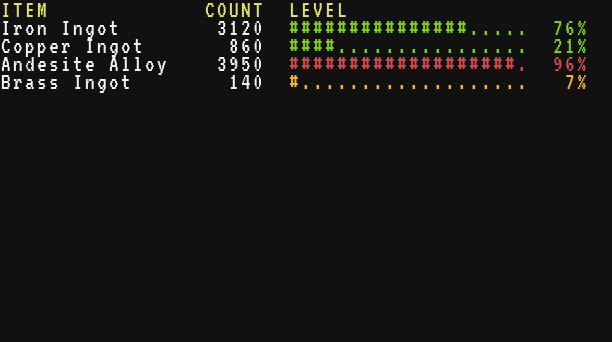
**Reading key=value lines.** split cuts the file into lines, find and sub cut each line at the =, trim cleans both sides, tonumber turns numbers back into numbers. The pcall example of Global functions builds a complete settings loader on this.
local text = "speed = 64\nside = back\n# a comment\n"
local config = {}
for _, line in ipairs(text:split("\n")) do
  local eq = line:find("=")
  if eq and not line:starts("#") then
    config[line:sub(1, eq - 1):trim()] = line:sub(eq + 1):trim()
  end
end
print(config.speed, config.side, tonumber(config.speed) * 2)64 back 128