
 Networks
Data Cables, Radio Modems and Wi-Fi Routers: how computers reach each other, when a message arrives, and how to design the conversation.
One computer drives the blocks around it. A network links several: the warehouse computer counts the iron, the factory computer runs the presses, and the dashboard in your base shows both and gives orders. A Data Cable also does something else: it brings blocks far from the computer within its reach, as peripherals.
This guide explains what links what, how far, when a message is delivered, and how to design the messages your programs exchange. The functions themselves are described in net.
Who can do what
| computer | net library | Data Cable | Radio Modem and Wi-Fi Router |
|---|---|---|---|
| Tube Computer | no | no | no |
| Transistor Mainframe | no | no | no |
| Minicomputer | yes | yes | no |
| Personal Computer | yes | yes | yes |
| Microcontroller | yes | yes | yes |
| Modern Computer | yes | yes | yes |
The Data Cable arrives with the Minicomputer (Integrated Circuit age), the Radio Modem with the Personal Computer (Microprocessor age), the Wi-Fi Router with the Modern Computer (Digital age). A Wi-Fi Router works on a Personal Computer or a Microcontroller too.
A Minicomputer ignores a radio placed next to it or on its cable. It can still talk to a Personal Computer on the same cable, but that computer does not pass its messages on by radio: computers never forward messages by themselves, only a program can (see relays).
The Data Cable
A Data Cable joins other cables, computers from the Minicomputer up, and the blocks a computer can drive. Plain shafts, cogwheels and gearboxes are left out: a cable can run along a gear train without picking it up. Everything joined this way forms one cable network, and it does two things.
Peripherals. Every device touching the network becomes a peripheral of every computer on it. Blocks touching the computer itself are named after the face ("left", "top"...), the others type@x,y,z: their type and the coordinates of their block, the ones F3 shows. On a Minicomputer with a vault, a Traffic Light and a Rotation Speed Controller on its cable:
for _, name in ipairs(peripheral.list()) do
  print(name)
end> devices inventory@-312,64,1048 traffic_light@-305,66,1040 kinetic@-298,64,1052
You rarely need to type such a name: peripheral.find("traffic_light") wraps the first one of that type. See Peripherals and peripheral.
Messages. The computers on the network (Minicomputer and newer) exchange messages, which arrive with via = "cable". They are not peripherals: net.computers lists them.
Cutting a side. Right-click a side of a cable with Create's Wrench: that arm disappears, and nothing goes through that side any more, neither cable, device nor computer. Wrench it again to restore it. This way two cables side by side stay two networks, and a chest next to a cable stays out of it. When two cables meet, both are cut at once. Sneak and right-click with the Wrench to pick the cable up.
A few rules:
- Cables do not connect to the Tube Computer and the Transistor Mainframe: they have no network port.
- Two computers touching each other are not linked: put a cable between them.
- A network counts at most 2048 cable blocks from a computer.
- Nothing loads a chunk for a cable: the part of a network in an unloaded chunk is out of reach until the chunk loads again.
- A computer looks again at the blocks around its cables at most once a second: a chest you just placed can take a second to show up.
- On a Create Aeronautics vehicle, the coordinates in the names are those where Aeronautics keeps the vehicle's blocks, not where it flies. Use the names
peripheral.listgives.
The Radio Modem
A Radio Modem gives radio to a Personal Computer, a Microcontroller or a Modern Computer. Place it against the computer (on any face), or anywhere on its cable network: then every radio-capable computer of that cable uses it.
Two computers can talk by radio when a radio of one is within 128 blocks of a radio of the other. The distance is measured between the radios, not between the computers, in a straight line: a modem at the end of a cable, on a roof, reaches further than the computer in its basement. Messages arrive with via = "radio".
A modem is a peripheral too (type radio_modem): radio.range() tells its range in blocks.
Radio does not hop. With three computers in a row, 100 blocks apart, the middle one hears both others, but the two ends do not hear each other: the middle computer passes nothing on unless a program does it. Use Wi-Fi Routers instead, or a relay.
The Wi-Fi Router
A Wi-Fi Router is placed like a modem, against the computer or on its cable, and reaches 256 blocks.
Its real strength is its network name, the SSID. All routers with the same SSID, in the same dimension, form one network: the backbone. A message that reaches one router of the backbone comes out of all the others, at any distance. With a router at each end of the map, both ends talk.
A router gets its SSID from a program, with radio.set_ssid() (32 characters at most). Type this once on each computer that holds a router:
local router = peripheral.find("wifi_router")
router.set_ssid("ironworks")
print("SSID: " .. router.get_ssid())
The SSID is saved in the router and survives a restart of the world, but not breaking the router: set it again after moving one. A router without an SSID is only a radio with a longer range. Giving an SSID to a Radio Modem stops the program with only Wi-Fi routers have an SSID.
As soon as a router with an SSID is involved, messages arrive with via = "wifi". net.networks shows the backbones a computer is on.
How a message travels
To decide whether computer S (the sender) reaches computer R (the receiver), the mod tries, in this order:
- Cable. R is on the same cable network as S: delivered,
via = "cable". - No radio. S has no Radio Modem or Wi-Fi Router (touching it or on its cable): R is out of reach.
- Direct radio. A radio of S and a radio of R are within range of each other: delivered,
via = "radio"when both are modems or routers without SSID,"wifi"otherwise. - The backbones of S. S is on the backbone of each SSID of its own routers, and of each router with an SSID that one of its radios reaches.
- Out of a backbone. R is reached through one of those backbones when one of its routers has that SSID, or when one of its radios is in range of a router with that SSID: delivered,
via = "wifi".
So a message makes at most three jumps: a radio jump into the backbone, the backbone itself, and a radio jump out of it. Here, a Personal Computer at the mine reaches one at the port, thousands of blocks away, with nothing but Radio Modems at both ends and two routers named ironworks on the way:
  PC #12, the sender, at the mine
  [Radio Modem]
        |
        |  1. radio jump: 90 blocks (a modem reaches 128)
        v
  [Wi-Fi Router "ironworks"]   on Microcontroller #3, near the mine
        ||
        ||  2. the backbone: every router named "ironworks"
        ||     in this dimension, at any distance
        ||
  [Wi-Fi Router "ironworks"]   on Microcontroller #8, near the port
        |
        |  3. radio jump: 60 blocks (a modem reaches 128)
        v
  [Radio Modem]
  PC #20, the receiver, at the port
The routers of a backbone must belong to computers: a router counts only when it touches a Personal Computer, a Microcontroller or a Modern Computer, or sits on its cable, in a loaded chunk. That computer does not need to run a program. A router placed alone, or on a Minicomputer, does nothing.
Range, dimensions and chunks
- The smaller range counts. A Radio Modem (128) and a Wi-Fi Router (256) talk within 128 blocks.
- The server can change ranges.
wirelessRangeMultiplier, in the[computers]section ofworld/serverconfig/computingages-server.toml, multiplies the range of every modem and router (from 0.1 to 16, 1 by default).radio.range()gives the range with the multiplier applied. - One dimension. Radio and Wi-Fi stay in their dimension: a router in the Nether does not hear the Overworld.
- Loaded chunks only. The sender, the receiver and every computer holding a router used on the way must be in chunks that are loaded and ticking (near a player, or kept loaded). Nothing loads a chunk for a message.
- Vehicles. On Create Aeronautics vehicles, distances use the real position of the vehicle in the world: a radio on board an airship moves with it, and so does its range. See
vehicle. - Changes take a second. A computer looks at its radios and their SSIDs at most once a second: a modem you just placed, or a new SSID, counts within a second.
When a message is delivered
A message goes into the receiver's event queue in the same tick, and messages from one computer to another arrive in the order they were sent. net.send returns true (and net.broadcast counts the receiver) only when the receiver:
- is in reach, as described above;
- is switched on, in a loaded and ticking chunk;
- has room in its receive buffer: the events waiting in its queue may take up to a quarter of its memory (4 K cells on a Microcontroller, 8 K on a Minicomputer, 32 K on a Personal Computer, 256 K on a Modern Computer). A receiver that does not keep up refuses new messages instead of crashing.
What happens next depends on the receiver:
- A program waiting in
net.receiveoros.pull_eventgets the message at its next tick. - A program that is busy, or sleeping, finds the message in its queue at its next
net.receive: nothing is lost. - A computer with no program running, at the shell prompt, throws its messages away, although
net.sendreturnedtrue. Start the receiving program from astartupfile, so that it runs as soon as the computer boots. - A computer that stopped turning (no rotation) is still on: it accepts messages until its buffer is full, and handles them when the rotation comes back.
- The queue holds 256 events of all kinds: when it overflows, the oldest event is dropped.
Outputs that a message triggers (rs.set, link.set, kinetic.set_speed()) reach the world at the end of the receiver's tick, and only the last value of the tick counts: a flood of messages cannot flood the world with block updates.
Designing a protocol
A protocol is the agreement between your programs: which channel they use, what a message contains, who answers what. Five minutes of design save hours of puzzling over a dashboard that shows nothing.
Channels
Give each conversation its own channel: "stock", "factory", "alarm", or one per installation, like "ironworks". A receiver drops at once the channels it does not care about, and two installations in the same area do not mix their messages.
A channel is a label, not a lock: any computer in reach can send on any channel. Before obeying an order, check who sent it (m.sender), and possibly how (m.via == "cable" can only come from a computer wired to yours).
Messages are tables with a type
Send tables rather than bare values, and give each one a type field that says what it is. A program can then handle several kinds of messages on one channel, and you can add fields later without breaking anything:
net.broadcast({type = "stock", item = "minecraft:iron_ingot", count = 1830}, "ironworks")
net.send(5, {type = "command", id = 17, action = "stop"}, "ironworks")
net.send(8, {type = "ack", id = 17, running = false}, "ironworks")
On the receiving side, a table of handlers, one per type, keeps the program tidy. The messages here are written by hand to show what happens:
local stock = 0
local handlers = {}

function handlers.stock(m)
  stock = m.data.count
  print("stock is now " .. stock)
end

function handlers.ping(m)
  print("ping from #" .. m.sender)   -- a real program answers with net.send
end

local function dispatch(m)
  if m.channel ~= "ironworks" or type(m.data) ~= "table" then return end
  local handler = handlers[m.data.type]
  if handler then
    handler(m)
  else
    print("unknown type: " .. tostring(m.data.type))
  end
end

dispatch({sender = 3, channel = "ironworks", data = {type = "stock", count = 1830}})
dispatch({sender = 8, channel = "ironworks", data = {type = "ping"}})
dispatch({sender = 8, channel = "ironworks", data = {type = "dance"}})
dispatch({sender = 8, channel = "chat", data = "hello"})stock is now 1830 ping from #8 unknown type: dance
In the real program, the loop is simply while true do dispatch(net.receive()) end. Always check type(m.data) == "table" before reading fields: another program may send a plain value, or no data at all, and then reading a field stops your program:
local m = {sender = 4, channel = "ironworks"}   -- a message sent without data
local d = m.data
print(d.type)snippet:3: attempt to index a nil value (local 'd')
Questions, answers and ids
When a computer asks something, the answer must find its question. Put an id in each request (a counter is enough) and have the other side copy it into its answer. The asker then ignores any answer whose id is not the one it waits for, including late answers to an earlier question.
Never wait for an answer without a timeout: net.receive(2) returns nil after 2 seconds, net.receive() could wait forever if the other computer is gone. net shows a complete ask function with retries.
Acknowledgements and retries
net.send returning true only means that the message is in the other computer's queue. For an order that matters, have the receiver confirm it with an acknowledgement, an "ack" message with the same id. The sender sends again when no ack comes in time, a few times, then gives up and says so.
A retry can reach the receiver twice: when the order arrived but the ack was lost. So prefer orders that can be repeated safely: "start", "stop", "set the speed to 64", "open the door", rather than "toggle" or "add 16 RPM". A toggle received twice does nothing. When an order cannot be repeated safely, the receiver remembers the last id it carried out for each sender and only acknowledges a repeat, and the sender keeps its counter in a file (fs.write) so that it does not start again at 1 after a reboot.
One event loop
net.receive throws away every other event while it waits: a program stuck in a loop waiting for an answer misses clicks, keys and timers, and also the other messages. A computer that must react to several things uses a single loop around os.pull_event(), and keeps what it is waiting for in variables: "a command is pending, its deadline is at 42 seconds". A timer checks the deadlines. The dashboard below works this way.
Broadcast without loops
Answer a broadcast with net.send(m.sender, ...), never with another broadcast on the same channel.
A relay is a program that repeats messages, to link radios that are too far apart. Two relays that hear each other would bounce every message forever, so each message carries its origin and a sequence number, the relay remembers those it has already repeated, and a hop counter stops anything that still goes round:
-- relay: repeats each message of the "mail" channel once
local seen = {}
local seen_count = 0
while true do
  local m = net.receive()
  local d = m.data
  if m.channel == "mail" and type(d) == "table" and d.origin and d.seq then
    local key = d.origin .. ":" .. d.seq
    local hops = d.hops or 0
    if not seen[key] and hops < 8 then
      seen[key] = true
      seen_count = seen_count + 1
      if seen_count > 1000 then   -- forget old messages, so that memory does not fill up
        seen = {}
        seen_count = 0
      end
      d.hops = hops + 1
      net.broadcast(d, "mail")
    end
  end
end
The sender gives each message origin = net.id() and a new seq, the receiver ignores an origin:seq it has already seen (it may get the same message from several relays). With a Wi-Fi backbone, you seldom need relays.
A complete example: warehouse, factory, dashboard
Three computers run an iron plant together:
- The warehouse (Microcontroller #3): a Create Item Vault against its back, a Radio Modem on top. Every 10 seconds, it tells everyone how many iron ingots the vault holds.
- The factory (Personal Computer #5): a Rotation Speed Controller on top drives the Mechanical Press line, a Wi-Fi Router on its cable. It runs the line faster when the warehouse is full, and obeys start and stop orders from the dashboard.
- The dashboard (Modern Computer #8): in the base, 600 blocks away, with an LCD Monitor showing its screen and a Wi-Fi Router. It shows the plant, and a click on its button stops or starts the factory.
The warehouse modem is 90 blocks from the factory's router: within 128. Both routers are named ironworks (with the set_ssid line above, typed once on the factory and on the dashboard). So the warehouse joins the backbone, and every computer reaches every other one.
The protocol, all on the "ironworks" channel:
| type | sent by | to | fields | when |
|---|---|---|---|---|
stock | warehouse | everyone | item, count | every 10 seconds |
status | factory | everyone | running, rpm, stock | every 5 seconds, and after each order |
command | dashboard | factory | id, action ("start" or "stop") | on a click |
ack | factory | dashboard | id, running | in answer to each command |
Each program is saved as startup on its computer, so that it runs again after a reboot or when the chunk reloads.
The warehouse only broadcasts:
-- warehouse (Microcontroller #3): counts the iron in the vault and tells everyone every 10 seconds
local vault = peripheral.wrap("back")
local ITEM = "minecraft:iron_ingot"
while true do
  net.broadcast({type = "stock", item = ITEM, count = vault.count(ITEM)}, "ironworks")
  sleep(10)
end
The factory reacts to two kinds of messages and to a timer, so it uses os.pull_event. Its orders are absolute ("start", "stop"): an order received twice does no harm, so it does not need to remember ids, it only copies the id into its ack. It only takes orders from the dashboard:
-- factory (Personal Computer #5): press line speed from the stock,
-- start and stop on orders from the dashboard, status every 5 seconds
local DASHBOARD = 8
local motor = peripheral.wrap("top")   -- Rotation Speed Controller
local running = true
local stock = nil                       -- iron in the warehouse, nil until the first report
local rpm = 0

local function apply()
  if not running then
    rpm = 0
  elseif stock == nil or stock < 256 then
    rpm = 32                            -- little iron left: slow down
  elseif stock < 2048 then
    rpm = 96
  else
    rpm = 192                           -- plenty: full speed
  end
  motor.set_speed(rpm)
end

local function report()
  net.broadcast({type = "status", running = running, rpm = rpm, stock = stock}, "ironworks")
end

apply()
report()
local timer = os.start_timer(5)
while true do
  local e = os.pull_event()
  if e.name == "message" and e.channel == "ironworks" and type(e.data) == "table" then
    local d = e.data
    if d.type == "stock" then
      stock = d.count
      apply()
    elseif d.type == "command" and e.sender == DASHBOARD then
      if d.action == "start" then running = true end
      if d.action == "stop" then running = false end
      apply()
      net.send(e.sender, {type = "ack", id = d.id, running = running}, "ironworks")
      report()
    end
  elseif e.name == "timer" and e.id == timer then
    report()
    timer = os.start_timer(5)
  end
end
The dashboard waits for messages, clicks and a timer in one loop. A click sends a command; the timer, every second, sends it again when no ack came within 2 seconds, three times at most; the ack clears it. A factory report older than 15 seconds shows in red: the factory is off, or its chunk is not loaded.
-- dashboard (Modern Computer #8): shows the plant on its LCD Monitor,
-- a click on the button row starts or stops the factory
local FACTORY = 5
local BUTTON_ROW = 11
local stock = nil       -- last warehouse report
local status = nil      -- last factory report, with the time it came
local pending = nil     -- the command waiting for its ack
local next_id = 1
local notice = ""

local function put(row, color, text)
  term.set_cursor(2, row)
  term.set_fg(color)
  term.write(text)
end

local function bar(row, value, max)   -- a gauge of 40 cells
  local cells = math.max(0, math.min(40, math.floor(value / max * 40)))
  term.set_cursor(13, row)
  term.set_bg(term.colors.lime)
  term.write(string.rep(" ", cells))
  term.set_bg(term.colors.gray)
  term.write(string.rep(" ", 40 - cells))
  term.set_bg(term.colors.black)
end

local function draw()
  term.set_bg(term.colors.black)
  term.clear()
  put(2, term.colors.yellow, "IRONWORKS")
  if stock then
    put(4, term.colors.white, "Warehouse  " .. stock .. " iron ingots")
    bar(5, stock, 4096)
  else
    put(4, term.colors.light_gray, "Warehouse  no report yet")
  end
  if status == nil then
    put(7, term.colors.light_gray, "Factory    no report yet")
  elseif os.clock() - status.at > 15 then
    put(7, term.colors.red, "Factory    silent for " .. math.floor(os.clock() - status.at) .. " s")
  elseif status.running then
    put(7, term.colors.lime, "Factory    running at " .. status.rpm .. " RPM")
    bar(8, status.rpm, 256)
  else
    put(7, term.colors.orange, "Factory    stopped")
  end
  if pending then
    term.set_bg(term.colors.gray)
    put(BUTTON_ROW, term.colors.white, " sending " .. pending.action .. "... ")
  elseif status and status.running then
    term.set_bg(term.colors.red)
    put(BUTTON_ROW, term.colors.white, " STOP THE FACTORY ")
  else
    term.set_bg(term.colors.green)
    put(BUTTON_ROW, term.colors.white, " START THE FACTORY ")
  end
  term.set_bg(term.colors.black)
  put(BUTTON_ROW + 2, term.colors.light_gray, notice)
end

local function transmit()
  pending.tries = pending.tries + 1
  pending.deadline = os.clock() + 2
  net.send(FACTORY, {type = "command", id = pending.id, action = pending.action}, "ironworks")
end

local function order(action)
  pending = {id = next_id, action = action, tries = 0, deadline = 0}
  next_id = next_id + 1
  notice = ""
  transmit()
end

draw()
local timer = os.start_timer(1)
while true do
  local e = os.pull_event()
  if e.name == "message" and e.channel == "ironworks" and type(e.data) == "table" then
    local d = e.data
    if d.type == "stock" then
      stock = d.count
    elseif d.type == "status" and e.sender == FACTORY then
      status = d
      status.at = os.clock()
    elseif d.type == "ack" and e.sender == FACTORY and pending and d.id == pending.id then
      if d.running then notice = "the factory confirms: running" else notice = "the factory confirms: stopped" end
      pending = nil
    end
    draw()
  elseif e.name == "click" and e.y == BUTTON_ROW and pending == nil then
    if status and status.running then order("stop") else order("start") end
    draw()
  elseif e.name == "timer" and e.id == timer then
    if pending and os.clock() >= pending.deadline then
      if pending.tries < 3 then
        transmit()
      else
        notice = "no answer from the factory after 3 tries"
        pending = nil
      end
    end
    draw()
    timer = os.start_timer(1)
  end
end
Because the program waits with os.pull_event() without a filter, right-clicking the LCD Monitor presses the screen (a click anywhere on the button's row counts). Here is the screen with the factory running, drawn by the same draw function with sample values:
local BUTTON_ROW = 11
local stock = 1830
local status = {running = true, rpm = 96, at = os.clock()}
local pending = nil
local notice = "the factory confirms: running"

local function put(row, color, text)
  term.set_cursor(2, row)
  term.set_fg(color)
  term.write(text)
end

local function bar(row, value, max)   -- a gauge of 40 cells
  local cells = math.max(0, math.min(40, math.floor(value / max * 40)))
  term.set_cursor(13, row)
  term.set_bg(term.colors.lime)
  term.write(string.rep(" ", cells))
  term.set_bg(term.colors.gray)
  term.write(string.rep(" ", 40 - cells))
  term.set_bg(term.colors.black)
end

local function draw()
  term.set_bg(term.colors.black)
  term.clear()
  put(2, term.colors.yellow, "IRONWORKS")
  if stock then
    put(4, term.colors.white, "Warehouse  " .. stock .. " iron ingots")
    bar(5, stock, 4096)
  else
    put(4, term.colors.light_gray, "Warehouse  no report yet")
  end
  if status == nil then
    put(7, term.colors.light_gray, "Factory    no report yet")
  elseif os.clock() - status.at > 15 then
    put(7, term.colors.red, "Factory    silent for " .. math.floor(os.clock() - status.at) .. " s")
  elseif status.running then
    put(7, term.colors.lime, "Factory    running at " .. status.rpm .. " RPM")
    bar(8, status.rpm, 256)
  else
    put(7, term.colors.orange, "Factory    stopped")
  end
  if pending then
    term.set_bg(term.colors.gray)
    put(BUTTON_ROW, term.colors.white, " sending " .. pending.action .. "... ")
  elseif status and status.running then
    term.set_bg(term.colors.red)
    put(BUTTON_ROW, term.colors.white, " STOP THE FACTORY ")
  else
    term.set_bg(term.colors.green)
    put(BUTTON_ROW, term.colors.white, " START THE FACTORY ")
  end
  term.set_bg(term.colors.black)
  put(BUTTON_ROW + 2, term.colors.light_gray, notice)
end

draw()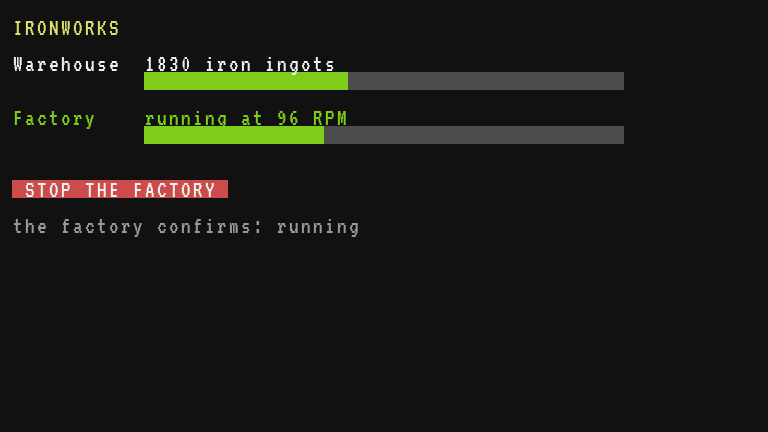
What each part teaches:
- The warehouse knows nobody: it broadcasts, and whoever cares listens. Adding a second dashboard changes nothing on the other computers.
- The factory checks the sender of each order, answers each one with an ack, and keeps running on its last known stock if the warehouse goes silent.
- The dashboard never blocks: one loop, a pending command with a deadline, a timer for retries and for spotting a silent factory.
To go further: show the age of the warehouse report as well, write each order in a log file with fs.append, or have the factory refuse to start while the line is overstressed (kinetic.overstressed()). The cookbook builds similar projects step by step: Factory dashboard and Remote control over the network.