

math
Numbers: rounding, roots, trigonometry, logarithms and chance.
The math library works on numbers. Every number in Brass is the same kind of number (a 64-bit floating point number, like 2, -0.5 or 1e6), so there is no separate integer type: math.floor(7 / 2) gives 3, and 3 prints without a decimal point.
You will use it to turn sensor readings into clean values (math.floor, math.round), to keep a value between two limits (math.min and math.max), to compute angles and distances for a vehicle or a drawing (math.sqrt, math.atan2, math.sin), and to roll dice (math.random).
local stock = 1234
local stacks = math.floor(stock / 64)
local rest = stock % 64
print(stacks .. " stacks and " .. rest .. " items")19 stacks and 18 items
Two operators often replace a call: a // b is math.floor(a / b), and a % b is the remainder that is never negative when b is positive. Both are faster than a function call.
math.floor(x) | Rounds down, towards minus infinity. |
math.ceil(x) | Rounds up, towards plus infinity. |
math.round(x) | Rounds to the nearest whole number. Halves go up: 2.5 gives 3 and -2.5 gives -2. |
math.abs(x) | The absolute value: the distance between x and zero. |
math.min(...) | The smallest of the numbers given. At least one number is required. |
math.max(...) | The largest of the numbers given. At least one number is required. |
math.huge | Infinity: larger than every other number. -math.huge is smaller than every number. |
math.sqrt(x) | The square root. The square root of a negative number is not a number: it prints as nan. |
math.exp(x) | e to the power x. Useful for smooth curves, like a value that decays a little every tick. |
math.log(x [, base]) | The logarithm of x: the power the base must be raised to in order to give x. Without a base, the natural logarithm. |
math.pi | The number π, half a turn in radians. |
math.sin(x) | The sine of an angle in radians. |
math.cos(x) | The cosine of an angle in radians. |
math.tan(x) | The tangent of an angle in radians: the slope of a line at that angle. |
math.atan(y [, x]) | The arc tangent: the angle whose tangent is y / x. With two arguments it does exactly the same as math.atan2. |
math.atan2(y, x) | The angle of the direction from the origin to the point (x, y), in radians. Unlike math.atan(y / x), it knows which quarter the point is in, and does not fail when x is zero. |
math.fmod(a, b) | The remainder of the division of a by b, which keeps the sign of a. The % operator differs for negative numbers: its result has the sign of b. |
math.random([m [, n]]) | A random number. Three forms: |
math.randomseed(seed) | Restarts the random sequence from seed: the same seed always gives the same numbers afterwards. |
Rounding
Rounds down, towards minus infinity.
xnumber- any number
- number
- the largest whole number that is not above
x
print(math.floor(2.9))
print(math.floor(-2.1))
print(7 // 2)2 -3 3
Use it to cut a value into whole parts, for example a count of items into stacks, or a pixel coordinate into a character cell:
local px = 137
local column = math.floor((px - 1) / 6) + 1  -- characters are 6 pixels wide
print("pixel " .. px .. " is in column " .. column)pixel 137 is in column 23
See also math.ceil() math.round()
Rounds up, towards plus infinity.
xnumber- any number
- number
- the smallest whole number that is not below
x
math.ceil is the right tool when you need "enough" of something: crates to hold items, trips of a train, lines to show a list.
local items = 200
print(math.ceil(items / 64) .. " chest slots needed")
print(math.ceil(-2.9))4 chest slots needed -2
See also math.floor() math.round()
Rounds to the nearest whole number. Halves go up: 2.5 gives 3 and -2.5 gives -2.
xnumber- any number
- number
- the nearest whole number
math.round is a Brass extension (Lua has none). It is the same as math.floor(x + 0.5). To keep one decimal, scale the number first:
local speed = 12.3456
print(math.round(speed))
print(math.round(speed * 10) / 10)
print(math.round(-2.5))12 12.3 -2
To show a number with a fixed count of decimals (3.10 rather than 3.1), use string.format("%.2f", x): it returns text, ready to print.
See also math.floor() math.ceil()
The absolute value: the distance between x and zero.
xnumber- any number
- number
xwithout its sign
Handy to compare two values without caring which one is larger, for example to tell whether a contraption is close enough to its target:
local target, position = 64, 61.5
if math.abs(target - position) < 3 then
  print("close enough")
end
print(math.abs(-7))close enough 7
Limits
The smallest of the numbers given. At least one number is required.
xnumber- one or more numbers
- number
- the smallest of them
print(math.min(4, 2, 8))
local fuel = 30
print("burn " .. math.min(fuel, 16) .. " this round")2 burn 16 this round
Together with math.max, it clamps a value between two limits, which you will need all the time with redstone (0 to 15) and with Create speeds (-256 to 256 RPM):
local function clamp(x, low, high)
  return math.max(low, math.min(high, x))
end
print(clamp(22, 0, 15))
print(clamp(-4, 0, 15))
print(clamp(9, 0, 15))15 0 9
See also math.max()
The largest of the numbers given. At least one number is required.
xnumber- one or more numbers
- number
- the largest of them
local readings = {12, 40, 7, 33}
local best = readings[1]
for i = 2, #readings do
  best = math.max(best, readings[i])
end
print("peak: " .. best)peak: 40
See also math.min()
Infinity: larger than every other number. -math.huge is smaller than every number.
- number
- infinity
It is the usual starting value when you look for the smallest of a list: the first value you compare is always smaller.
local distances = {48.2, 12.9, 30}
local nearest = math.huge
for _, d in ipairs(distances) do
  if d < nearest then nearest = d end
end
print(nearest)
print(math.huge, -math.huge)12.9 inf -inf
Powers and roots
The square root. The square root of a negative number is not a number: it prints as nan.
xnumber- a number, zero or more
- number
- the square root of
x
Its everyday use is the distance between two points, with Pythagoras:
local function distance(x1, z1, x2, z2)
  local dx, dz = x2 - x1, z2 - z1
  return math.sqrt(dx * dx + dz * dz)
end
print(math.sqrt(16))
print(distance(0, 0, 30, 40))4 50
Raising to a power needs no function: 2 ^ 10 is 1024, and x ^ 0.5 is another way to write the square root.
e to the power x. Useful for smooth curves, like a value that decays a little every tick.
xnumber- the exponent
- number
- e (2.718...) to the power
x
print(math.exp(0))
print(math.exp(1))1 2.718281828459
See also math.log()
The logarithm of x: the power the base must be raised to in order to give x. Without a base, the natural logarithm.
xnumber- a number above zero
basenumber optional- the base of the logarithm, e (2.718...) when left out
- number
- the logarithm of
x
print(math.log(100, 10))
print(math.log(1024, 2))
print(math.log(math.exp(3)))2 10 3
A logarithm counts digits or doublings: math.floor(math.log(n, 10)) + 1 is the number of digits of a whole number n above zero, handy to align columns of numbers on a screen.
See also math.exp()
Trigonometry
Angles are in radians: a full turn is 2 * math.pi. Create and the sensors of Create Aeronautics talk in degrees, so convert with degrees * math.pi / 180 and radians * 180 / math.pi.
The number π, half a turn in radians.
- number
- 3.14159...
local r = 5
print(math.pi)
print("area: " .. math.pi * r * r)3.1415926535898 area: 78.539816339745
The sine of an angle in radians.
xnumber- an angle in radians
- number
- its sine, between -1 and 1
With math.cos, it places a point on a circle: the base of every round gauge, radar sweep or orbiting sprite drawn with gfx.
local cx, cy, radius = 100, 60, 40
for step = 0, 3 do
  local angle = step * math.pi / 2
  local x = cx + math.round(radius * math.cos(angle))
  local y = cy + math.round(radius * math.sin(angle))
  print(step, x, y)
end0 140 60 1 100 100 2 60 60 3 100 20
On a screen, the same two lines draw a ring of dots. A screen picture like this one is made by running the code:
gfx.clear("black")
local cx, cy = 153, 90
for degrees = 0, 359, 10 do
  local a = degrees * math.pi / 180
  gfx.pixel(cx + math.round(70 * math.cos(a)), cy + math.round(70 * math.sin(a)), "lime", 3)
end
gfx.line(cx, cy, cx + 70, cy, "yellow", 2)
gfx.text(4, 4, "36 POINTS ON A CIRCLE", "white")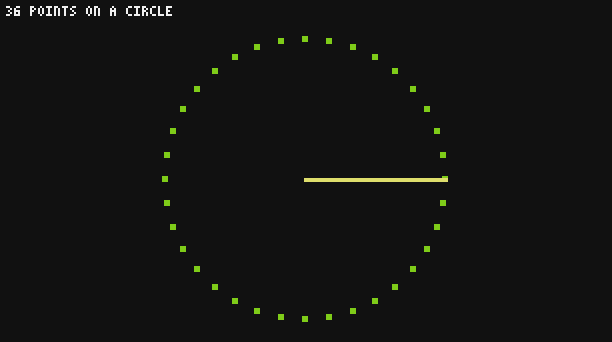
See also math.cos() math.pi
The cosine of an angle in radians.
xnumber- an angle in radians
- number
- its cosine, between -1 and 1
print(math.cos(0))
print(math.cos(math.pi))1 -1
A needle gauge: the needle of a speedometer sweeps half a circle, from the left (0 RPM) to the right (256 RPM). Since a function returns a single value in Brass, the tip of the needle comes back as a table:
local function needle(rpm)
  local angle = math.pi - (rpm / 256) * math.pi
  return {x = math.round(math.cos(angle) * 20), y = math.round(-math.sin(angle) * 20)}
end
local tip = needle(128)
print(tip.x, tip.y)0 -20
See also math.sin() math.pi
The tangent of an angle in radians: the slope of a line at that angle.
xnumber- an angle in radians
- number
- its tangent
print(math.round(math.tan(math.pi / 4)))1
The arc tangent: the angle whose tangent is y / x. With two arguments it does exactly the same as math.atan2.
ynumber- the vertical part, or the slope when
xis left out xnumber optional- the horizontal part, 1 when left out
- number
- an angle in radians
print(math.atan(1) * 180 / math.pi)45
See also math.atan2()
The angle of the direction from the origin to the point (x, y), in radians. Unlike math.atan(y / x), it knows which quarter the point is in, and does not fail when x is zero.
ynumber- the vertical part (or the difference of Z, on a map)
xnumber- the horizontal part (or the difference of X)
- number
- the angle of the point (x, y), between -π and π
This is the function for "which way do I turn?": the direction from a vehicle to its target.
local function heading(fromX, fromZ, toX, toZ)
  local radians = math.atan2(toZ - fromZ, toX - fromX)
  return math.round(radians * 180 / math.pi)
end
print(heading(0, 0, 10, 0))
print(heading(0, 0, 0, 10))
print(heading(0, 0, -10, 0))0 90 180
See also math.atan()
Remainders
The remainder of the division of a by b, which keeps the sign of a. The % operator differs for negative numbers: its result has the sign of b.
anumber- the number to divide
bnumber- the divisor
- number
- the remainder of
a / b, with the sign ofa
print(math.fmod(7, 3), 7 % 3)
print(math.fmod(-7, 3), -7 % 3)1 1 -1 2
For positions that wrap around (a pattern that repeats, a ring of 16 lamps), % is usually what you want, because it never goes below zero.
Chance
Each computer has its own random number generator. It starts from a different point every time the world loads, so two runs of a program do not roll the same numbers, unless you call math.randomseed.
A random number. Three forms:
mnumber optional- the upper bound (with one argument) or the lower bound (with two)
nnumber optional- the upper bound
- number
- a random number
| call | result |
|---|---|
math.random() | a number with decimals, from 0 included to 1 excluded |
math.random(m) | a whole number from 1 to m, both included |
math.random(m, n) | a whole number from m to n, both included |
Decimal bounds are rounded down. When the lower bound is above the upper one, the program stops with the error bad argument to 'random' (interval is empty).
print(math.random(1, 6))   -- a die: 1, 2, 3, 4, 5 or 6
print(math.random(10))     -- 1 to 10
print(math.random())       -- for example 0.71828...
Pick a random element of a list:
local songs = {"cat", "blocks", "chirp", "far", "mall"}
local pick = songs[math.random(#songs)]
print("now playing: " .. pick)
A chance in percent, for an event that should happen one time out of five:
if math.random() < 0.2 then
  print("a creeper appears!")
end
See also math.randomseed()
math.randomseed(seed)
Restarts the random sequence from seed: the same seed always gives the same numbers afterwards.
seednumber- any number
Use a fixed seed to make a "random" world or puzzle that is the same every time, or the time to get a new sequence on each run:
math.randomseed(42)
local a = math.random(1000)
math.randomseed(42)
local b = math.random(1000)
print(a == b)true
math.randomseed(os.time() + os.id() * 1000) -- different on each computer and each runCommon patterns
Map a reading to another scale. A redstone signal (0 to 15) to a speed (0 to 256 RPM), or a stock (0 to the capacity) to the width of a bar on the screen:
local function map(value, inLow, inHigh, outLow, outHigh)
  local t = (value - inLow) / (inHigh - inLow)
  return outLow + t * (outHigh - outLow)
end
print(map(15, 0, 15, 0, 256))
print(math.floor(map(750, 0, 2000, 0, 40)))256 15
Smooth a jumpy reading. Sensors move every tick; a running average hides the noise. Each new reading counts for 20 % of the result:
local smooth = 0
for _, reading in ipairs({10, 12, 30, 11, 10}) do
  smooth = smooth + (reading - smooth) * 0.2
end
print(math.round(smooth * 10) / 10)9.6
See also math.random()