
 Time and timers
Ticks, sleep and timers, the clocks of the computer and the time of day of the world: wait, measure, repeat, and act at nightfall.
Time is everywhere in a contraption: a lamp that blinks, a screen refreshed every second, a press line that runs for 30 seconds, street lights that come on at nightfall. Brass has a few tools for it: sleep to wait, timers to wait while doing something else, os.clock and os.time to measure, and os.day_time to read the time of the Minecraft world.
This page explains how they count, which one to choose, and what happens to time when the computer stops turning or its chunk unloads.
Ticks
Minecraft advances in ticks: 20 per second when the server keeps up, so one tick is 0.05 seconds. A computer runs once per tick, and every tool on this page counts in ticks: sleep, timers, os.time and os.clock.
Durations are given in seconds (sleep(0.5), os.start_timer(2)), and turned into ticks by rounding up. A twentieth of a second is the finest step: nothing in Brass waits less than one tick.
When the server lags and runs fewer than 20 ticks per second, programs slow down with the rest of the world: a sleep(1) still waits 20 ticks, which then take longer than a real second. Create machines slow down the same way, so a program stays in step with the contraption it drives.
sleep
sleep(seconds) pauses the program. It is the simplest way to wait, and the right one for programs that do one thing after another: a blinking lamp, a sequence of pistons, a traffic light cycle.
for _, wanted in ipairs({0, 0.01, 0.06, 0.5, 1}) do
  local start = os.time()
  sleep(wanted)
  print("sleep(" .. wanted .. "): " .. os.time() - start .. " tick(s)")
endsleep(0): 1 tick(s) sleep(0.01): 1 tick(s) sleep(0.06): 2 tick(s) sleep(0.5): 10 tick(s) sleep(1): 20 tick(s)
sleep(0) and sleep(0.01) both wait one tick: it is the shortest pause, handy to let the world apply an output before the next one (see Redstone and Create links). sleep(0.06) waits two ticks, never less than asked.
While the program sleeps it runs no instruction, and it does not handle any event: the events that arrive wait in the queue until the program reads them (Events).
The clocks of the computer: os.time and os.clock
os.time() is the number of ticks since the computer booted. os.clock() is the same in seconds (the ticks divided by 20), so it moves in steps of 0.05.
They are made for durations: read the clock twice and subtract.
local start = os.clock()
sleep(1.5)
print("waited " .. os.clock() - start .. " s")waited 1.5 s
Three things to know about these clocks:
- They start from 0 at each boot: when the computer is switched on, rebooted, or loaded again with its chunk. Their value alone means nothing; only a difference does. Two computers show different values at the same moment.
- They count the ticks the computer really ran. When it stops turning, its clocks stop too (see
Time and timers). - They have nothing to do with the time of day of the world: for that, use
os.day_time.
Measuring a duration
A Smart Observer watches the belt after a Mechanical Press: it lights up each time a pressed item passes, and its signal reaches the left face of the computer. This program shows the time between two items, the real pace of the line:
local last = nil
while true do
  os.pull_event("redstone")
  if rs.get("left") > 0 then   -- the start of a pulse
    local now = os.clock()
    if last ~= nil then
      print(string.format("%.2f s since the previous item", now - last))
    end
    last = now
  end
end
The precision is one tick (0.05 s). To time something shorter, repeat it and divide: time 20 items, not one.
The time of day: os.day_time
os.day_time() is the time of day of the world, from 0 to 23999. A Minecraft day lasts 24000 ticks, that is 20 minutes, and 0 is not midnight but sunrise:
os.day_time() | clock | in the world |
|---|---|---|
| 0 | 06:00 | sunrise |
| 1000 | 07:00 | full day |
| 6000 | 12:00 | noon |
| 12000 | 18:00 | sunset starts |
| 13000 | 19:00 | night: monsters can spawn outside |
| 18000 | 00:00 | midnight |
| 23000 | 05:00 | dawn |
One hour of the world is 1000 ticks (50 real seconds), so an hour is t // 1000 from 6 o'clock. To show the time like a clock:
local function clock_text(t)
  local hours = (t // 1000 + 6) % 24
  local minutes = (t % 1000) * 60 // 1000
  return string.format("%02d:%02d", hours, minutes)
end
print(clock_text(0))
print(clock_text(6000))
print(clock_text(13000))
print(clock_text(18000))
print(clock_text(23500))06:00 12:00 19:00 00:00 05:30
os.day_time only gives the time of the current day, not the date: the number of days since the world was created is not available. Keep a counter of your own (in a file, see below) if you need one.
The time of day can jump: when players sleep through the night, or after a /time set command. With the game rule doDaylightCycle off, it does not move at all. Never wait for an exact value (os.day_time() == 13000 is almost never true, since the program reads the time only now and then): test a range, or notice that a moment has passed since the last reading, like the daily routine below does.
Timers or sleep?
os.start_timer(seconds) returns at once with an id, and a timer event carrying that id joins the queue when the time is up. Its delay is rounded up to whole ticks like sleep, with one tick at least.
sleep(seconds) | os.start_timer(seconds) | |
|---|---|---|
| the program | stops until the end | goes on at once |
| events meanwhile | wait in the queue | handled as they come |
| the end of the wait | sleep returns | a timer event with id |
| good for | sequences: blink, pulse, cycles | programs that react: buttons, screens, messages |
A program may have 256 timers waiting at most; one more stops it with too many timers. A timer cannot be cancelled: forget its id and ignore its event. The Events section shows the usual patterns: a periodic timer in the main loop, and a timeout.
Schedules
Every 5 minutes. Inside a main loop, a timer restarted each time it rings:
local SAVE_EVERY = 5 * 60
local save_timer = os.start_timer(SAVE_EVERY)
while true do
  local e = os.pull_event()
  if e.name == "timer" and e.id == save_timer then
    -- write the counters to a file, send a report...
    save_timer = os.start_timer(SAVE_EVERY)
  end
end
When the work itself takes time, this schedule drifts a little: the next timer starts after the work. When several jobs run at different rates, a deadline for each one keeps them apart and never drifts:
local next_report = os.clock() + 300   -- every 5 minutes
local next_check = os.clock() + 2      -- every 2 seconds
while true do
  local now = os.clock()
  if now >= next_check then
    -- read the vault, update the screen
    next_check = next_check + 2
  end
  if now >= next_report then
    -- send the hourly figures to the control room
    next_report = next_report + 300
  end
  sleep(0.5)
end
At nightfall. Read the time of day every few seconds and act when day turns into night, not while it is night:
local function is_night()
  local t = os.day_time()
  return t >= 13000 and t < 23000
end

local night = nil   -- unknown at the start: the first reading always acts
while true do
  local now_night = is_night()
  if now_night ~= night then
    night = now_night
    rs.set("top", night)   -- the street lamps of the village
  end
  sleep(5)
end
The Day and night lighting recipe builds a full lighting controller on this idea.
Example: a clock on the screen
The time of the world in big digits, refreshed every second, on a blue sky by day and a dark one at night. The screen below is what a computer shows at noon.
local function clock_text(t)
  local hours = (t // 1000 + 6) % 24
  local minutes = (t % 1000) * 60 // 1000
  return string.format("%02d:%02d", hours, minutes)
end

-- gfx letters are 3 pixels wide plus a 1 pixel gap, times the scale
local function centered(y, text, colour, scale)
  local width = #text * 4 * scale - scale
  gfx.text((gfx.size().w - width) // 2 + 1, y, text, colour, scale)
end

while true do
  local t = os.day_time()
  local night = t >= 13000 and t < 23000
  gfx.clear(night and "blue" or "light_blue")
  centered(50, clock_text(t), "white", 12)
  centered(130, night and "NIGHT" or "DAY", night and "yellow" or "white", 3)
  sleep(1)
end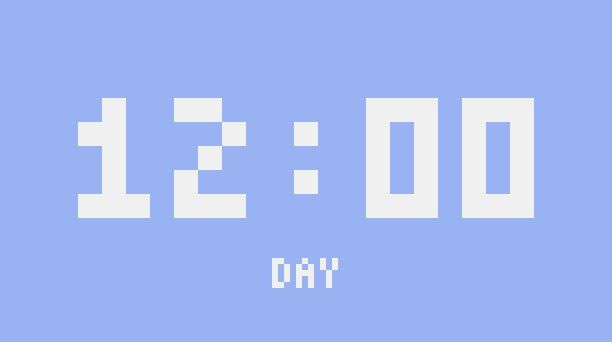
To show the time on a Create Display Board or a Nixie Tube as well, add display.set({"Time", clock_text(t)}) in the loop and point a Display Link at the computer (display).
Example: a daily routine
A Create village that lives by the clock: the mill starts at sunrise and stops at sunset, a bell rings at noon, the street lamps light up at night. Each line of the routine is a time and an output. The mill turns through a Clutch on the left face: a powered clutch stops it, so the mill starts when the output goes off.
local routine = {
  {at = 0,     side = "left",  on = false},   -- 06:00 clutch released: the mill starts
  {at = 6000,  side = "right", on = true},    -- 12:00 the bell rings
  {at = 6100,  side = "right", on = false},   --       and stops
  {at = 12000, side = "left",  on = true},    -- 18:00 clutch powered: the mill stops
  {at = 13000, side = "top",   on = true},    -- 19:00 street lamps on
  {at = 23000, side = "top",   on = false},   -- 05:00 street lamps off
}

-- has the moment "at" passed between two readings? (the day wraps from 23999 to 0)
local function passed(at, from, to)
  if from <= to then
    return at > from and at <= to
  end
  return at > from or at <= to
end

local last = os.day_time()
while true do
  sleep(1)
  local now = os.day_time()
  for _, step in ipairs(routine) do
    if passed(step.at, last, now) then
      rs.set(step.side, step.on)
    end
  end
  last = now
end
Because it looks at what has passed since the last reading, the routine survives jumps: when the players sleep through the night, every step between the evening and the morning runs at the next reading, and the outputs end up as they should be in the morning.
A computer starts with all its outputs off. To put things right after a reboot in the middle of the day, set each output once at the start from the current time, before the loop.
Example: a stopwatch
A stopwatch for a race track: Enter (or a pressure plate wired to the left face) starts and stops it, r resets it. A timer redraws the screen ten times a second, while the keys and the plate are handled at once.
local running = false
local started_at = 0   -- os.clock() when the current run started
local banked = 0       -- seconds counted by the previous runs

local function total()
  if running then
    return banked + os.clock() - started_at
  end
  return banked
end

local function draw()
  local tenths = math.floor(total() * 10)
  local text = string.format("%02d:%04.1f", tenths // 600, (tenths % 600) / 10)
  gfx.clear("black")
  gfx.text(59, 50, text, running and "lime" or "white", 7)
  gfx.text(96, 130, "ENTER: START/STOP    R: RESET", "gray", 1)
end

local function start_stop()
  if running then
    banked = total()
    running = false
  else
    started_at = os.clock()
    running = true
  end
end

draw()
local redraw = os.start_timer(0.1)
while true do
  local e = os.pull_event()
  if e.name == "timer" and e.id == redraw then
    draw()
    redraw = os.start_timer(0.1)
  elseif e.name == "key" and e.key == "enter" then
    start_stop()
  elseif e.name == "redstone" and rs.get("left") > 0 then
    start_stop()
  elseif e.name == "char" and e.char == "r" and not running then
    banked = 0
    draw()
  end
end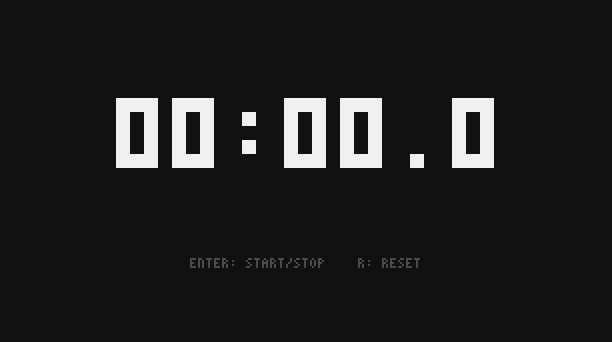
The time comes from os.clock, not from counting redraws: if the computer slows down, the screen updates less often but the time stays right.
When the rotation stops
A computer runs on rotation. Its speed only changes how many instructions it runs per tick, not how time flows for it:
- A slower rotation slows the program, not the clocks. At 32 RPM a Personal Computer runs an eighth of its 24,000 instructions per second, but
sleep(1)still waits 20 ticks and a timer still rings on time. What takes longer is the code between two waits. SeeSpeed, memory and limits. - No rotation (or an overstressed network) freezes the computer: the program stops where it is,
os.clockandos.timestop, sleeps and timers stop counting, the redstone outputs keep their value. Events still join the queue (256 at most). When the rotation comes back, everything goes on from where it was.
Above 256 RPM the computer is not faster: 256 RPM is full speed.
When the chunk unloads
When nobody is near and its chunk unloads (or the server stops), the computer shuts down: the program ends, the memory is lost, the redstone outputs and Redstone Link signals are released. When the chunk loads again, the computer boots: its clocks start from 0, and it runs its startup file if there is one.
So a program that must keep going across visits should:
- live in the file named
startup, so that it starts again by itself; - save what it must remember (counters, the state of a machine, the last day seen) in a file with
fs.write(), and read it back at the start withfs.read(); - set its outputs at the start, since they are all off after a boot.
-- a counter of pressed ingots that survives reboots and chunk unloads
local count = tonumber(fs.read("count.txt") or "0")
while true do
  os.pull_event("redstone")
  if rs.get("left") > 0 then
    count = count + 1
    fs.write("count.txt", tostring(count))
  end
end
Timers do not survive either: a 10-minute timer started just before the chunk unloads never rings. For long schedules, write the deadline in a file, or use os.day_time, which belongs to the world and keeps moving even while the computer is away.