
 Overstress guard
Read the stress and capacity of a Create network, slow a Rotation Speed Controller down before the network overstresses, sound an alarm and draw a stress bar and its history.
When a Create network uses more stress than its generators provide, everything on it stops: the crushers, the press, the belts, even the computers it turns. It happens when you add one more machine, or when a contraption starts and its load joins the network at once. Players usually build a big safety margin, which wastes water wheels.
This project lets a computer keep the margin for you. A Rotation Speed Controller feeds the machines; the computer reads the stress and the capacity of the network through it, and when the network is close to its limit, it lowers the controller's speed. Machines behind the controller use stress in proportion to their speed, so a slower line uses less. When there is room again, the computer brings the speed back up to the one you asked for. A lamp lights while the network is close to the limit, and the screen draws a stress bar and the history of the last minute.
It shows how to drive a Create kinetic block (Create kinetic blocks), and how to draw a live chart with gfx, including the trick that makes a scrolling graph cheap: gfx.scroll.
What you need
- A computer that draws: a Transistor Mainframe or newer (
gfxdoes not exist on the Tube Computer). A Personal Computer shows the colours of the zones; the Transistor Mainframe and the Minicomputer show everything in one colour. - A Rotation Speed Controller between your generators and the machines, touching a side of the computer. With a Minicomputer or newer it can also be on a Data Cable: its name is then
kinetic@x,y,z. - A Redstone Lamp (or a Bell) on top of the computer: the alarm.
- The computer needs its own rotation too, like every computer: a shaft into its back, from another network (a water wheel of its own). A computer turned by the network it guards freezes with it during an overstress, and could not bring it back.
Seen from above (the large cogwheel of the controller is on top of it, and drives the machines):
                         +------------+
  water wheels ========= |    RSC     | =========  the shaft goes on
                         +------------+
                         |  Computer  |  -> screen      lamp on top of the computer
                    ===> +------------+
            shaft into the back of the computer
The controller touches the computer's side. Set CONTROLLER to that side, "left" or "right" as seen when you face the screen.
How Create counts stress
Each machine has a stress impact per RPM: a Mechanical Press at 64 RPM uses twice what it uses at 32 RPM. Each generator gives a capacity (a water wheel turning at its speed gives a fixed amount). Both are in stress units (SU). The network is overstressed when the sum of the impacts goes above the sum of the capacities.
The controller sits in the same network as the machines it drives: kinetic.stress() and kinetic.capacity() called on it read the totals of the whole network, the generators and every machine before and after it. And since the machines behind it use stress in proportion to its speed, kinetic.set_speed() is a direct handle on the load.
| method | returns |
|---|---|
controller.stress() | the stress used by the network, in SU |
controller.capacity() | the stress the generators can provide, in SU (0 without rotation) |
controller.overstressed() | true when the network is overstressed (everything stopped) |
controller.set_speed(rpm) | sets the target speed: a whole number (the controller goes from -256 to 256 RPM) |
Two details matter. set_speed needs a whole number: set_speed(90.5) stops the program with bad argument #1 to 'set_speed' (number has no integer representation). And each new speed rebuilds the kinetic network, so the program only calls it when the speed really changes.
The program, step by step
1. The settings
local CONTROLLER = "left"   -- the Rotation Speed Controller: a side or "kinetic@x,y,z"
local ALARM = "top"         -- the lamp: lit while the network is near its limit
local DIRECTION = 1         -- 1 or -1: which way the machines turn
local MIN_SPEED = 16        -- the guard never goes slower than this
local STEP = 8              -- RPM changed at each check
local HIGH = 0.90           -- above 90 % of the capacity: slow down
local LOW = 0.75            -- below 75 %: speed up again
local PERIOD = 0.5          -- seconds between two checks

local target = 128          -- the speed you want; the + and - keys change it
Between LOW and HIGH, the guard holds the speed as it is. Without that band, it would speed up and slow down at every check around a single limit.
2. Reading the network
local controller = nil

local function read_network()
  return {
    stress = controller.stress(),
    capacity = controller.capacity(),
    over = controller.overstressed(),
  }
end
A function returns one value in Brass, so the three readings come back in a table. The program calls it through pcall: if the controller is broken or its chunk unloads, the reading fails with an error instead of stopping the program.
3. Deciding the speed
Each check computes usage, the share of the capacity in use, and chooses a new speed:
- overstressed: straight down to
MIN_SPEED, to restart the network as fast as possible; - **above
HIGH**: oneSTEPslower (if it is already atMIN_SPEED, the guard can do no more: "AT MINIMUM"); - target lowered with the
-key: down to the target at once; - **below
LOW** and slower than the target: oneSTEPfaster; - otherwise: hold.
local speed = MIN_SPEED     -- the speed the guard has set, without the direction
local stress, capacity, usage = 0, 0, 0
local mode = "STARTING"

local function apply(new_speed)
  if new_speed == speed then return end
  local r = pcall(controller.set_speed, new_speed * DIRECTION)
  if r.ok then speed = new_speed else mode = "NO CONTROLLER" end
end

local function check()
  local r = pcall(read_network)
  if not r.ok then
    mode = "NO CONTROLLER"
    usage = 0
    rs.set(ALARM, true)
    return
  end
  stress = r.value.stress
  capacity = r.value.capacity
  if capacity <= 0 then
    usage = 0
    mode = "NO POWER"
    rs.set(ALARM, false)
    return
  end
  usage = stress / capacity
  local wanted = speed
  if r.value.over then
    wanted = MIN_SPEED
    mode = "OVERSTRESSED"
  elseif usage > HIGH then
    wanted = math.max(MIN_SPEED, speed - STEP)
    if wanted == speed then mode = "AT MINIMUM" else mode = "SLOWING DOWN" end
  elseif speed > target then
    wanted = target
    mode = "OK"
  elseif usage < LOW and speed < target then
    wanted = math.min(target, speed + STEP)
    mode = "SPEEDING UP"
  elseif speed < target then
    mode = "HOLDING"
  else
    mode = "OK"
  end
  apply(wanted)
  rs.set(ALARM, r.value.over or usage > HIGH)
end
Without rotation (capacity is 0) there is nothing to protect: the guard waits, and does not divide by zero.
4. The stress bar
The drawing uses the pixel layer of the screen: 306 x 171 pixels on a Personal Computer, 6 x 9 per character. The bar spans the width of the screen under the third text row. Two white marks show LOW and HIGH, with their percentage written in the small 3 x 5 font of gfx.text.
local BX, BY, BW, BH = 7, 30, 294, 14     -- the bar: x, y, width, height in pixels

local function zone_color(u)
  if u >= HIGH then return "red" end
  if u >= LOW then return "yellow" end
  return "lime"
end

local function draw_bar(u)
  gfx.rect(BX, BY, BW, BH, "gray", true)
  local w = math.floor(math.min(1, u) * BW + 0.5)
  if w > 0 then gfx.rect(BX, BY, w, BH, zone_color(u), true) end
  for _, level in ipairs({LOW, HIGH}) do
    local x = BX + math.floor(level * BW + 0.5)
    gfx.line(x, BY - 2, x, BY + BH + 1, "white")
    gfx.text(x - 3, BY + BH + 4, tostring(math.floor(level * 100 + 0.5)), "light_gray")
  end
end
gfx.rect(x, y, w, h, color, true) fills the rectangle; drawing the grey background first and the coloured part over it is simpler than drawing two pieces side by side.
5. The history graph, with gfx.scroll
Redrawing a whole graph at every check would cost a loop over every sample. Instead, the program shifts the picture of the graph three pixels to the left with gfx.scroll, and draws only the newest column at the right edge. Each column also gets one pixel of each threshold line, which draws them as dotted lines that scroll with the data.
local GX, GY, GW, GH = 7, 93, 294, 66     -- the graph area, in pixels
local COL = 3                             -- width of one sample

local function level_y(u)
  return GY + GH - math.floor(math.min(1, u) * GH + 0.5)
end

local function graph_column(u)
  gfx.scroll(-COL, 0, GX, GY, GW, GH)
  local x = GX + GW - COL
  gfx.rect(x, GY, COL, GH, "black", true)
  local h = GY + GH - level_y(u)
  if h > 0 then gfx.rect(x, GY + GH - h, COL, h, zone_color(u), true) end
  gfx.pixel(x + 1, level_y(HIGH), "red")
  gfx.pixel(x + 1, level_y(LOW), "yellow")
end
With 294 pixels and 3 pixels per sample, the graph holds 98 samples: 49 seconds at one check every half second.
6. The text and the screen
The text goes on top of the drawing: term.clear erases the characters but leaves the pixels alone, so the program can rewrite every line at each check without touching the graph.
local MODE_COLORS = {
  ["STARTING"] = "light_gray", ["OK"] = "lime", ["SPEEDING UP"] = "light_blue",
  ["HOLDING"] = "light_gray", ["SLOWING DOWN"] = "yellow", ["AT MINIMUM"] = "red",
  ["OVERSTRESSED"] = "red", ["NO POWER"] = "gray", ["NO CONTROLLER"] = "red",
}

local function draw()
  term.set_bg(term.colors.black)
  term.clear()
  term.set_cursor(1, 1)
  term.set_bg(term.colors.blue)
  term.set_fg(term.colors.white)
  term.write(string.format(" %-49s ", "OVERSTRESS GUARD"))
  term.set_bg(term.colors.black)
  term.set_cursor(1, 3)
  term.write(string.format(" Stress   %d / %d SU", math.floor(stress + 0.5), math.floor(capacity + 0.5)))
  term.set_cursor(44, 3)
  term.set_fg(term.colors[zone_color(usage)])
  term.write(string.format("%5d %%", math.floor(usage * 100 + 0.5)))
  draw_bar(usage)
  term.set_cursor(1, 7)
  term.set_fg(term.colors.white)
  term.write(string.format(" Speed    %d RPM (target %d RPM)", speed * DIRECTION, target * DIRECTION))
  term.set_cursor(1, 8)
  term.write(" State    ")
  term.set_fg(term.colors[MODE_COLORS[mode]])
  term.write(mode)
  term.set_cursor(1, 10)
  term.set_fg(term.colors.gray)
  term.write(" Usage, last " .. math.floor(GW / COL * PERIOD) .. " s")
  term.set_cursor(1, 19)
  term.write(" + and - change the target speed")
end
term.colors[zone_color(usage)] turns a colour name into the number term.set_fg expects: term.colors.red and term.colors["red"] are the same thing. %% in string.format writes a percent sign.
7. Starting and the main loop
At the start, the guard wraps the controller and sets it to MIN_SPEED: a soft start, the machines speed up step by step instead of all at once, so the guard sees the load grow. If the block on that side is kinetic but not a Rotation Speed Controller, set_speed fails, and the program stops with a clear message.
local function setup()
  controller = peripheral.wrap(CONTROLLER)
  if controller == nil or controller.set_speed == nil then
    error("no Rotation Speed Controller on '" .. CONTROLLER .. "'")
  end
  local r = pcall(controller.set_speed, MIN_SPEED * DIRECTION)
  if not r.ok then error(r.error) end
  term.set_bg(term.colors.black)
  term.clear()
  gfx.clear()
  gfx.rect(GX - 1, GY - 1, GW + 2, GH + 2, "gray")
end

setup()
local timer = os.start_timer(PERIOD)
while true do
  local e = os.pull_event()
  if e.name == "timer" and e.id == timer then
    check()
    graph_column(usage)
    draw()
    timer = os.start_timer(PERIOD)
  elseif e.name == "char" and e.char == "+" then
    target = math.min(256, target + STEP)
    draw()
  elseif e.name == "char" and e.char == "-" then
    target = math.max(MIN_SPEED, target - STEP)
    draw()
  end
end
The char event carries the character typed in the terminal, so the keys work while the terminal is open.
The whole program
-- Overstress guard: reads the stress of a Create network through a Rotation
-- Speed Controller, slows it down before the network overstresses, speeds it
-- up again when there is room, and draws a stress bar and its history.

local CONTROLLER = "left"   -- the Rotation Speed Controller: a side or "kinetic@x,y,z"
local ALARM = "top"         -- the lamp: lit while the network is near its limit
local DIRECTION = 1         -- 1 or -1: which way the machines turn
local MIN_SPEED = 16        -- the guard never goes slower than this
local STEP = 8              -- RPM changed at each check
local HIGH = 0.90           -- above 90 % of the capacity: slow down
local LOW = 0.75            -- below 75 %: speed up again
local PERIOD = 0.5          -- seconds between two checks

local target = 128          -- the speed you want; the + and - keys change it

local BX, BY, BW, BH = 7, 30, 294, 14     -- the bar, in pixels
local GX, GY, GW, GH = 7, 93, 294, 66     -- the graph area, in pixels
local COL = 3                             -- width of one sample

local MODE_COLORS = {
  ["STARTING"] = "light_gray", ["OK"] = "lime", ["SPEEDING UP"] = "light_blue",
  ["HOLDING"] = "light_gray", ["SLOWING DOWN"] = "yellow", ["AT MINIMUM"] = "red",
  ["OVERSTRESSED"] = "red", ["NO POWER"] = "gray", ["NO CONTROLLER"] = "red",
}

local controller = nil
local speed = MIN_SPEED     -- the speed the guard has set, without the direction
local stress, capacity, usage = 0, 0, 0
local mode = "STARTING"

-- Reading and deciding ---------------------------------------------------------

local function read_network()
  return {
    stress = controller.stress(),
    capacity = controller.capacity(),
    over = controller.overstressed(),
  }
end

local function apply(new_speed)
  if new_speed == speed then return end
  local r = pcall(controller.set_speed, new_speed * DIRECTION)
  if r.ok then speed = new_speed else mode = "NO CONTROLLER" end
end

local function check()
  local r = pcall(read_network)
  if not r.ok then
    mode = "NO CONTROLLER"
    usage = 0
    rs.set(ALARM, true)
    return
  end
  stress = r.value.stress
  capacity = r.value.capacity
  if capacity <= 0 then
    usage = 0
    mode = "NO POWER"
    rs.set(ALARM, false)
    return
  end
  usage = stress / capacity
  local wanted = speed
  if r.value.over then
    wanted = MIN_SPEED
    mode = "OVERSTRESSED"
  elseif usage > HIGH then
    wanted = math.max(MIN_SPEED, speed - STEP)
    if wanted == speed then mode = "AT MINIMUM" else mode = "SLOWING DOWN" end
  elseif speed > target then
    wanted = target
    mode = "OK"
  elseif usage < LOW and speed < target then
    wanted = math.min(target, speed + STEP)
    mode = "SPEEDING UP"
  elseif speed < target then
    mode = "HOLDING"
  else
    mode = "OK"
  end
  apply(wanted)
  rs.set(ALARM, r.value.over or usage > HIGH)
end

-- Drawing ----------------------------------------------------------------------

local function zone_color(u)
  if u >= HIGH then return "red" end
  if u >= LOW then return "yellow" end
  return "lime"
end

local function draw_bar(u)
  gfx.rect(BX, BY, BW, BH, "gray", true)
  local w = math.floor(math.min(1, u) * BW + 0.5)
  if w > 0 then gfx.rect(BX, BY, w, BH, zone_color(u), true) end
  for _, level in ipairs({LOW, HIGH}) do
    local x = BX + math.floor(level * BW + 0.5)
    gfx.line(x, BY - 2, x, BY + BH + 1, "white")
    gfx.text(x - 3, BY + BH + 4, tostring(math.floor(level * 100 + 0.5)), "light_gray")
  end
end

local function level_y(u)
  return GY + GH - math.floor(math.min(1, u) * GH + 0.5)
end

local function graph_column(u)
  gfx.scroll(-COL, 0, GX, GY, GW, GH)
  local x = GX + GW - COL
  gfx.rect(x, GY, COL, GH, "black", true)
  local h = GY + GH - level_y(u)
  if h > 0 then gfx.rect(x, GY + GH - h, COL, h, zone_color(u), true) end
  gfx.pixel(x + 1, level_y(HIGH), "red")
  gfx.pixel(x + 1, level_y(LOW), "yellow")
end

local function draw()
  term.set_bg(term.colors.black)
  term.clear()
  term.set_cursor(1, 1)
  term.set_bg(term.colors.blue)
  term.set_fg(term.colors.white)
  term.write(string.format(" %-49s ", "OVERSTRESS GUARD"))
  term.set_bg(term.colors.black)
  term.set_cursor(1, 3)
  term.write(string.format(" Stress   %d / %d SU", math.floor(stress + 0.5), math.floor(capacity + 0.5)))
  term.set_cursor(44, 3)
  term.set_fg(term.colors[zone_color(usage)])
  term.write(string.format("%5d %%", math.floor(usage * 100 + 0.5)))
  draw_bar(usage)
  term.set_cursor(1, 7)
  term.set_fg(term.colors.white)
  term.write(string.format(" Speed    %d RPM (target %d RPM)", speed * DIRECTION, target * DIRECTION))
  term.set_cursor(1, 8)
  term.write(" State    ")
  term.set_fg(term.colors[MODE_COLORS[mode]])
  term.write(mode)
  term.set_cursor(1, 10)
  term.set_fg(term.colors.gray)
  term.write(" Usage, last " .. math.floor(GW / COL * PERIOD) .. " s")
  term.set_cursor(1, 19)
  term.write(" + and - change the target speed")
end

-- Start and main loop ------------------------------------------------------------

local function setup()
  controller = peripheral.wrap(CONTROLLER)
  if controller == nil or controller.set_speed == nil then
    error("no Rotation Speed Controller on '" .. CONTROLLER .. "'")
  end
  local r = pcall(controller.set_speed, MIN_SPEED * DIRECTION)
  if not r.ok then error(r.error) end
  term.set_bg(term.colors.black)
  term.clear()
  gfx.clear()
  gfx.rect(GX - 1, GY - 1, GW + 2, GH + 2, "gray")
end

setup()
local timer = os.start_timer(PERIOD)
while true do
  local e = os.pull_event()
  if e.name == "timer" and e.id == timer then
    check()
    graph_column(usage)
    draw()
    timer = os.start_timer(PERIOD)
  elseif e.name == "char" and e.char == "+" then
    target = math.min(256, target + STEP)
    draw()
  elseif e.name == "char" and e.char == "-" then
    target = math.max(MIN_SPEED, target - STEP)
    draw()
  end
endWhat the screen looks like
The drawing code of the program, fed with 98 made-up samples instead of a real network: the load grows, the guard holds it under 90 %, a big contraption starts and overstresses the network for a moment, the guard drops to MIN_SPEED and climbs back. The last reading: 1792 SU used out of 2048, the guard holds 96 RPM instead of 128.
local HIGH, LOW, PERIOD, DIRECTION = 0.90, 0.75, 0.5, 1
local BX, BY, BW, BH = 7, 30, 294, 14
local GX, GY, GW, GH = 7, 93, 294, 66
local COL = 3
local MODE_COLORS = {
  ["STARTING"] = "light_gray", ["OK"] = "lime", ["SPEEDING UP"] = "light_blue",
  ["HOLDING"] = "light_gray", ["SLOWING DOWN"] = "yellow", ["AT MINIMUM"] = "red",
  ["OVERSTRESSED"] = "red", ["NO POWER"] = "gray", ["NO CONTROLLER"] = "red",
}
local target, speed = 128, 96
local stress, capacity, usage = 1792, 2048, 0.875
local mode = "HOLDING"

local function zone_color(u)
  if u >= HIGH then return "red" end
  if u >= LOW then return "yellow" end
  return "lime"
end

local function draw_bar(u)
  gfx.rect(BX, BY, BW, BH, "gray", true)
  local w = math.floor(math.min(1, u) * BW + 0.5)
  if w > 0 then gfx.rect(BX, BY, w, BH, zone_color(u), true) end
  for _, level in ipairs({LOW, HIGH}) do
    local x = BX + math.floor(level * BW + 0.5)
    gfx.line(x, BY - 2, x, BY + BH + 1, "white")
    gfx.text(x - 3, BY + BH + 4, tostring(math.floor(level * 100 + 0.5)), "light_gray")
  end
end

local function level_y(u)
  return GY + GH - math.floor(math.min(1, u) * GH + 0.5)
end

local function graph_column(u)
  gfx.scroll(-COL, 0, GX, GY, GW, GH)
  local x = GX + GW - COL
  gfx.rect(x, GY, COL, GH, "black", true)
  local h = GY + GH - level_y(u)
  if h > 0 then gfx.rect(x, GY + GH - h, COL, h, zone_color(u), true) end
  gfx.pixel(x + 1, level_y(HIGH), "red")
  gfx.pixel(x + 1, level_y(LOW), "yellow")
end

local function draw()
  term.set_bg(term.colors.black)
  term.clear()
  term.set_cursor(1, 1)
  term.set_bg(term.colors.blue)
  term.set_fg(term.colors.white)
  term.write(string.format(" %-49s ", "OVERSTRESS GUARD"))
  term.set_bg(term.colors.black)
  term.set_cursor(1, 3)
  term.write(string.format(" Stress   %d / %d SU", math.floor(stress + 0.5), math.floor(capacity + 0.5)))
  term.set_cursor(44, 3)
  term.set_fg(term.colors[zone_color(usage)])
  term.write(string.format("%5d %%", math.floor(usage * 100 + 0.5)))
  draw_bar(usage)
  term.set_cursor(1, 7)
  term.set_fg(term.colors.white)
  term.write(string.format(" Speed    %d RPM (target %d RPM)", speed * DIRECTION, target * DIRECTION))
  term.set_cursor(1, 8)
  term.write(" State    ")
  term.set_fg(term.colors[MODE_COLORS[mode]])
  term.write(mode)
  term.set_cursor(1, 10)
  term.set_fg(term.colors.gray)
  term.write(" Usage, last " .. math.floor(GW / COL * PERIOD) .. " s")
  term.set_cursor(1, 19)
  term.write(" + and - change the target speed")
end

-- made-up samples: a load that grows, held under 90 %, then an overstress
local function sample(i)
  if i <= 30 then return 0.35 + i * 0.017 end
  if i <= 55 then return 0.84 + 0.04 * math.sin(i * 0.7) end
  if i <= 58 then return 1.08 end
  if i <= 62 then return 0.30 + (i - 58) * 0.05 end
  return math.min(0.875, 0.50 + (i - 62) * 0.02)
end

gfx.clear()
gfx.rect(GX - 1, GY - 1, GW + 2, GH + 2, "gray")
for i = 1, 98 do
  graph_column(sample(i))
end
draw()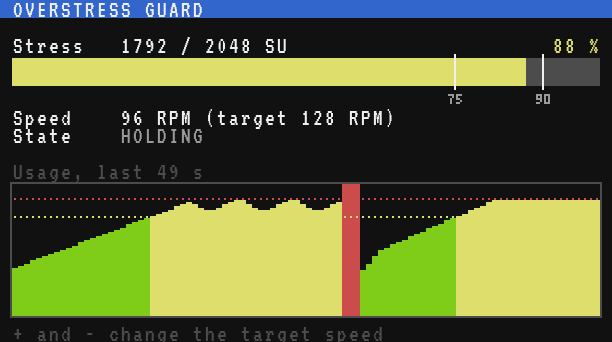
Testing it
- Power a Rotation Speed Controller from a few water wheels, and put a heavy load behind it: several Mechanical Presses, a row of Crushing Wheels, or a big fan wall. Place the computer against the controller, the lamp on top.
- Run the program: the speed starts at 16 RPM and climbs by 8 every half second. Watch the bar grow.
- If the load is heavy enough, the climb stops before the bar reaches the red zone: the state reads
HOLDING, and the speed stays below 128. - Add another press while it runs: the bar jumps up, the lamp lights, the state reads
SLOWING DOWN, and the speed drops until the bar is back under 90 %. - Break a water wheel: the capacity falls, the network may overstress for a moment; the guard drops to the minimum and climbs back to what the remaining wheels can carry.
- Type
-a few times in the terminal: the target falls, and the controller follows at once.
Variations
- A bell or a Redstone Link. Replace
rs.set(ALARM, ...)withlink.set("minecraft:redstone", "minecraft:bell", ...)to sound the alarm anywhere in the base. Ring it only when the state changes toOVERSTRESSED, like the bell ofStock alarm and display board. - Several lines, one guard. Wrap several controllers, each with its own priority. When the network is short, slow down the least important line first (the cobblestone generator before the iron).
- A log. Append the time and the usage to a file every minute, to find out when the network is short (
Data logger and graph). - A remote screen. Send
usageandmodeto the factory dashboard withnet.broadcast(Factory dashboard). - A smarter step. The stress of the machines behind the controller grows with the speed, so the speed that brings the usage back to, say, 85 % is about
speed * 0.85 / usage. Use it instead ofSTEPfor a faster reaction, rounded withmath.floorbecauseset_speedwants a whole number.