
 Touch control panel
A wall of monitors with one button per machine: a press switches a Redstone Link frequency, and the states come back after a reboot.
Your factory has grown: crushers on one side, presses and mixers on the other, a fan line for washing, drills in the quarry. Each has its lever somewhere, and turning the whole thing off at night means a walk. This project gathers the switches on one touch screen: a wall of monitors in the control room, one big button per machine. A right-click on a button starts or stops that machine through a Redstone Link frequency, wherever it is in the base. The states are saved in a file, so after a server restart every machine comes back as you left it.
It is the reference for clickable screens in Brass: drawing buttons with gfx and term, reading click events (e.x, e.y, e.source), and keeping a small state file with fs.
What you need
- A Personal Computer (or a Modern Computer): the colours make the panel readable at a glance. Any computer from the Transistor Mainframe on runs it, in one colour.
- A wall of LCD Monitors (or CRT Monitors), for instance 3 wide and 2 high, touching the computer. Monitors of the same type side by side, facing the same way, form one screen that shows the computer's terminal. A right-click on it presses the screen while the program waits for clicks; sneak and right-click to open the terminal instead.
- One Redstone Link per machine, set to receive, next to the block that controls the machine. Each one gets two items in its frequency slots: the program uses a machine item and a Lever (
Crushing Wheel + Leverfor the crushers,Mechanical Press + Leverfor the presses...). - For Create machines, a Clutch on the shaft that drives each line, with the Redstone Link next to it.
Seen from the side:
      +-------+-------+-------+
      |  LCD  |  LCD  |  LCD  |        the touch screen, facing the room
      +-------+-------+-------+
      |  LCD  |  LCD  |  LCD  |
      +-------+-------+-------+
              |  PC   |  <- the computer behind the wall, touching it
              +-------+

  At each machine:   shaft ==[Clutch]== shaft ==> Mechanical Press
[Redstone Link, receiver: Mechanical Press + Lever]A powered Clutch disconnects its shaft. To run a machine behind a clutch, the program must transmit nothing, and to stop it, transmit a signal. The setting clutch = true reverses the signal for those machines. A lamp, on the contrary, lights while it is powered: no clutch for the lights.
The program, step by step
1. The machines
One line per button: the name shown, the two items of the frequency, and whether the machine runs through a clutch.
local STATE_FILE = "panel/state"
local MACHINES = {
  {name = "Crushers", freq = {"create:crushing_wheel", "minecraft:lever"}, clutch = true},
  {name = "Presses", freq = {"create:mechanical_press", "minecraft:lever"}, clutch = true},
  {name = "Mixers", freq = {"create:mechanical_mixer", "minecraft:lever"}, clutch = true},
  {name = "Washing fans", freq = {"create:encased_fan", "minecraft:lever"}, clutch = true},
  {name = "Quarry drills", freq = {"create:mechanical_drill", "minecraft:lever"}, clutch = true},
  {name = "Lights", freq = {"minecraft:redstone_lamp", "minecraft:lever"}},
}
local BW, BH = 23, 4       -- size of a button, in characters
Item ids must exist: link.set stops with unknown item 'create:crushing_wheels' on a typo. The program checks them all at start (step 3), so a mistake shows at once.
2. Switching a machine
link.set transmits on a frequency from the computer itself, with no Redstone Link block next to it. true is strength 15, false is 0:
local last = "nothing yet"   -- the last action, for the status line

local function apply(m)
  local power = m.on
  if m.clutch then power = not m.on end
  link.set(m.freq[1], m.freq[2], power)
end

local function set_machine(m, on, source)
  m.on = on
  apply(m)
  local word = "OFF"
  if on then word = "ON" end
  last = m.name .. " " .. word .. " (" .. source .. ")"
end

local function all_off(source)
  for _, m in ipairs(MACHINES) do
    m.on = false
    apply(m)
  end
  last = "all off (" .. source .. ")"
end
A computer stops transmitting on every frequency when it reboots or shuts down: the clutches of the Create lines then receive nothing, and their machines run. That is why the program applies the saved states again as soon as it starts.
3. Saving and loading the states
The state file is plain text, one machine per line: Presses=1. string.split cuts the file into lines, and each line at the =:
local function save()
  local lines = {}
  for _, m in ipairs(MACHINES) do
    local value = "0"
    if m.on then value = "1" end
    table.insert(lines, m.name .. "=" .. value)
  end
  fs.write(STATE_FILE, table.concat(lines, "\n"))
end

local function load_states()
  local text = fs.read(STATE_FILE)
  if text == nil then return end
  for _, line in ipairs(text:split("\n")) do
    local parts = line:split("=")
    for _, m in ipairs(MACHINES) do
      if #parts == 2 and m.name == parts[1] then m.on = parts[2] == "1" end
    end
  end
end
The machines are found by name, so you can reorder MACHINES or add one without losing the others' states.
local text = "Crushers=1\nPresses=0\nLights=1"
for _, line in ipairs(text:split("\n")) do
  local parts = line:split("=")
  print(parts[1], parts[2] == "1")
endCrushers true Presses false Lights true
setup places the buttons in two columns, loads the states and applies them. A wrong item id stops the program here with the name of the machine:
local function setup()
  for i, m in ipairs(MACHINES) do
    m.x = 3 + ((i - 1) % 2) * 24
    m.y = 3 + ((i - 1) // 2) * 5
    m.on = false
  end
  load_states()
  for _, m in ipairs(MACHINES) do
    local r = pcall(apply, m)
    if not r.ok then error("machine '" .. m.name .. "': " .. r.error) end
  end
end4. Drawing the buttons
A button is drawn in two layers. Below, with gfx, a filled rectangle, a border two pixels thick and a round lamp. Above, with term, the number and the name of the machine, and its state. The pixel layer lies under the text, so the characters show on top of the coloured rectangle.
A character is 6 pixels wide and 9 high: the character in column c starts at pixel (c - 1) * 6 + 1. Two small functions turn character positions into pixels:
local function px(col) return (col - 1) * 6 + 1 end
local function py(row) return (row - 1) * 9 + 1 end

local function draw_button(m, number)
  local fill, edge, lamp = "gray", "light_gray", "red"
  if m.on then fill, edge, lamp = "green", "lime", "lime" end
  local x, y, w, h = px(m.x), py(m.y), BW * 6, BH * 9
  gfx.rect(x, y, w, h, fill, true)
  gfx.rect(x, y, w, h, edge, 2)
  gfx.circle(x + w - 16, y + h // 2, 7, "black", true)
  gfx.circle(x + w - 16, y + h // 2, 5, lamp, true)
  term.set_cursor(m.x + 2, m.y + 1)
  term.set_fg(term.colors.white)
  term.write(number .. "  " .. m.name)
  term.set_cursor(m.x + 5, m.y + 2)
  if m.on then term.write("ON") else term.write("OFF") end
end

local function draw()
  term.set_bg(term.colors.black)
  term.clear()
  gfx.clear()
  local count = 0
  for _, m in ipairs(MACHINES) do
    if m.on then count = count + 1 end
  end
  term.set_cursor(1, 1)
  term.set_bg(term.colors.blue)
  term.set_fg(term.colors.white)
  term.write(string.format(" %-38s%11s ", "CONTROL PANEL", count .. "/" .. #MACHINES .. " on"))
  term.set_bg(term.colors.black)
  for i, m in ipairs(MACHINES) do draw_button(m, i) end
  gfx.rect(px(3), py(18), 11 * 6, 9, "red", true)
  term.set_cursor(4, 18)
  term.set_fg(term.colors.white)
  term.write(" ALL OFF")
  term.set_cursor(16, 18)
  term.set_fg(term.colors.light_gray)
  term.write("Last: " .. last)
  term.set_cursor(3, 19)
  term.set_fg(term.colors.gray)
  term.write("Click a button, or type 1 to 6 (0: all off).")
end5. Clicks and keys
A click event gives the character under the pointer: e.x (column) and e.y (row), counted from 1 at the top left, whether the click came from the terminal or from a monitor. e.source says which ("terminal" or "monitor"), and the status line shows it. Finding the button under a click is a test on its rectangle:
local function button_at(x, y)
  for i, m in ipairs(MACHINES) do
    if x >= m.x and x < m.x + BW and y >= m.y and y < m.y + BH then return i end
  end
  return nil
end
The main loop waits for any event. Clicks press buttons; the digit keys typed in the terminal do the same, 0 being "all off". Each change is saved at once.
setup()
draw()
while true do
  local e = os.pull_event()
  if e.name == "click" then
    local i = button_at(e.x, e.y)
    if i then
      set_machine(MACHINES[i], not MACHINES[i].on, e.source)
      save()
      draw()
    elseif e.y == 18 and e.x >= 3 and e.x <= 13 then
      all_off(e.source)
      save()
      draw()
    end
  elseif e.name == "char" then
    local n = tonumber(e.char)
    if n == 0 then
      all_off("keyboard")
      save()
      draw()
    elseif n ~= nil and MACHINES[n] ~= nil then
      set_machine(MACHINES[n], not MACHINES[n].on, "keyboard")
      save()
      draw()
    end
  end
end
The program waits with os.pull_event() and no filter: that is what makes a right-click on the monitor wall a press on the screen (a program waiting for "click" events does the same). See Events for this kind of loop.
The whole program
-- Touch control panel: one button per machine on a monitor wall. Each button
-- switches a Redstone Link frequency; the states survive a reboot.

local STATE_FILE = "panel/state"
local MACHINES = {
  -- clutch = true: the line runs through a Create Clutch, which disconnects
  -- when powered, so "on" means no signal.
  {name = "Crushers", freq = {"create:crushing_wheel", "minecraft:lever"}, clutch = true},
  {name = "Presses", freq = {"create:mechanical_press", "minecraft:lever"}, clutch = true},
  {name = "Mixers", freq = {"create:mechanical_mixer", "minecraft:lever"}, clutch = true},
  {name = "Washing fans", freq = {"create:encased_fan", "minecraft:lever"}, clutch = true},
  {name = "Quarry drills", freq = {"create:mechanical_drill", "minecraft:lever"}, clutch = true},
  {name = "Lights", freq = {"minecraft:redstone_lamp", "minecraft:lever"}},
}
local BW, BH = 23, 4       -- size of a button, in characters

local last = "nothing yet"   -- the last action, for the status line

-- Machines ---------------------------------------------------------------------------

local function apply(m)
  local power = m.on
  if m.clutch then power = not m.on end
  link.set(m.freq[1], m.freq[2], power)
end

local function set_machine(m, on, source)
  m.on = on
  apply(m)
  local word = "OFF"
  if on then word = "ON" end
  last = m.name .. " " .. word .. " (" .. source .. ")"
end

local function all_off(source)
  for _, m in ipairs(MACHINES) do
    m.on = false
    apply(m)
  end
  last = "all off (" .. source .. ")"
end

-- State file ---------------------------------------------------------------------------

local function save()
  local lines = {}
  for _, m in ipairs(MACHINES) do
    local value = "0"
    if m.on then value = "1" end
    table.insert(lines, m.name .. "=" .. value)
  end
  fs.write(STATE_FILE, table.concat(lines, "\n"))
end

local function load_states()
  local text = fs.read(STATE_FILE)
  if text == nil then return end
  for _, line in ipairs(text:split("\n")) do
    local parts = line:split("=")
    for _, m in ipairs(MACHINES) do
      if #parts == 2 and m.name == parts[1] then m.on = parts[2] == "1" end
    end
  end
end

local function setup()
  for i, m in ipairs(MACHINES) do
    m.x = 3 + ((i - 1) % 2) * 24
    m.y = 3 + ((i - 1) // 2) * 5
    m.on = false
  end
  load_states()
  for _, m in ipairs(MACHINES) do
    local r = pcall(apply, m)
    if not r.ok then error("machine '" .. m.name .. "': " .. r.error) end
  end
end

-- Screen ----------------------------------------------------------------------------------

local function px(col) return (col - 1) * 6 + 1 end
local function py(row) return (row - 1) * 9 + 1 end

local function draw_button(m, number)
  local fill, edge, lamp = "gray", "light_gray", "red"
  if m.on then fill, edge, lamp = "green", "lime", "lime" end
  local x, y, w, h = px(m.x), py(m.y), BW * 6, BH * 9
  gfx.rect(x, y, w, h, fill, true)
  gfx.rect(x, y, w, h, edge, 2)
  gfx.circle(x + w - 16, y + h // 2, 7, "black", true)
  gfx.circle(x + w - 16, y + h // 2, 5, lamp, true)
  term.set_cursor(m.x + 2, m.y + 1)
  term.set_fg(term.colors.white)
  term.write(number .. "  " .. m.name)
  term.set_cursor(m.x + 5, m.y + 2)
  if m.on then term.write("ON") else term.write("OFF") end
end

local function draw()
  term.set_bg(term.colors.black)
  term.clear()
  gfx.clear()
  local count = 0
  for _, m in ipairs(MACHINES) do
    if m.on then count = count + 1 end
  end
  term.set_cursor(1, 1)
  term.set_bg(term.colors.blue)
  term.set_fg(term.colors.white)
  term.write(string.format(" %-38s%11s ", "CONTROL PANEL", count .. "/" .. #MACHINES .. " on"))
  term.set_bg(term.colors.black)
  for i, m in ipairs(MACHINES) do draw_button(m, i) end
  gfx.rect(px(3), py(18), 11 * 6, 9, "red", true)
  term.set_cursor(4, 18)
  term.set_fg(term.colors.white)
  term.write(" ALL OFF")
  term.set_cursor(16, 18)
  term.set_fg(term.colors.light_gray)
  term.write("Last: " .. last)
  term.set_cursor(3, 19)
  term.set_fg(term.colors.gray)
  term.write("Click a button, or type 1 to 6 (0: all off).")
end

local function button_at(x, y)
  for i, m in ipairs(MACHINES) do
    if x >= m.x and x < m.x + BW and y >= m.y and y < m.y + BH then return i end
  end
  return nil
end

-- Main loop --------------------------------------------------------------------------------

setup()
draw()
while true do
  local e = os.pull_event()
  if e.name == "click" then
    local i = button_at(e.x, e.y)
    if i then
      set_machine(MACHINES[i], not MACHINES[i].on, e.source)
      save()
      draw()
    elseif e.y == 18 and e.x >= 3 and e.x <= 13 then
      all_off(e.source)
      save()
      draw()
    end
  elseif e.name == "char" then
    local n = tonumber(e.char)
    if n == 0 then
      all_off("keyboard")
      save()
      draw()
    elseif n ~= nil and MACHINES[n] ~= nil then
      set_machine(MACHINES[n], not MACHINES[n].on, "keyboard")
      save()
      draw()
    end
  end
endWhat the panel looks like
The drawing code of the program, with four machines running and the last press made on the monitor wall:
local MACHINES = {
  {name = "Crushers", on = true},
  {name = "Presses", on = true},
  {name = "Mixers", on = false},
  {name = "Washing fans", on = true},
  {name = "Quarry drills", on = false},
  {name = "Lights", on = true},
}
local BW, BH = 23, 4
local last = "Washing fans ON (monitor)"
for i, m in ipairs(MACHINES) do
  m.x = 3 + ((i - 1) % 2) * 24
  m.y = 3 + ((i - 1) // 2) * 5
end

local function px(col) return (col - 1) * 6 + 1 end
local function py(row) return (row - 1) * 9 + 1 end

local function draw_button(m, number)
  local fill, edge, lamp = "gray", "light_gray", "red"
  if m.on then fill, edge, lamp = "green", "lime", "lime" end
  local x, y, w, h = px(m.x), py(m.y), BW * 6, BH * 9
  gfx.rect(x, y, w, h, fill, true)
  gfx.rect(x, y, w, h, edge, 2)
  gfx.circle(x + w - 16, y + h // 2, 7, "black", true)
  gfx.circle(x + w - 16, y + h // 2, 5, lamp, true)
  term.set_cursor(m.x + 2, m.y + 1)
  term.set_fg(term.colors.white)
  term.write(number .. "  " .. m.name)
  term.set_cursor(m.x + 5, m.y + 2)
  if m.on then term.write("ON") else term.write("OFF") end
end

local function draw()
  term.set_bg(term.colors.black)
  term.clear()
  gfx.clear()
  local count = 0
  for _, m in ipairs(MACHINES) do
    if m.on then count = count + 1 end
  end
  term.set_cursor(1, 1)
  term.set_bg(term.colors.blue)
  term.set_fg(term.colors.white)
  term.write(string.format(" %-38s%11s ", "CONTROL PANEL", count .. "/" .. #MACHINES .. " on"))
  term.set_bg(term.colors.black)
  for i, m in ipairs(MACHINES) do draw_button(m, i) end
  gfx.rect(px(3), py(18), 11 * 6, 9, "red", true)
  term.set_cursor(4, 18)
  term.set_fg(term.colors.white)
  term.write(" ALL OFF")
  term.set_cursor(16, 18)
  term.set_fg(term.colors.light_gray)
  term.write("Last: " .. last)
  term.set_cursor(3, 19)
  term.set_fg(term.colors.gray)
  term.write("Click a button, or type 1 to 6 (0: all off).")
end

draw()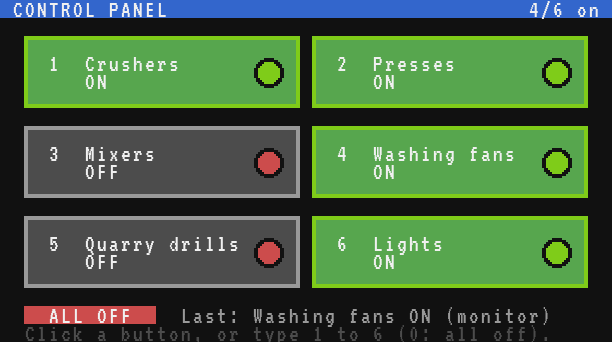
Testing it
- Place a Redstone Link next to a lamp, set it to receive, and put a Redstone Lamp and a Lever in its frequency slots. Run the program and press 6 Lights: the lamp lights; press again: it goes out.
- Put a Clutch on the shaft of a Mechanical Press, a receiving Redstone Link next to it with a Mechanical Press and a Lever. Press 2 Presses: the press runs when the button is green, stops when it is grey.
- Turn a few machines on, then reboot the computer (Ctrl+R in the terminal): the panel comes back with the same buttons lit, and the machines follow.
- Look at the saved states:
> cat panel/state
Crushers=1
Presses=1
Mixers=0
Washing fans=1
Quarry drills=0
Lights=1
Variations
- More buttons. On a Modern Computer (64 x 24), three columns of 20 characters and four rows give twelve buttons. Compute
m.xandm.yfrom the screen size given byterm.get_size()instead of fixed numbers. - Feedback from the machines. A machine can answer on its own frequency: a Redstone Link set to transmit next to a sensor (a Threshold Switch on a vault, a Daylight Detector...).
link.get(a, b)reads it, and alinkevent arrives each time it changes: colour the lamp of the button with what the machine really does. - Timers. Add a button "Lights until dawn" that turns the lights on and starts a timer; when
os.day_time()passes 0 (6 am), turn them off. SeeDay and night lighting. - A remote panel. Send the presses to another computer with
net.sendinstead oflink.set, for machines beyond the range of Redstone Links: seeRemote control over the network. - A confirmation. For dangerous machines (the quarry drills), make the first press turn the button yellow and only switch the machine on a second press within three seconds, with
os.start_timer(3).