
 Day and night lighting
Turn the lamps of several zones on at dusk and off at dawn through Redstone Link frequencies, with a manual override button and a status screen showing the time.
Street lamps that light up when the sun goes down, a station that stays lit a little longer, shop windows that go dark at 23:00, and everything off in the morning: no daylight detectors everywhere, one computer for the whole town. This recipe drives several zones of lamps through Create Redstone Links, each with its own hours, with a button to force everything on or off and a status screen that shows the time in big digits.
It is a good example of a program driven by the world's clock: it never counts the hours itself, it looks at os.day_time and works out what should be lit now. Sleeping in a bed, /time set or a server restart cannot fool it.
What you need
- A computer with a colour screen. A Microcontroller is perfect: cheap, colours, its own 16 KB memory, driven by a shaft from below. The screen is laid out for its 40 × 12 characters and fits the bigger ones too. Any computer from the Transistor Mainframe on can run it (the big clock needs
gfx), but only the colour ones show lit zones in yellow. - A Redstone Link per zone, in receiver mode, next to the lamps of that zone (or wired to them). Its two slots hold the two items of the zone's frequency, the same ones as in the program: glowstone dust and an iron ingot for the streets, for example. The computer transmits on that frequency itself with
link.set: it needs no link block of its own. The zones must be within Redstone Link range of the computer (Create'slinkRange, 256 blocks by default). - A button on top of the computer, for the manual override.
- Optionally, monitors touching the computer, to read the time from afar.
Control room (side view):              In each zone:

     [button]                          [Redstone Link]   receiver: glowstone dust + iron ingot
       [MC]   Microcontroller          [lamp][lamp][lamp] (powered by the link)
==shaft== from belowHow it works
1. Settings
Each zone has a name for the screen, the two items of its frequency, and its hours: when it lights up (on) and when it goes out (off), written like a clock.
local ZONES = {
  {name = "STREETS", a = "minecraft:glowstone_dust", b = "minecraft:iron_ingot", on = "18:30", off = "05:30"},
  {name = "STATION", a = "minecraft:glowstone_dust", b = "minecraft:gold_ingot", on = "18:00", off = "06:30"},
  {name = "FACTORY", a = "minecraft:glowstone_dust", b = "minecraft:copper_ingot", on = "19:00", off = "05:00"},
  {name = "SHOPS", a = "minecraft:glowstone_dust", b = "minecraft:emerald", on = "18:30", off = "23:00"},
}
In Minecraft the sun sets around 18:00 and it is dark from about 19:00; the sky starts to brighten around 05:00 and the day begins at 06:00. A computer can transmit on 32 frequencies at most, so 32 zones.
2. The world's clock
os.day_time gives the time of day in ticks, from 0 to 23999. The day starts at 6:00, not at midnight, and an hour is 1000 ticks: 18:30 is 12500, midnight is 18000, 05:30 is 23500. Two small functions convert both ways:
local function ticks_of(hhmm)
  local p = string.split(hhmm, ":")
  local h, m = tonumber(p[1]), tonumber(p[2])
  if #p ~= 2 or h == nil or m == nil then error("bad hour '" .. hhmm .. "', write it like 18:30") end
  return ((h - 6) % 24) * 1000 + m * 1000 // 60
end

local function clock_of(t)
  return string.format("%02d:%02d", (t // 1000 + 6) % 24, t % 1000 * 60 // 1000)
end
A typo in the settings ("1830") stops the program at once with a clear message, rather than lighting the wrong zone at a strange hour.
The heart of the program is between: is the time inside the span of a zone? A span usually crosses midnight (18:30 to 05:30), and in ticks it may also cross 6:00, where the count starts again from 0. When the start is after the end, the span wraps around: the time is in it if it is after the start or before the end.
local function between(now, from, to)
  if from <= to then return now >= from and now < to end
  return now >= from or now < to
end3. The lamps
wanted decides for one zone: always on or always off in a forced mode, the hours otherwise. update compares with what the zone has now (z.lit) and calls link.set only when it changes, with true or false (15 or 0). The first call after boot sends every zone, so the lamps are right from the start.
local function update(now)
  for _, z in ipairs(ZONES) do
    local lit = wanted(z, now)
    if lit ~= z.lit then
      z.lit = lit
      link.set(z.a, z.b, lit)
    end
  end
end
link.set stops the program with unknown item '...' when an item id is wrong: check the ids of the settings first if it does.
4. The button
A button sends a redstone event when it is pressed and another one when it pops back out. To act once per press, the program remembers the input at the previous event and reacts only when it goes from off to on:
local function on_redstone()
  local now_pressed = rs.get(BUTTON) > 0
  if now_pressed and not pressed then next_mode() end
  pressed = now_pressed
end
Each press moves to the next mode: AUTO, ALL ON, ALL OFF, then AUTO again. A click on the mode line of the screen does the same, handy on a monitor.
5. The status screen
The time is drawn with gfx.text at size 4, with a sun or a moon next to it (two discs: a white one, and a black one taking a bite out of it). It is redrawn only when the minute changes. The zones are plain text, yellow when lit, with their hours, and the last line tells you what happens next, found by next_change: the closest start or end among the zones, counted with % 24000 so that a time after midnight comes after 23:00.
6. The main loop
Each turn of the loop updates the lamps and the screen, then waits for an event: the one-second timer, the button, or a click. A minute of the world lasts less than a second of real time (1000 ticks an hour, 20 ticks a second), so the clock on the screen advances by one or two minutes at each turn.
The whole program
-- Day and night lighting: the lamps of each zone light up at dusk and go out at
-- dawn, through Create Redstone Link frequencies. A button on top of the computer
-- (or a click on the mode line) switches between AUTO, ALL ON and ALL OFF.

-- 1. Settings: each zone is a frequency (its two items) and its hours
local ZONES = {
  {name = "STREETS", a = "minecraft:glowstone_dust", b = "minecraft:iron_ingot", on = "18:30", off = "05:30"},
  {name = "STATION", a = "minecraft:glowstone_dust", b = "minecraft:gold_ingot", on = "18:00", off = "06:30"},
  {name = "FACTORY", a = "minecraft:glowstone_dust", b = "minecraft:copper_ingot", on = "19:00", off = "05:00"},
  {name = "SHOPS", a = "minecraft:glowstone_dust", b = "minecraft:emerald", on = "18:30", off = "23:00"},
}
local BUTTON = "top"
local MODES = {"AUTO", "ALL ON", "ALL OFF"}

local mode = 1           -- index in MODES
local pressed = false    -- the button's input at the last event: a press is off -> on
local shown_clock = nil  -- the time on the screen, redrawn when it changes

-- 2. Time: os.day_time counts ticks from 6:00, 1000 ticks an hour
local function ticks_of(hhmm)
  local p = string.split(hhmm, ":")
  local h, m = tonumber(p[1]), tonumber(p[2])
  if #p ~= 2 or h == nil or m == nil then error("bad hour '" .. hhmm .. "', write it like 18:30") end
  return ((h - 6) % 24) * 1000 + m * 1000 // 60
end

local function clock_of(t)
  return string.format("%02d:%02d", (t // 1000 + 6) % 24, t % 1000 * 60 // 1000)
end

-- Is now inside [from, to)? The span may cross 6:00, where the ticks start again from 0
local function between(now, from, to)
  if from <= to then return now >= from and now < to end
  return now >= from or now < to
end

-- 3. The lamps
local function wanted(z, now)
  if MODES[mode] == "ALL ON" then return true end
  if MODES[mode] == "ALL OFF" then return false end
  return between(now, z.from, z.to)
end

-- Sends a frequency only when its zone changes
local function update(now)
  for _, z in ipairs(ZONES) do
    local lit = wanted(z, now)
    if lit ~= z.lit then
      z.lit = lit
      link.set(z.a, z.b, lit)
    end
  end
end

local function next_mode()
  mode = mode % #MODES + 1
end

-- The next change in AUTO mode: the closest start or end among the zones
local function next_change(now)
  local best, text = 24000, ""
  for _, z in ipairs(ZONES) do
    local when, what = z.from, " on at " .. z.on
    if z.lit then when, what = z.to, " off at " .. z.off end
    local wait = (when - now) % 24000
    if wait < best then best, text = wait, z.name .. what end
  end
  return text
end

-- The button: a "redstone" event comes on press and on release
local function on_redstone()
  local now_pressed = rs.get(BUTTON) > 0
  if now_pressed and not pressed then next_mode() end
  pressed = now_pressed
end

-- 4. The screen: a big clock and the sky in gfx, the zones in text
local W = gfx.size().w

local function draw_sky(now)
  local x, y = W - 16, 14
  gfx.rect(x - 13, y - 13, 27, 27, "black", true)
  if between(now, 12500, 23500) then
    gfx.circle(x, y, 8, "white", true)          -- the moon: a disc...
    gfx.circle(x + 4, y - 3, 7, "black", true)  -- ...with a bite out of it
  else
    gfx.circle(x, y, 5, "yellow", true)         -- the sun and its rays
    for k = 0, 7 do
      local a = k * math.pi / 4
      gfx.line(x + math.round(8 * math.cos(a)), y + math.round(8 * math.sin(a)),
        x + math.round(11 * math.cos(a)), y + math.round(11 * math.sin(a)), "yellow")
    end
  end
end

local function at(x, y, text, color)
  term.set_cursor(x, y)
  term.set_fg(color)
  term.write(text)
end

local function draw(now)
  local clock = clock_of(now)
  if clock ~= shown_clock then
    gfx.rect(1, 1, W - 30, 26, "black", true)
    gfx.text(6, 5, clock, "white", 4)
    draw_sky(now)
    shown_clock = clock
  end
  term.set_cursor(1, 4)
  term.clear_line()
  local color = term.colors.lime
  if mode > 1 then color = term.colors.orange end
  at(2, 4, "Mode: " .. MODES[mode], color)
  at(20, 4, "(button: next)", term.colors.gray)
  for i, z in ipairs(ZONES) do
    local y = 5 + i
    term.set_cursor(1, y)
    term.clear_line()
    local c = term.colors.gray
    if z.lit then c = term.colors.yellow end
    at(2, y, z.name, c)
    at(12, y, z.lit and "ON" or "off", c)
    at(17, y, z.on .. "-" .. z.off, term.colors.light_gray)
  end
  term.set_cursor(1, 11)
  term.clear_line()
  if mode == 1 then
    at(2, 11, "Next: " .. next_change(now), term.colors.light_gray)
  else
    at(2, 11, "Forced: press the button for AUTO", term.colors.orange)
  end
end

-- 5. Main loop: a look at the clock every second, the button at once
for _, z in ipairs(ZONES) do
  z.from, z.to = ticks_of(z.on), ticks_of(z.off)
end
term.clear()
gfx.clear()
pressed = rs.get(BUTTON) > 0
local timer = os.start_timer(1)
while true do
  local now = os.day_time()
  update(now)
  draw(now)
  local e = os.pull_event()
  if e.name == "timer" and e.id == timer then
    timer = os.start_timer(1)
  elseif e.name == "redstone" then
    on_redstone()
  elseif e.name == "click" and e.y == 4 then
    next_mode()
  end
endWhat it looks like
The same code on a Microcontroller, with the time set by hand to 19:42 (13700 ticks) instead of os.day_time, and no Redstone Links to drive:
local ZONES = {
  {name = "STREETS", on = "18:30", off = "05:30"},
  {name = "STATION", on = "18:00", off = "06:30"},
  {name = "FACTORY", on = "19:00", off = "05:00"},
  {name = "SHOPS", on = "18:30", off = "23:00"},
}
local MODES = {"AUTO", "ALL ON", "ALL OFF"}
local mode = 1
local shown_clock = nil

local function ticks_of(hhmm)
  local p = string.split(hhmm, ":")
  return ((tonumber(p[1]) - 6) % 24) * 1000 + tonumber(p[2]) * 1000 // 60
end
local function clock_of(t)
  return string.format("%02d:%02d", (t // 1000 + 6) % 24, t % 1000 * 60 // 1000)
end
local function between(now, from, to)
  if from <= to then return now >= from and now < to end
  return now >= from or now < to
end
local function next_change(now)
  local best, text = 24000, ""
  for _, z in ipairs(ZONES) do
    local when, what = z.from, " on at " .. z.on
    if z.lit then when, what = z.to, " off at " .. z.off end
    local wait = (when - now) % 24000
    if wait < best then best, text = wait, z.name .. what end
  end
  return text
end

local W = gfx.size().w
local function draw_sky(now)
  local x, y = W - 16, 14
  gfx.rect(x - 13, y - 13, 27, 27, "black", true)
  if between(now, 12500, 23500) then
    gfx.circle(x, y, 8, "white", true)
    gfx.circle(x + 4, y - 3, 7, "black", true)
  else
    gfx.circle(x, y, 5, "yellow", true)
    for k = 0, 7 do
      local a = k * math.pi / 4
      gfx.line(x + math.round(8 * math.cos(a)), y + math.round(8 * math.sin(a)),
        x + math.round(11 * math.cos(a)), y + math.round(11 * math.sin(a)), "yellow")
    end
  end
end
local function at(x, y, text, color)
  term.set_cursor(x, y)
  term.set_fg(color)
  term.write(text)
end
local function draw(now)
  local clock = clock_of(now)
  if clock ~= shown_clock then
    gfx.rect(1, 1, W - 30, 26, "black", true)
    gfx.text(6, 5, clock, "white", 4)
    draw_sky(now)
    shown_clock = clock
  end
  term.set_cursor(1, 4)
  term.clear_line()
  local color = term.colors.lime
  if mode > 1 then color = term.colors.orange end
  at(2, 4, "Mode: " .. MODES[mode], color)
  at(20, 4, "(button: next)", term.colors.gray)
  for i, z in ipairs(ZONES) do
    local y = 5 + i
    term.set_cursor(1, y)
    term.clear_line()
    local c = term.colors.gray
    if z.lit then c = term.colors.yellow end
    at(2, y, z.name, c)
    at(12, y, z.lit and "ON" or "off", c)
    at(17, y, z.on .. "-" .. z.off, term.colors.light_gray)
  end
  term.set_cursor(1, 11)
  term.clear_line()
  if mode == 1 then
    at(2, 11, "Next: " .. next_change(now), term.colors.light_gray)
  else
    at(2, 11, "Forced: press the button for AUTO", term.colors.orange)
  end
end

local now = 13700   -- 19:42
for _, z in ipairs(ZONES) do
  z.from, z.to = ticks_of(z.on), ticks_of(z.off)
  z.lit = between(now, z.from, z.to)
end
term.clear()
gfx.clear()
draw(now)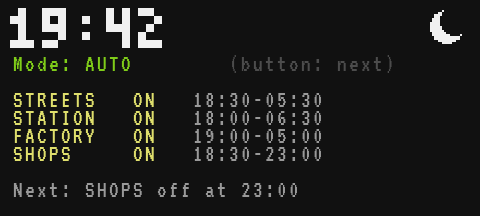
Testing it
- Put the Redstone Links in receiver mode (sneak and right-click them, or right-click with a Wrench) with the right items, and start the program. At midday, every zone is off and the last line reads
Next: STATION on at 18:00. Move the clock with the game's commands and watch the zones follow within a second:
/time set 12100
/time set 12600
/time set 17100
/time set 23600
That is 18:06 (the station lights up), 18:36 (streets and shops), 23:06 (the shops go dark) and 05:36 (only the station is still lit).
- Press the button: ALL ON, every lamp lights up whatever the time. Again: ALL OFF. Again: back to AUTO, and each zone returns to its hours.
- Sleep in a bed at night: in the morning, the lamps go out by themselves, because the program reads the time instead of counting it.
- Break the computer's shaft for a moment: the program freezes with the computer and the links keep their last value; with the rotation back, it carries on. A reboot (Ctrl+R) is different: every link is released, the lamps go dark for an instant, then the program sends every zone again.
Variations
- A Daylight Detector instead of the clock. Storms darken the sky without changing the time. Put a Daylight Detector against the computer and light the streets when
rs.get("left")is below a level of your choice: it reads the real light, rain included. - An override per zone. Make the zone lines clickable (
e.y == 5 + i) and give each zone its own mode, shown next to its name. - A Display Link.
display.set({clock_of(now), next_change(now)})puts the time and the next change on a Create Display Board at the station, through a Display Link placed against the computer (display). - A close zone without a link. For lamps right next to the computer,
rs.set("left", lit)does the job of a frequency. - Warn before closing. Make the shops blink at 22:55: in
update, when the time is a few minutes beforez.to, sendtrueandfalseon alternate seconds.