
 Door with a code
A keypad on the terminal that opens a Create door for a few seconds, locks itself after wrong codes, keeps the code in a file and logs every attempt.
A sliding door of Create in front of your workshop, and next to it a small computer set into the wall. Whoever knows the code types it, the door slides open for five seconds and closes behind them. Three wrong codes in a row lock the keypad for thirty seconds, then a minute, then two. Every attempt is written in a log file with its time.
The project brings together the input side of Brass: read with a mask to type a secret (read()), timers to count down without missing anything (os.start_timer()), files to keep the code and the log (fs), and the two ways to send a signal to a Create contraption: a redstone output (rs) and a Redstone Link frequency (link).
What you need
- A computer with a keyboard and a drawing screen: any computer from the Transistor Mainframe on (the padlock is drawn with
gfx). The Microcontroller suits it best: small enough to hide in a wall, with its 40 x 12 screen, and its files live in a soldered memory that nobody can take out like a floppy disk. It is driven from below. - A door: a Create sliding door (Andesite Door, Brass Door, Train Door...), an iron door, or a whole gate on a Mechanical Piston. Each of them opens while it receives redstone.
- Either the door touching the computer, on its
leftside as seen when you face the screen; or a Redstone Link set to receive next to the door, with an Iron Ingot and an Iron Door in its two frequency slots. The program drives both, so either works. - Optionally, a monitor in the wall outside: a right-click on it opens the computer's terminal, so the visitor can type the code without reaching the computer itself.
Seen from the front:
   +-------+-------+
   | door  |       |      a two-block Create sliding door
   | (top) |       |
   +-------+-------+
   | door  | Micro |  <-  the Microcontroller, screen facing you,
   |       | ctrl  |      the door touching its left side
   +-------+-------+
shaft below the MicrocontrollerThe program, step by step
1. The settings
local CODE_FILE = "door/code"   -- the code, as plain text
local LOG_FILE = "door/log"     -- one line per attempt
local DOOR_SIDE = "left"        -- redstone output to the door (nil: none)
local DOOR_LINK = {"minecraft:iron_ingot", "minecraft:iron_door"}  -- Redstone Link (nil: none)
local OPEN_SECONDS = 5          -- how long the door stays open
local MAX_TRIES = 3             -- wrong codes before the keypad locks
local LOCK_SECONDS = 30         -- the first lockout; it doubles each time, up to 10 minutes
local MAX_LOG = 4000            -- bytes; beyond, the log becomes door/log.old
The code is not written in the program: it lives in door/code, so you can share the program with friends without giving away your code, and change the code without editing the program.
2. The door, the log and the code file
The door is opened and closed in one place. rs.set and link.set both accept true and false as well as a strength from 0 to 15:
local function set_door(open)
  if DOOR_SIDE then rs.set(DOOR_SIDE, open) end
  if DOOR_LINK then link.set(DOOR_LINK[1], DOOR_LINK[2], open) end
end
The log gets one line per event, with the time of day. fs.append adds to the end of the file and creates it the first time. So that the log never fills the medium, it is renamed door/log.old when it passes MAX_LOG bytes (fs.move replaces an older door/log.old). fs.size returns nil while the file does not exist yet.
local function clock_text()
  local t = (os.day_time() + 6000) % 24000  -- 0 is 6 am
  return string.format("%02d:%02d", t // 1000, t % 1000 * 60 // 1000)
end

local function log_line(text)
  local size = fs.size(LOG_FILE)
  if size ~= nil and size > MAX_LOG then fs.move(LOG_FILE, LOG_FILE .. ".old") end
  fs.append(LOG_FILE, clock_text() .. "  " .. text .. "\n")
end
The code file is read once at start. fs.read returns nil when the file is missing, and trim removes a line break left by the editor:
local function load_code()
  local text = fs.read(CODE_FILE)
  if text ~= nil and text:trim() ~= "" then return text:trim() end
  return nil
end
The program never writes a typed code into the log, only whether it was right. A wrong code is often the right one with a typo, and a log that anyone can cat should not hold it.
3. The screen and the padlock
The screen is built for the 40 columns of the Microcontroller and adapts to wider ones: the padlock is placed from the width given by term.get_size. It is drawn with gfx: a ring for the shackle (gfx.circle with a thickness), its lower half erased with the colour "none", two legs, the body and a keyhole. Open, the shackle rises and its right leg leaves the body.
local message, message_color = "", "white"
local door_open = false

local function draw_lock(open)
  local x = term.get_size().w * 6 - 44
  local y = 22
  local color, lift, right_leg = "red", 0, 9
  if open then color, lift, right_leg = "lime", 7, 3 end
  gfx.rect(x - 2, y - 10, 36, 56, "none", true)
  gfx.circle(x + 15, y + 10 - lift, 10, color, 3)
  gfx.rect(x + 2, y + 11 - lift, 27, 10, "none", true)
  gfx.rect(x + 5, y + 10 - lift, 3, 9 + lift, color, true)
  gfx.rect(x + 23, y + 10 - lift, 3, right_leg, color, true)
  gfx.rect(x, y + 18, 31, 24, color, true)
  gfx.circle(x + 15, y + 27, 3, "black", true)
  gfx.rect(x + 14, y + 29, 3, 7, "black", true)
end

local function draw_screen(tries_left)
  local w = term.get_size().w
  term.set_bg(term.colors.black)
  term.clear()
  term.set_cursor(1, 1)
  term.set_bg(term.colors.blue)
  term.set_fg(term.colors.white)
  term.write(string.format(" %-" .. (w - 2) .. "s ", "DOOR CODE"))
  term.set_bg(term.colors.black)
  term.set_cursor(3, 3)
  term.set_fg(term.colors.light_gray)
  term.write("Type the code, then Enter.")
  term.set_cursor(3, 5)
  term.set_fg(term.colors.white)
  term.write("Code:")
  gfx.line(49, 46, 180, 46, "gray")
  term.set_cursor(3, 7)
  term.set_fg(term.colors.gray)
  term.write("Tries left: " .. tries_left)
  term.set_cursor(3, 9)
  term.set_fg(term.colors[message_color])
  term.write(message)
  term.set_cursor(3, 11)
  term.set_fg(term.colors.gray)
  term.write("Every attempt is logged.")
  draw_lock(door_open)
end
The grey line under the code field is a gfx.line from pixel 49 to 180, one pixel below the fifth text row: a text row is 9 pixels high, so row 5 covers pixels 37 to 45.
4. Counting down with timers
Opening the door and the lockout both wait for a number of seconds while showing what is left. Each second is one timer. os.pull_event("timer") throws away every other event while it waits, so the keys a visitor hammers during a lockout are lost, not saved up for the next read. That is exactly what a lockout needs.
local function show_message(text, color)
  message, message_color = text, color
  term.set_cursor(1, 9)
  term.set_bg(term.colors.black)
  term.clear_line()
  term.set_cursor(3, 9)
  term.set_fg(term.colors[color])
  term.write(text)
end

local function countdown(seconds, text, color)
  for left = seconds, 1, -1 do
    show_message(text .. " " .. left .. " s", color)
    local id = os.start_timer(1)
    local e = os.pull_event("timer")
    while e.id ~= id do e = os.pull_event("timer") end
  end
end
Checking e.id makes sure the program reacts to its timer, not to one started elsewhere. The Events page explains why programs prefer timers to sleep when they have several things to watch.
5. Choosing the code the first time
When door/code does not exist, the program asks for a code twice before saving it. read("*") shows a star for each character typed. fs.write creates the door folder on the way.
local function choose_code()
  while true do
    draw_screen(MAX_TRIES)
    term.set_cursor(3, 3)
    term.clear_line()
    term.set_cursor(3, 3)
    term.set_fg(term.colors.yellow)
    term.write("No code yet: choose one.")
    term.set_fg(term.colors.white)
    term.set_cursor(9, 5)
    local first = read("*"):trim()
    term.set_cursor(3, 7)
    term.clear_line()
    term.set_cursor(3, 7)
    term.write("Again:")
    term.set_cursor(10, 7)
    local second = read("*"):trim()
    if first ~= "" and first == second then
      fs.write(CODE_FILE, first)
      log_line("new code chosen")
      return first
    end
    countdown(3, "The codes differ. Again in", "red")
  end
end6. The keypad loop
The main loop draws the screen, waits for a line with read("*") and compares it with the code. Here read is the right tool: it handles the editing keys (Backspace, the arrows) and returns only when the visitor presses Enter.
gfx.clear()
set_door(false)
local code = load_code()
if code == nil then code = choose_code() end
local wrong = 0
local lock = LOCK_SECONDS
while true do
  draw_screen(MAX_TRIES - wrong)
  term.set_cursor(9, 5)
  term.set_fg(term.colors.white)
  local typed = read("*"):trim()
  if typed == code then
    wrong = 0
    lock = LOCK_SECONDS
    log_line("door opened")
    set_door(true)
    door_open = true
    draw_screen(MAX_TRIES)
    countdown(OPEN_SECONDS, "Welcome! Closing in", "lime")
    set_door(false)
    door_open = false
    message = ""
  elseif typed ~= "" then
    wrong = wrong + 1
    log_line("wrong code " .. wrong .. "/" .. MAX_TRIES)
    if wrong < MAX_TRIES then
      message, message_color = "Wrong code.", "red"
    else
      log_line("keypad locked for " .. lock .. " s")
      draw_screen(0)
      countdown(lock, "Locked. Try again in", "red")
      lock = math.min(lock * 2, 600)
      wrong = 0
      message = ""
    end
  end
end
An empty line (Enter alone) does nothing, so a stray key press never costs a try. The lockout doubles after each series of wrong codes and goes back to 30 seconds after the next right one.
The whole program
-- Door with a code: a keypad on the terminal opens a Create door for a few
-- seconds. Wrong codes lock the keypad; every attempt goes to door/log.

local CODE_FILE = "door/code"   -- the code, as plain text
local LOG_FILE = "door/log"     -- one line per attempt
local DOOR_SIDE = "left"        -- redstone output to the door (nil: none)
local DOOR_LINK = {"minecraft:iron_ingot", "minecraft:iron_door"}  -- Redstone Link (nil: none)
local OPEN_SECONDS = 5          -- how long the door stays open
local MAX_TRIES = 3             -- wrong codes before the keypad locks
local LOCK_SECONDS = 30         -- the first lockout; it doubles each time, up to 10 minutes
local MAX_LOG = 4000            -- bytes; beyond, the log becomes door/log.old

local message, message_color = "", "white"
local door_open = false

-- Door, log, code -----------------------------------------------------------------

local function set_door(open)
  if DOOR_SIDE then rs.set(DOOR_SIDE, open) end
  if DOOR_LINK then link.set(DOOR_LINK[1], DOOR_LINK[2], open) end
end

local function clock_text()
  local t = (os.day_time() + 6000) % 24000  -- 0 is 6 am
  return string.format("%02d:%02d", t // 1000, t % 1000 * 60 // 1000)
end

local function log_line(text)
  local size = fs.size(LOG_FILE)
  if size ~= nil and size > MAX_LOG then fs.move(LOG_FILE, LOG_FILE .. ".old") end
  fs.append(LOG_FILE, clock_text() .. "  " .. text .. "\n")
end

local function load_code()
  local text = fs.read(CODE_FILE)
  if text ~= nil and text:trim() ~= "" then return text:trim() end
  return nil
end

-- Screen ---------------------------------------------------------------------------

local function draw_lock(open)
  local x = term.get_size().w * 6 - 44
  local y = 22
  local color, lift, right_leg = "red", 0, 9
  if open then color, lift, right_leg = "lime", 7, 3 end
  gfx.rect(x - 2, y - 10, 36, 56, "none", true)
  gfx.circle(x + 15, y + 10 - lift, 10, color, 3)
  gfx.rect(x + 2, y + 11 - lift, 27, 10, "none", true)
  gfx.rect(x + 5, y + 10 - lift, 3, 9 + lift, color, true)
  gfx.rect(x + 23, y + 10 - lift, 3, right_leg, color, true)
  gfx.rect(x, y + 18, 31, 24, color, true)
  gfx.circle(x + 15, y + 27, 3, "black", true)
  gfx.rect(x + 14, y + 29, 3, 7, "black", true)
end

local function draw_screen(tries_left)
  local w = term.get_size().w
  term.set_bg(term.colors.black)
  term.clear()
  term.set_cursor(1, 1)
  term.set_bg(term.colors.blue)
  term.set_fg(term.colors.white)
  term.write(string.format(" %-" .. (w - 2) .. "s ", "DOOR CODE"))
  term.set_bg(term.colors.black)
  term.set_cursor(3, 3)
  term.set_fg(term.colors.light_gray)
  term.write("Type the code, then Enter.")
  term.set_cursor(3, 5)
  term.set_fg(term.colors.white)
  term.write("Code:")
  gfx.line(49, 46, 180, 46, "gray")
  term.set_cursor(3, 7)
  term.set_fg(term.colors.gray)
  term.write("Tries left: " .. tries_left)
  term.set_cursor(3, 9)
  term.set_fg(term.colors[message_color])
  term.write(message)
  term.set_cursor(3, 11)
  term.set_fg(term.colors.gray)
  term.write("Every attempt is logged.")
  draw_lock(door_open)
end

local function show_message(text, color)
  message, message_color = text, color
  term.set_cursor(1, 9)
  term.set_bg(term.colors.black)
  term.clear_line()
  term.set_cursor(3, 9)
  term.set_fg(term.colors[color])
  term.write(text)
end

-- Waiting --------------------------------------------------------------------------

local function countdown(seconds, text, color)
  for left = seconds, 1, -1 do
    show_message(text .. " " .. left .. " s", color)
    local id = os.start_timer(1)
    local e = os.pull_event("timer")
    while e.id ~= id do e = os.pull_event("timer") end
  end
end

local function choose_code()
  while true do
    draw_screen(MAX_TRIES)
    term.set_cursor(3, 3)
    term.clear_line()
    term.set_cursor(3, 3)
    term.set_fg(term.colors.yellow)
    term.write("No code yet: choose one.")
    term.set_fg(term.colors.white)
    term.set_cursor(9, 5)
    local first = read("*"):trim()
    term.set_cursor(3, 7)
    term.clear_line()
    term.set_cursor(3, 7)
    term.write("Again:")
    term.set_cursor(10, 7)
    local second = read("*"):trim()
    if first ~= "" and first == second then
      fs.write(CODE_FILE, first)
      log_line("new code chosen")
      return first
    end
    countdown(3, "The codes differ. Again in", "red")
  end
end

-- Keypad ---------------------------------------------------------------------------

gfx.clear()
set_door(false)
local code = load_code()
if code == nil then code = choose_code() end
local wrong = 0
local lock = LOCK_SECONDS
while true do
  draw_screen(MAX_TRIES - wrong)
  term.set_cursor(9, 5)
  term.set_fg(term.colors.white)
  local typed = read("*"):trim()
  if typed == code then
    wrong = 0
    lock = LOCK_SECONDS
    log_line("door opened")
    set_door(true)
    door_open = true
    draw_screen(MAX_TRIES)
    countdown(OPEN_SECONDS, "Welcome! Closing in", "lime")
    set_door(false)
    door_open = false
    message = ""
  elseif typed ~= "" then
    wrong = wrong + 1
    log_line("wrong code " .. wrong .. "/" .. MAX_TRIES)
    if wrong < MAX_TRIES then
      message, message_color = "Wrong code.", "red"
    else
      log_line("keypad locked for " .. lock .. " s")
      draw_screen(0)
      countdown(lock, "Locked. Try again in", "red")
      lock = math.min(lock * 2, 600)
      wrong = 0
      message = ""
    end
  end
endWhat the screen looks like
The drawing functions of the program on a Microcontroller, just after a wrong code, with four stars typed for the next try:
local MAX_TRIES = 3
local message, message_color = "Wrong code.", "red"
local door_open = false

local function draw_lock(open)
  local x = term.get_size().w * 6 - 44
  local y = 22
  local color, lift, right_leg = "red", 0, 9
  if open then color, lift, right_leg = "lime", 7, 3 end
  gfx.rect(x - 2, y - 10, 36, 56, "none", true)
  gfx.circle(x + 15, y + 10 - lift, 10, color, 3)
  gfx.rect(x + 2, y + 11 - lift, 27, 10, "none", true)
  gfx.rect(x + 5, y + 10 - lift, 3, 9 + lift, color, true)
  gfx.rect(x + 23, y + 10 - lift, 3, right_leg, color, true)
  gfx.rect(x, y + 18, 31, 24, color, true)
  gfx.circle(x + 15, y + 27, 3, "black", true)
  gfx.rect(x + 14, y + 29, 3, 7, "black", true)
end

local function draw_screen(tries_left)
  local w = term.get_size().w
  term.set_bg(term.colors.black)
  term.clear()
  term.set_cursor(1, 1)
  term.set_bg(term.colors.blue)
  term.set_fg(term.colors.white)
  term.write(string.format(" %-" .. (w - 2) .. "s ", "DOOR CODE"))
  term.set_bg(term.colors.black)
  term.set_cursor(3, 3)
  term.set_fg(term.colors.light_gray)
  term.write("Type the code, then Enter.")
  term.set_cursor(3, 5)
  term.set_fg(term.colors.white)
  term.write("Code:")
  gfx.line(49, 46, 180, 46, "gray")
  term.set_cursor(3, 7)
  term.set_fg(term.colors.gray)
  term.write("Tries left: " .. tries_left)
  term.set_cursor(3, 9)
  term.set_fg(term.colors[message_color])
  term.write(message)
  term.set_cursor(3, 11)
  term.set_fg(term.colors.gray)
  term.write("Every attempt is logged.")
  draw_lock(door_open)
end

gfx.clear()
draw_screen(MAX_TRIES - 1)
term.set_cursor(9, 5)
term.set_fg(term.colors.white)
term.write("****")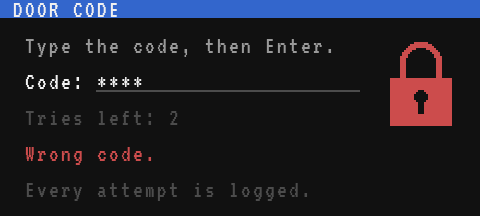
When the code is right, the same screen turns the padlock green and opens its shackle while the door is open:
local message, message_color = "Welcome! Closing in 4 s", "lime"
local door_open = true

local function draw_lock(open)
  local x = term.get_size().w * 6 - 44
  local y = 22
  local color, lift, right_leg = "red", 0, 9
  if open then color, lift, right_leg = "lime", 7, 3 end
  gfx.rect(x - 2, y - 10, 36, 56, "none", true)
  gfx.circle(x + 15, y + 10 - lift, 10, color, 3)
  gfx.rect(x + 2, y + 11 - lift, 27, 10, "none", true)
  gfx.rect(x + 5, y + 10 - lift, 3, 9 + lift, color, true)
  gfx.rect(x + 23, y + 10 - lift, 3, right_leg, color, true)
  gfx.rect(x, y + 18, 31, 24, color, true)
  gfx.circle(x + 15, y + 27, 3, "black", true)
  gfx.rect(x + 14, y + 29, 3, 7, "black", true)
end

local function draw_screen(tries_left)
  local w = term.get_size().w
  term.set_bg(term.colors.black)
  term.clear()
  term.set_cursor(1, 1)
  term.set_bg(term.colors.blue)
  term.set_fg(term.colors.white)
  term.write(string.format(" %-" .. (w - 2) .. "s ", "DOOR CODE"))
  term.set_bg(term.colors.black)
  term.set_cursor(3, 3)
  term.set_fg(term.colors.light_gray)
  term.write("Type the code, then Enter.")
  term.set_cursor(3, 5)
  term.set_fg(term.colors.white)
  term.write("Code:")
  gfx.line(49, 46, 180, 46, "gray")
  term.set_cursor(3, 7)
  term.set_fg(term.colors.gray)
  term.write("Tries left: " .. tries_left)
  term.set_cursor(3, 9)
  term.set_fg(term.colors[message_color])
  term.write(message)
  term.set_cursor(3, 11)
  term.set_fg(term.colors.gray)
  term.write("Every attempt is logged.")
  draw_lock(door_open)
end

gfx.clear()
draw_screen(3)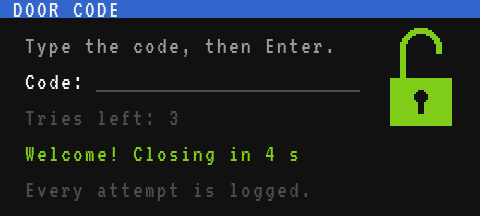
Testing it
- Save the program as
startupand run it. The first time, it asks for a code twice: type4321and Enter, twice. - Type a wrong code:
Wrong code., and one try less. Type the right one: the padlock turns green, the door opens, the countdown runs, and the door closes. - Type three wrong codes: the keypad locks for 30 seconds. Type on the keyboard during the lockout: nothing appears, and nothing is waiting once it ends.
- Three more wrong codes: now the lockout lasts a minute.
- Stop the program with Ctrl+T and read the log:
> cat door/log
07:12  new code chosen
07:13  door opened
08:40  wrong code 1/3
08:40  wrong code 2/3
08:41  wrong code 3/3
08:41  keypad locked for 30 s
08:42  door opened
To change the code, delete the file (rm door/code) and run the program again: it asks for a new one. Or write the new code straight into the file with edit door/code.
This is a lock for friends, not a defence against griefers. Whoever can open the terminal can also press Ctrl+T, stop the program and cat door/code. Hide the computer in the wall and leave only a monitor outside, and keep in mind that a right-click on that monitor still opens the same terminal. Stopping the program while the door is open leaves it open, too: redstone outputs and Redstone Link transmissions keep their last value until the computer reboots or is switched off.
Variations
- A keypad on the monitor. Instead of
read, draw ten digit buttons on a monitor and collect the clicks (os.pull_event("click"), withe.xande.y): the code is then typed by right-clicking the screen, with no terminal open at all. The buttons ofTouch control panelare a good start. - Several codes. Keep one code per line in
door/code(fs.read(CODE_FILE):split("\n")), and log which one opened the door (its position in the list, not the code itself). - An alarm. On a lockout, ring a bell through a second Redstone Link frequency, or send a message to another computer with
net.send(net): "someone is trying codes at the workshop". - Open from inside. A button inside the room, wired to the computer, opens without a code: wait with
os.pull_event()in a loop that handles bothcharevents andredstoneevents (rs.gettells which side), and build the code from thecharevents yourself, sincereadonly returns on Enter. - Several doors. One computer can drive many doors through as many Redstone Link frequencies (up to 32), each with its own code file; the code typed chooses the door.